We're comparing Almabase vs GiveCampus to provide you with all the angles you need to figure out which solution fits your team the best.
Published:
February 28, 2025
Updated:
If you’ve looked at fundraising and alumni engagement platforms for educational institutions, you’ve probably seen Almabase and GiveCampus get mentioned frequently.
With two great options, it might seem a difficult choice at first. However, depending on your needs for a peer-to-peer fundraising platform, an all-around digital engagement solution, or other needs, your choice can vary greatly. With this blog, we’d like to provide a buyer’s guide to help you make an informed choice to see what each platform does well and which of the two might fit your team better. Let’s get started:
Almabase is a SaaS platform designed to empower alumni teams across schools, colleges, and universities. It integrates with existing CRM systems to enhance digital engagement, event management, and online giving campaigns. Almabase is effective for small teams looking to amplify their impact without expanding resources.
GiveCampus is a fundraising platform specifically built for educational institutions. It streamlines the fundraising lifecycle by identifying, engaging, soliciting, and stewarding donors. GiveCampus is known for its user-friendly interface and robust volunteer management features.
1. Integration and Efficiency: Almabase seamlessly integrates into most educational institution CRM systems, especially those based on Raiser’s Edge NXT thanks to a long-standing partnership, which ensures:
2. Digital Engagement Tools: Almabase offers advanced digital engagement tools that help institutions build lifelong relationships with alumni through a comprehensive alumni directory, personalized emails, text communication, etc. to reach out to alumni more effectively.
3. Excellent Customer Support: Almabase offers both email and chat-based support that can be reached at any time, with a focus on quick response and resolution time.
1. User-Friendly Interface: GiveCampus is praised for its intuitive design, making it easy for both fundraisers and donors to use. It simplifies the donation process, leading to higher conversion rates.
2. Volunteer Management: GiveCampus offers a robust volunteer management system that empowers volunteers to track their outreach efforts effectively. This feature is great for successful peer-to-peer fundraising campaigns.
3. Extensive support for mobile payment: GiveCampus supports most popular mobile/digital wallets and a large number of cryptocurrencies, allowing more flexibility for donors.
If you are an educational institution that already has a digital engagement platform and only needs a fundraising module, both solutions will provide with you a robust fundraising and event solution. However, if you are looking for all-around alumni engagement on top of fundraising, Almabase might suit your needs better.
If your institution already uses a CRM like Raiser’s Edge NXT, Almabase might be more suitable due to its seamless integration capabilities. While GiveCampus also has several amazing integrations, it incurs additional charges for third-party integrations.
If volunteer management and peer-to-peer fundraising are key priorities, GiveCampus offers more robust features in this area.
Almabase supports several payment platforms and is a great choice due to its integration with Blackbaud Merchant Services (BBMS). However, if you are looking to support as many platforms as possible including cryptocurrency, GiveCampus does give you more choices.
Both platforms have slightly different pricing structures. Almabase’s pricing primarily depends on the size of your institution, the number of records, and how many modules you need. On the other hand, GiveCampus has different plans depending on the number of features you need, and may also charge fees for exceeding goals on top of integration charges. You should ideally consider both options to get a quote that fits your needs and your budget.
If yours or a related nonprofit wants to make use of either option, it is certainly possible. However, Almabase has more experience working with nonprofits while GiveCampus exclusively caters to educational institutions.
What we advise when picking any platform is that you consider the budget, skillset, and time available to your team above all else (even if that means you choose a platform that’s not ours). What works really well for a similarly sized school might not work for you due to nuanced aspects like state regulations, donor experiences, extra fee scaling, etc.
Once everything seems aligned, make sure to pursue a demo or free trial (ideally one that’s personalized for your needs) to confirm. That being said, we hope you are able to make a decision you, your team, and your alumni are comfortable with.

Subscribe
See how modern advancement teams bring alumni engagement and fundraising together.
Plan faster. Execute better
Explore free templates designed for alumni and fundraising teams.
.png)

.avif)
The best peer-to-peer fundraising platforms help educational institutions and nonprofits boost donor engagement through personalized giving pages, social fundraising, and CRM integration. These tools streamline campaigns with built-in analytics, gamification, and mobile optimization. While some options are completely free, others cater to large-scale fundraisers that require advanced data synchronization and scalability.
The right tools can make all the difference in modern fundraising. In this blog, we’ll highlight some of the best options on the market and explore what you can expect out of them.
.avif)
Peer-to-peer fundraising, or P2P fundraising, is a type of crowdfunding in which your organization encourages its supporters to fundraise for your cause. Typically, these supporters will create an individual fundraising page and share it with their friends, family members, and social media followers to raise money.
A peer-to-peer fundraising site is the software that allows your supporters to create a donation page, share it with their personal network, and collect donations to support your mission.
Typically, most fundraising tools today include features such as:
When shopping for a peer-to-peer fundraising tool, you’ll need to weigh the cost of the tool against the value it provides. However, it can be difficult to know the true cost of using the platform, depending on the software’s pricing structure. Get familiar with these common structures:
To compare tools with different pricing structures, calculate what each platform will cost you, on average, for a certain period of time.
Whether you’re a K-12 school ,higher ed institution, or a nonprofit, in no particular order, here are some peer-to-peer fundraising platforms that you should consider:
(Prices are based on publicly available data at the time of writing and are subject to change over time)
Almabase runs on a philosophy of integrating into your CRM and existing workflows, which remains true for their peer-to-peer fundraising features. Almabase boasts native sync with most higher-ed CRMs due to their TrueSync integration, combined with superior customer support and a willingness to integrate your ideas into their long-term vision. Almabase offers customizable pages and leaderboards powered with inbuilt text and email communication features built to drive donor engagement through organic and personalized communication.
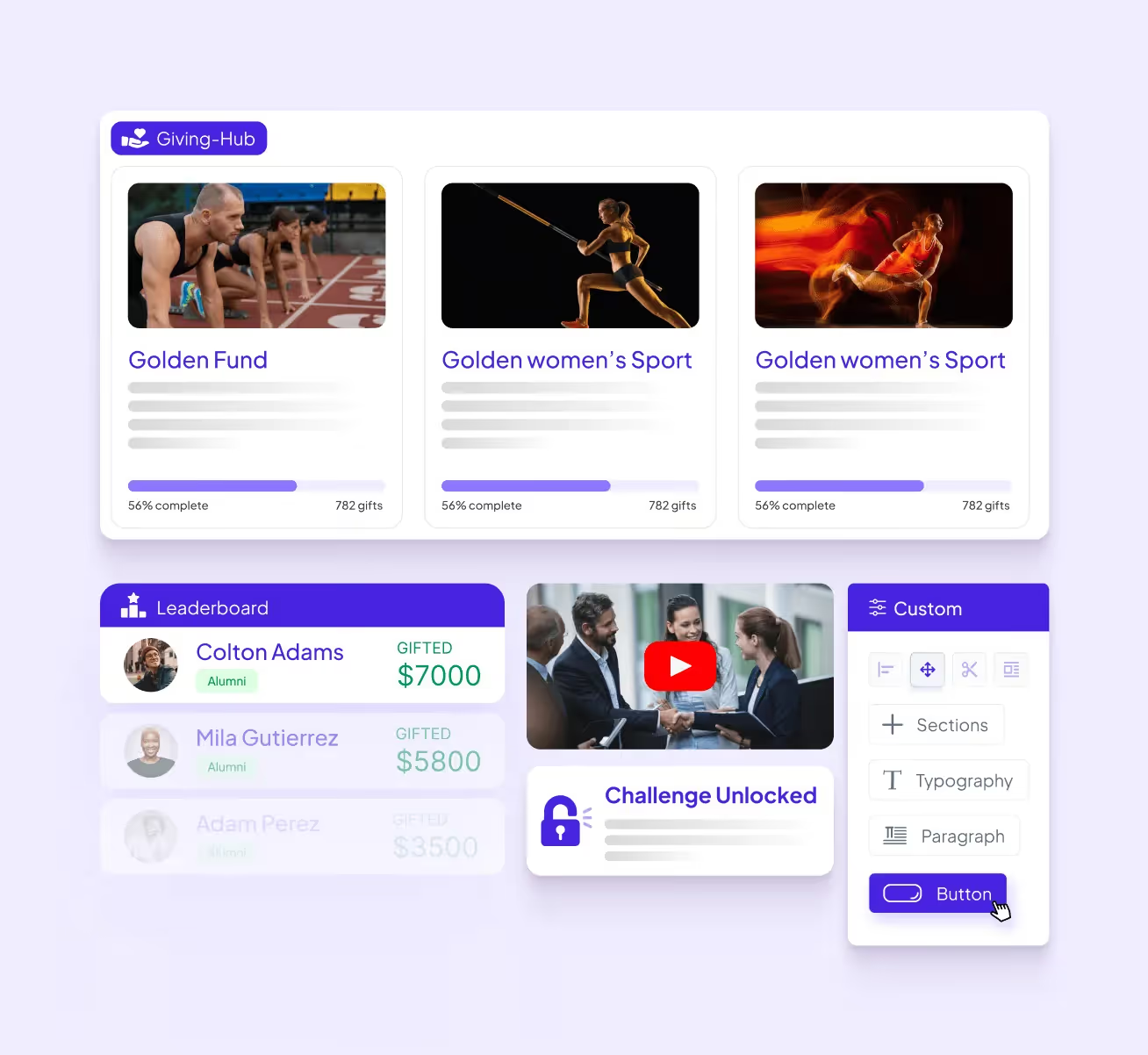
Almabase’s pricing depends entirely on your needs. Learn how Almabase empowers your p2p strategy, Schedule a personalized demo and get a quote.
GoFundMe Pro (formerly Classy) is a peer-to-peer fundraising platform optimized for maximum nonprofit impact. It provides ready-to-use templates for scalable, high-impact campaigns and equips supporters with intuitive tools to advocate for the cause.
GoFundMe Pro offers features like campaign templating, embedded videos and livestreams, progress thermometers, team structures, and mobile-optimized pages. The platform also supports recurring gift options and flexible payment processing, and has a mobile- and user-friendly interface.
GoFundMe Pro offers a standard “Essentials” plan and a “Partner” custom plan.
Bloomerang Fundraising (formerly Qgiv) is a fundraising platform offering tools for donation management, event planning, and donor engagement. It provides features like customizable donation forms, peer-to-peer fundraising, and text-to-give options
Bloomerang Fundraising starts at $40 per month if purchased as part of a bundle with Bloomerang CRM.
Zeffy is a 100% free fundraising platform for nonprofits, offering peer-to-peer fundraising, crowdfunding, donation pages, and recurring giving options. This tool generates revenue through optional tips that donors can provide in addition to their donation. It allows fundraisers to join as individuals or teams and create their own fundraising pages. The platform is also known for being simple, intuitive, and customizable
Zeffy has no fees and instead runs on optional tips from donors.
Donorbox is a fundraising platform that allows nonprofits to launch peer-to-peer fundraisers in a few steps. It provides customizable donation forms and supports recurring donations via various payment methods.
Donorbox also offers features for managing donors, sending personalized emails, and recording donor communications. The platform provides resources like onboarding emails, courses, and templates to support nonprofits in their fundraising efforts.
For peer-to-peer fundraisers, Donorbox charges a flat 1.75% platform fee for a main campaign and 2.95% for a supporter’s campaign.
Bonfire specializes in fundraising through custom merchandise sales. Nonprofits, schools, and even individuals can design their own custom merch and sell it via Bonfire’s free online stores.
Bonfire supports peer-to-peer campaigns (which it refers to as “giving campaigns”) by allowing your supporters to create and share t-shirt fundraisers on behalf of your organization—then, all of the money they raise is sent directly to your nonprofit.
Bonfire is completely free to use, and your nonprofit keeps 100% of the profits. There’s an 8% processing fee on additional donations, but if you verify your nonprofit status with Bonfire, that fee is reduced to 3.5%
Givebutter provides tools to launch peer-to-peer campaigns, complete with donation forms, fundraising pages, event management, a built-in CRM, and marketing tools to analyze your progress and streamline workflows. Their fundraiser teams offer a great choice for organizations looking to gamify their peer-to-peer fundraisers as well.
Givebutter offers a popular “free forever” plan, as well as a paid option starting at $29/month. If your organization opts out of having donors cover fees, Givebutter charges 1% for donation forms, 3% for pages, and 5% for events and auctions, as well as a payment processing charge of 2.9% + ¢0.30 per transaction.
GiveCampus is a fundraising platform for educational institutions, providing solutions for online giving, giving days, crowdfunding, P2P fundraising, and more. It blends peer-to-peer outreach, social media, and gamification to engage more donors and increase fundraising. The platform allows schools to execute giving days, year-end appeals, and crowdfunding campaigns.
GiveCampus also offers features like matches and challenges to inspire donors and make them feel like their contributions are making a difference
GiveCampus has three platform plans: Essentials, Professional, and Enterprise. Additionally, pricing will vary depending on the modules you require.
As a Blackbaud product, JustGiving is a great choice if you are used to the Blackbaud CRM environment. Compared to other platforms on this list, JustGiving is relatively simple both in its presentation and its scope. This makes it an easy choice for teams just starting out or looking for something simple for a one-off event. However, there may be better choices for teams that want a more comprehensive solution that spans multiple fundraisers and year-long campaigns.
JustGiving charges platform fees and a standard payment processing fee based on your geographical location and payment platform. Crowdfunding pages are free to set up. While UK charities do not need to pay a platform fee, they do have a subscription model.
Gravyty leverages predictive AI technology to provide frontline fundraisers with personalized insights into donor behavior. This innovative approach helps organizations enhance their outreach efforts by automating email drafts tailored to individual donors while integrating seamlessly with existing CRM systems. Gravyty's focus on personalization empowers fundraisers to build stronger relationships with donors.
While some information is available online, interested organizations will need to contact Gravyty for a custom quote.
Bonterra’s peer-to-peer fundraising product (formerly DonorDrive) offers smart and customizable P2P fundraising solutions that empower supporters to create personalized experiences at scale. Its features include an intuitive event builder, personalized coaching for fundraisers, gamification elements like leaderboards, social media integrations, and seamless CRM integration, which enhances supporter engagement significantly
Bonterra offers three tiers—Essentials, Pro, and Enterprise—with pricing based on customer needs.
With so many unique platforms out there, choosing the right one can be a little overwhelming. However, there are several key factors to consider when selecting the right peer-to-peer fundraising software for your team:
Each platform will offer peer-to-peer fundraising capabilities, but you should dig a little deeper to find the right fit for your needs. For example, if you are a small team looking to organize a quick fundraiser, you may end up paying for features you don’t need. On the other hand, if you are looking for a long-term solution, a platform without built-in analytics would be a dealbreaker. Look for features that boost, rather than hamper, your fundraising efforts, and aim for a high return on investment.
Many teams want a tool that scales up alongside them as they engage more donors and alumni, but there is often a point where their needs outgrow the platform. To avoid this, consider both your short-term and long-term goals to determine if the platform’s upgraded pricing tiers will meet your team’s requirements later on. This way, you can simply upgrade to a plan with more advanced features or storage rather than migrating to a completely new platform.
Your staff, fundraisers, and donors should all have positive, smooth experiences when engaging with your fundraising pages. For example, if you want to sell custom merch, both the designing process and purchasing process should be easy and intuitive for supporters. From payment processing to reporting workflows to page load times, there are many aspects you should ask about or test out during a free trial or demo to see if a platform is the right one for you.
Some solutions come with a relatively low learning curve but offer limited functionality. Some, on the other hand, can be the driving force behind all your fundraising strategies but may require in-depth technical and/or coding experience. Try to find a balance between the training time required and potential functionality to ensure high adoption.
Pricing is a key consideration for any tool, but it’s also important to consider the nuances that may arise down the line. Always consider the rates associated with upfront costs, renewals, transaction fees, upgraded plans, and other relevant expenses. Additionally, switching to a new platform inevitably leads to more expenses through database transfers and staff upskilling. Consult with your database managers and other staff members before making a decision.
In the event that something goes wrong, you need to be able to reach the platform provider to resolve the issue. Keep factors like response times on live chat or email support channels in mind. For the long term, you also want to support platforms that onboard customer feedback and have detailed roadmaps for upcoming features.
Both your staff and donors need to be assured that sensitive data like payment information will be kept safe and secure. Always look out for a platform’s data encryption measures, as well as its compliance and authentication processes, to see if it inspires confidence from your donors.
Third-party review sites like G2 and Capterra offer insight into what customers think about specific tools. Keep in mind that these reviews are subjective, but they can be a great indication of how a platform is perceived overall, highlighting positive and negative software trends.
There is no single “best” fundraising website, but you can find the one that is best for your organization. Choose a platform that aligns with your goals, budget, audience, and campaign type.
Yes, a reputable fundraising platform should be able to integrate with your CRM to ensure donor data flows automatically into your central database. This eliminates data silos and the need for manual data transfers.
GoFundMe is a popular tool for personal crowdfunding, but it may lack the tools you need to run a full-fledged campaign. The platforms referenced in this guide offer the specialized tools mission-driven organizations need for branding, tracking donor data, and communications.
Crowdfunding is a centralized process led by your organization using a single donation page. On the other hand, peer-to-peer campaigns decentralize fundraising, empowering many supporters to help you raise money. Peer-to-peer campaigns empower supporters to help you raise money, meaning there are many people fundraising for your cause. Make sure your platform has the tools to support a peer-to-peer campaign.
Look for platforms that include gamification features, such as fundraising thermometers, badges, and leaderboards. These tools spark friendly competition among fundraisers and help them visualize their progress to maintain momentum and engagement.
We hope we’ve given you the tools you need to choose or at least consider some of the best peer-to-peer fundraising solutions out there, as well as the questions you need to ask yourself before adopting one. Whether you’re a higher ed institution optimizing your peer-to-peer fundraisers or a K-12 school just looking to get started, we hope you pick out the right solution and can make a great positive change.
If you’ve had successful peer-to-peer fundraisers before, learn how you can build a peer-to-peer fundraising community to help you keep providing meaningful experiences
.avif)
11 great peer-to-peer fundraising platforms for Institutions and Nonprofits 2026
Lorem ipsum dolor sit amet, consectetur adipiscing elit. Suspendisse varius enim in eros elementum tristique. Duis cursus, mi quis viverra ornare, eros dolor interdum nulla, ut commodo diam libero vitae erat. Aenean faucibus nibh et justo cursus id rutrum lorem imperdiet. Nunc ut sem vitae risus tristique posuere.
In the ever-evolving landscape of higher education advancement, the role of technology is more critical than ever. If you’re an advancement professional, you likely rely on various software solutions to manage your database, organize events, raise funds, and engage with your community. It’s a given that having the right technology in place can streamline your day-to-day operations, enhance your effectiveness, and improve constituent engagement and fundraising outcomes.
However, many institutions find themselves grappling with tools that, rather than simplifying processes, introduce complexities that consume valuable time and resources. The irony is palpable: while we invest in technology to solve problems, we often end up spending more time troubleshooting and managing these tools than actually leveraging them to achieve our goals.
This raises a crucial question: Are your current tools truly helping you, or are they slowing you down?
1. Excessive Manual Work: If your team spends significant time on tasks that could be automated - such as updating contact information, processing donations, or compiling reports manually - it may indicate a need for more efficient systems.
2. Fragmented Data: When information is scattered across multiple platforms, it can lead to inconsistencies and a lack of a unified view of your constituents' engagement.
3. Limited Personalization: In an era where personalized experiences are expected, just a "Hi {FirstName}" may no longer suffice. Modern constituents often expect more tailored interactions.
4. Missed Engagement Signals: Outdated systems may fail to capture important signals like website visits, social media interactions, and event participation - valuable indicators of constituent interest and potential donor behavior.
5. Staff Frustration: If your team spends more time troubleshooting technology than focusing on core tasks, it can lead to reduced productivity and morale.
• Seamless data integration across systems
• Advanced personalization capabilities
• Automated tracking of engagement metrics
• AI-powered predictive analytics for donor identification
• User-friendly interfaces that free up staff time for strategic tasks
While the prospect of upgrading technology can seem daunting, the long-term benefits often outweigh the short-term challenges of implementation. Institutions that embrace modern engagement tools frequently report improved efficiency, enhanced constituent relationships, and better fundraising outcomes.
To explore this topic in greater depth, we've prepared a comprehensive ebook: "Hidden Costs of Sticking with Outdated Technology." Here’s what you can takeaway:
.avif)

Are Your Engagement Tools Slowing You Down?
Lorem ipsum dolor sit amet, consectetur adipiscing elit. Suspendisse varius enim in eros elementum tristique. Duis cursus, mi quis viverra ornare, eros dolor interdum nulla, ut commodo diam libero vitae erat. Aenean faucibus nibh et justo cursus id rutrum lorem imperdiet. Nunc ut sem vitae risus tristique posuere.
Whether you are just starting to modernize your alumni program or are looking to change your approach, a persistent (but healthy) question to have in your strategizing process is what to choose between a single highly integrated and modular platform or a bunch of best-in-class tools that each do a specific function well.
There are a lot of things to consider and the answer will not be the same for every institution. Today, we would like to help you make that decision by going over each approach and letting you know what you need to consider before making a decision.
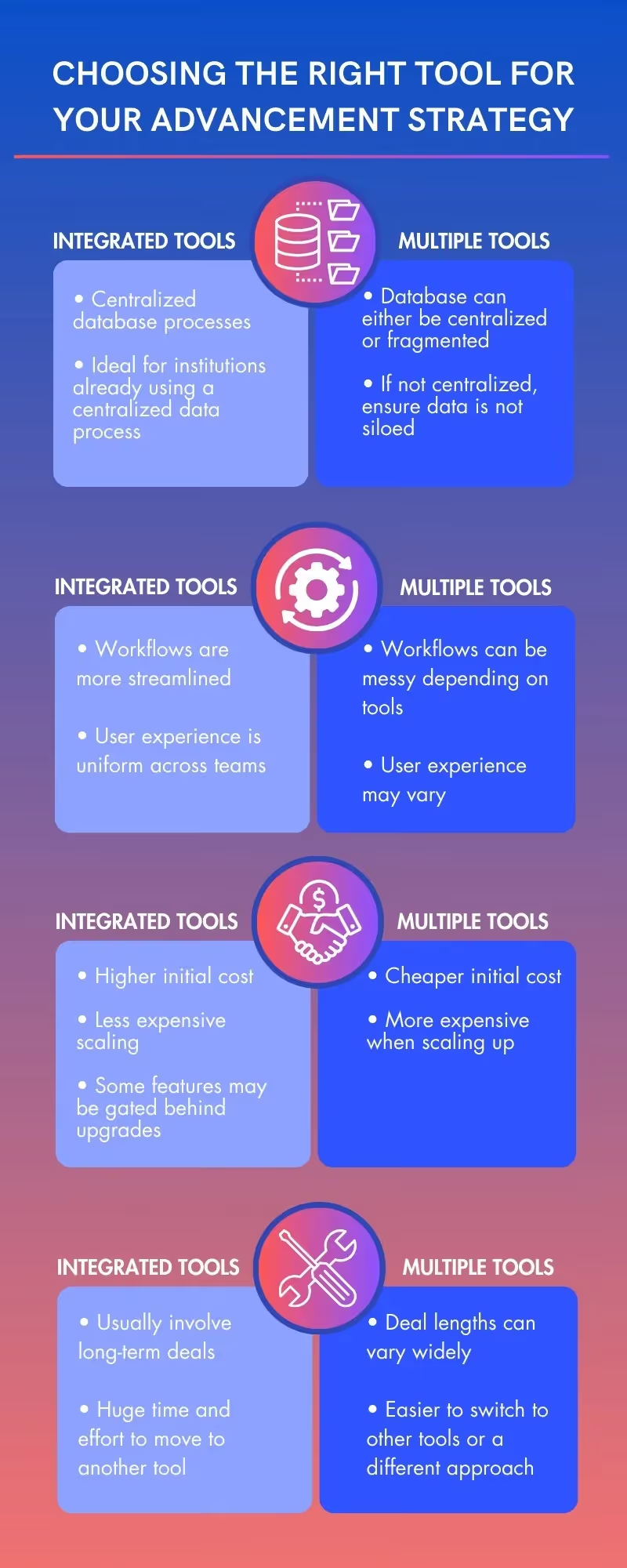
A well-integrated tool is often the choice of many, and for good reason. As an institution, you want to have an efficient but simple data management process, and a single integrated tool for fundraising and alumni engagement works great as it makes it easy to centralize your data management process. This approach naturally leads to more streamlined workflows and similar user experiences across your whole team as you all work on various parts within the same platform.
Depending on how well you use the various features of these tools, they can also be relatively inexpensive to implement. On the flip side, if you are after only a certain feature, that same feature may not be as personalized for you as a specialized tool. Depending on the platform and the features you need, they might also have a steep learning curve. Finally, these integrated tools usually involve a long-term relationship with their customer institutions, where they improve each other over time. Depending on your need, this can be just what you need or a dealbreaker, as it is slightly more difficult to switch to another tool after having everything set up.
On the other hand, many institutions also opt to utilize multiple tools that each serve a specialized feature. This provides them the opportunity to choose the best tool for each needed feature. It allows them to flexibly scale their selections depending on their budget or team size. It’s also a more comfortable option for institutions that are just starting out and don’t have the expertise or experience to work with an all-encompassing tool just yet.
However, this approach can be expensive if you need a lot of features and have a lot of alumni. It also requires staff to manage multiple systems and integrations from different sources, which may all have unique quirks. Data management needs to be closely monitored, as data inconsistency between any of the employed tools is a real possibility. If you choose to go with multiple tools, it is crucial to eliminate data silos. If you do choose to use multiple tools, it’s important that your tools talk to each other and data flows seamlessly.
Now that we’ve had a brief look at the pros and cons of each approach, it’s time to go over some of the things you need to consider so that whichever approach you choose will fit your institution perfectly:
➼ Institution size: For mid-sized sized institutions (5000 annual students and above) that may have a diverse alumni population, an integrated approach would fit their needs better. Meanwhile, institutions that have smaller alumni populations and databases may prefer to start with a small set of specialized tools and see how it aligns with their goals down the line.
➼ Budget: With less administration and vendor management required from the institution, integrated tools can usually be more cost-efficient in the long run. Integrated tools also have the distinct advantage of all their features feeding into a centralized database, which reduces operational costs for both sides. However, some of these integrated platforms may incur upgrade or extra feature fees and be more expensive to move on from. We highly recommend you do your research on these factors and align them with your budget.
➼ Staff volume and expertise: Consider how much staff will be needed for each approach and how much expertise will be needed. An integrated tool will be easier to manage as everyone works on the same tool, and communication channels with vendors are more streamlined. However, if you are a small team with little experience with these tools and are not looking to hire more soon, sticking to one or two specialized tools might be better. Do also consider any platforms your staff members might have experience with or have heard of. Finally, keep your data flows in mind. Even if your staff would prefer multiple specialized tools, check how the data can possibly be centralized between them and if so, how it can be optimized for scale.
➼ Alumni engagement goals: It really should go without saying, but your alumni engagement goals should always be the main factor when deciding which way to go. Consider your past engagement metrics, where you’d like to see improvements, which events and initiatives you are planning to integrate to make that happen, and finally, which approach or tool will be able to not just accomplish that goal but make it scalable in the future.
➼ Data capabilities of the team: Do consider your staff’s capabilities to manage alumni data. If you have a small team but are using a variety of tools, will the team be able to integrate data from multiple sources? In that case, will switching to an integrated tool to streamline your data integration process be better? How is your database set up in the first place, and will it be time-consuming to have it work with the tool you want? If you are choosing to adopt multiple best-in-class tools, will you have issues with data silos? These are just a few questions regarding database management and integration that you should consider.
➼ Scalability: Consider how many staff members, alumni, donors, and donations you may need to manage a few years from now and how you want to scale up to that level. The first step is to consider the tools you are currently using and how scalable they are. Next, consider alternative tools available that match your future goals and whether they can be aligned with your staff, existing programs, and budget to hone down on which tool you want to scale with. Who knows, maybe the tool you already have fits the bill, or you might just find the perfect alternative to take you to the next level!
Hopefully, we’ve given you plenty of food for thought to help you decide your strategy moving forward. We know that these are difficult but crucial questions that are necessary to answer. That’s why we are ending this blog with some actionable questions to consider if you are currently undecided on which approach is better. They are:

Factors That You Need to Consider Before Buying a Tool
Lorem ipsum dolor sit amet, consectetur adipiscing elit. Suspendisse varius enim in eros elementum tristique. Duis cursus, mi quis viverra ornare, eros dolor interdum nulla, ut commodo diam libero vitae erat. Aenean faucibus nibh et justo cursus id rutrum lorem imperdiet. Nunc ut sem vitae risus tristique posuere.
%201.svg)
%201.svg)
%204.svg)



.svg)