We’ll walk you through everything you need to know to create a smart, organized, and effective fundraising calendar that works for your team all year round

Anwesha Kiran
Updated:
April 1, 2026

Summary
• Start by mapping out your entire fundraising year: A well-structured fundraising calendar helps you move from last-minute scrambles to strategic planning, ensuring you hit key moments like Giving Tuesday or reunion weekends effectively.
• Boost collaboration and avoid campaign overlap: When everyone on your alumni relations, events, and communications teams sees the same calendar, it prevents scheduling conflicts and ensures everyone is working towards shared goals.
• Align your campaigns with academic and institutional milestones: Strategically time your appeals around events like homecoming, graduations, or even quiet reflection periods to make your asks more relevant and increase donor engagement.
• Clearly define roles and timelines for every initiative: Assigning who’s responsible for creative, tech setup, and outreach for each campaign helps keep everyone accountable and projects on track.
• Leverage simple tools and stay flexible: Whether you use Google Sheets or a project management tool, make sure your calendar is a living document that gets reviewed quarterly and has room for unexpected opportunities or changes.
• Grab a free, customizable template to get started right away: This post offers a downloadable fundraising calendar template, so you don’t have to build one from scratch to bring clarity and purpose to your fundraising efforts.
If you're part of a school, college, or university advancement team, chances are you've heard the term fundraising calendar more than once. And if you're still managing campaigns reactively—scrambling to send an email the day before Giving Tuesday or clashing with exam weeks—you’re not alone. A well-planned fundraising calendar can be the difference between chaos and clarity, missed opportunities and record-breaking donations.
In this blog, we’ll walk you through everything you need to know to create a smart, organized, and effective fundraising calendar that works for your team all year round. Whether you're starting from scratch or looking to improve what you already have, you'll also get tips on using a calendar fundraiser template, tools to help you stay on track, and even a downloadable fundraiser calendar template you can use right away.
Think of a fundraising calendar as your campaign playbook for the year. It’s not just a schedule—it's a strategy. It helps you map your fundraising efforts month-by-month or even week-by-week, aligning with key moments in the academic year, holidays, awareness days, and donor behaviors. For example, you might plan your annual giving campaign around Giving Tuesday, tie alumni events to reunion weekends, or schedule stewardship emails right after a major donation push.
The best part? It brings structure and visibility to your entire fundraising year. With a calendar in place, your team isn’t just reacting to deadlines—you’re anticipating them. Everyone knows what’s coming, what needs to be done, and who’s doing it. You’re no longer guessing or winging it. You’re planning with purpose.
Beyond organization, a good fundraising calendar helps build momentum. When your team knows what’s next, your audience does too. You can create more thoughtful campaigns, align your messaging with what’s going on in your institution or the world, and, most importantly, raise more funds with less stress.
Still wondering if it’s worth the time to create one? Here's why a fundraising calendar isn’t just “nice to have”—it’s essential.
A clear plan leads to better teamwork, stronger campaigns, and happier donors.
The first step is deciding what kinds of fundraising activities you'll include in your calendar. These can range from traditional campaigns to creative digital outreach. Your mix will depend on your institution’s goals, audience, and bandwidth.
Here are a few campaign types to consider:
💡Tip: Don’t try to do everything every month. Instead, spread out campaign types across the year. For example, you could run a major digital push in November, focus on alumni reunions in June, and reserve February for targeted email appeals.
Once you’ve chosen your campaign types, align them with your institution’s calendar. This not only ensures better participation but also helps you avoid scheduling mishaps—like launching a campaign during finals week.
Start by plotting out key academic milestones and cultural moments, such as:
For example, if your school’s homecoming is in October, that’s a great time to launch an alumni challenge campaign. Or, if seniors graduate in May, you might run a “Senior Class Gift” appeal leading up to their last day on campus—here’s a great example from NYU.
You can also tap into larger giving movements. Campaigns that align with Giving Tuesday or End-of-Year Giving see higher traction because they ride on already existing momentum.
Bonus: Consider building in quieter months for reflection and reporting. For example, use July to analyze mid-year performance and tweak your calendar for the next half.
Even the best calendar will fall flat without clear accountability. That’s why the next step is to break each campaign down into roles, timelines, and dependencies.
Start by answering:
Let’s say you’re running a virtual reunion fundraiser in June. Your calendar might look like this:
You don’t need an expensive tool to start building your fundraising calendar. Many institutions begin with what they already use. The key is to pick something collaborative, easy to update, and visually clear.
Here are a few tools that work well:
Don’t forget to also build in time for retrospectives. After each campaign, set aside a week to reflect: What worked? What didn’t? What can be repeated or improved?
Creating your calendar is one thing. Keeping it updated and useful is another. Here are some quick best practices to stay on course:
Life happens. So do emergencies, new opportunities, and spontaneous campus events. Build buffer periods and leave some “wiggle room” in your calendar for changes.
Don’t just create the calendar and forget it. Set reminders to revisit your calendar at least once per quarter to adjust timelines, add new events, or shift priorities.
Make the calendar a living document. Invite team members to suggest changes, mark progress, and keep notes. The more collaborative it is, the more likely it is to be used.
Want a ready-to-use fundraiser calendar template you can customize for your institution? Here’s one you can download and edit for free right now, no strings attached:
📅Link: [Fundraising Calendar - Template]
If you’ve ever wished for more organized campaigns, less deadline stress, and better results from your fundraising efforts, a fundraising calendar is your answer. It transforms fundraising from a reactive chore into a proactive, strategic process. With the right calendar in place, you’ll communicate more clearly, plan smarter, and raise more money—all while staying sane.
Subscribe
See how modern advancement teams bring alumni engagement and fundraising together.
Plan faster. Execute better
Explore free templates designed for alumni and fundraising teams.
.png)

.avif)
Anwesha Kiran
The best peer-to-peer fundraising platforms help educational institutions and nonprofits boost donor engagement through personalized giving pages, social fundraising, and CRM integration. These tools streamline campaigns with built-in analytics, gamification, and mobile optimization. While some options are completely free, others cater to large-scale fundraisers that require advanced data synchronization and scalability.
The right tools can make all the difference in modern fundraising. In this blog, we’ll highlight some of the best options on the market and explore what you can expect out of them.
.avif)
Peer-to-peer fundraising, or P2P fundraising, is a type of crowdfunding in which your organization encourages its supporters to fundraise for your cause. Typically, these supporters will create an individual fundraising page and share it with their friends, family members, and social media followers to raise money.
A peer-to-peer fundraising site is the software that allows your supporters to create a donation page, share it with their personal network, and collect donations to support your mission.
Typically, most fundraising tools today include features such as:
When shopping for a peer-to-peer fundraising tool, you’ll need to weigh the cost of the tool against the value it provides. However, it can be difficult to know the true cost of using the platform, depending on the software’s pricing structure. Get familiar with these common structures:
To compare tools with different pricing structures, calculate what each platform will cost you, on average, for a certain period of time.
Whether you’re a K-12 school ,higher ed institution, or a nonprofit, in no particular order, here are some peer-to-peer fundraising platforms that you should consider:
(Prices are based on publicly available data at the time of writing and are subject to change over time)
Almabase runs on a philosophy of integrating into your CRM and existing workflows, which remains true for their peer-to-peer fundraising features. Almabase boasts native sync with most higher-ed CRMs due to their TrueSync integration, combined with superior customer support and a willingness to integrate your ideas into their long-term vision. Almabase offers customizable pages and leaderboards powered with inbuilt text and email communication features built to drive donor engagement through organic and personalized communication.
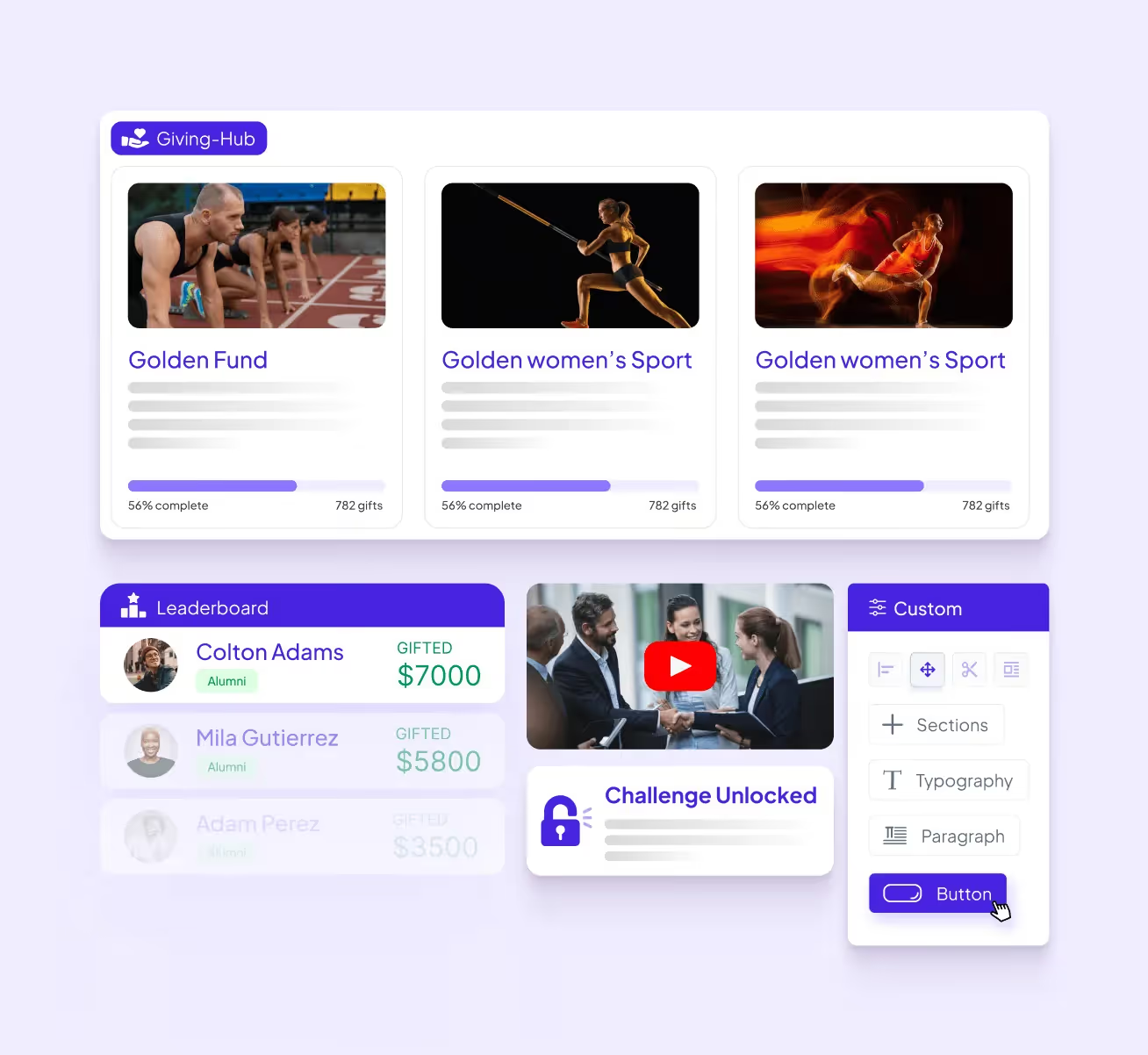
Almabase’s pricing depends entirely on your needs. Learn how Almabase empowers your p2p strategy, Schedule a personalized demo and get a quote.
GoFundMe Pro (formerly Classy) is a peer-to-peer fundraising platform optimized for maximum nonprofit impact. It provides ready-to-use templates for scalable, high-impact campaigns and equips supporters with intuitive tools to advocate for the cause.
GoFundMe Pro offers features like campaign templating, embedded videos and livestreams, progress thermometers, team structures, and mobile-optimized pages. The platform also supports recurring gift options and flexible payment processing, and has a mobile- and user-friendly interface.
GoFundMe Pro offers a standard “Essentials” plan and a “Partner” custom plan.
Bloomerang Fundraising (formerly Qgiv) is a fundraising platform offering tools for donation management, event planning, and donor engagement. It provides features like customizable donation forms, peer-to-peer fundraising, and text-to-give options
Bloomerang Fundraising starts at $40 per month if purchased as part of a bundle with Bloomerang CRM.
Zeffy is a 100% free fundraising platform for nonprofits, offering peer-to-peer fundraising, crowdfunding, donation pages, and recurring giving options. This tool generates revenue through optional tips that donors can provide in addition to their donation. It allows fundraisers to join as individuals or teams and create their own fundraising pages. The platform is also known for being simple, intuitive, and customizable
Zeffy has no fees and instead runs on optional tips from donors.
Donorbox is a fundraising platform that allows nonprofits to launch peer-to-peer fundraisers in a few steps. It provides customizable donation forms and supports recurring donations via various payment methods.
Donorbox also offers features for managing donors, sending personalized emails, and recording donor communications. The platform provides resources like onboarding emails, courses, and templates to support nonprofits in their fundraising efforts.
For peer-to-peer fundraisers, Donorbox charges a flat 1.75% platform fee for a main campaign and 2.95% for a supporter’s campaign.
Bonfire specializes in fundraising through custom merchandise sales. Nonprofits, schools, and even individuals can design their own custom merch and sell it via Bonfire’s free online stores.
Bonfire supports peer-to-peer campaigns (which it refers to as “giving campaigns”) by allowing your supporters to create and share t-shirt fundraisers on behalf of your organization—then, all of the money they raise is sent directly to your nonprofit.
Bonfire is completely free to use, and your nonprofit keeps 100% of the profits. There’s an 8% processing fee on additional donations, but if you verify your nonprofit status with Bonfire, that fee is reduced to 3.5%
Givebutter provides tools to launch peer-to-peer campaigns, complete with donation forms, fundraising pages, event management, a built-in CRM, and marketing tools to analyze your progress and streamline workflows. Their fundraiser teams offer a great choice for organizations looking to gamify their peer-to-peer fundraisers as well.
Givebutter offers a popular “free forever” plan, as well as a paid option starting at $29/month. If your organization opts out of having donors cover fees, Givebutter charges 1% for donation forms, 3% for pages, and 5% for events and auctions, as well as a payment processing charge of 2.9% + ¢0.30 per transaction.
GiveCampus is a fundraising platform for educational institutions, providing solutions for online giving, giving days, crowdfunding, P2P fundraising, and more. It blends peer-to-peer outreach, social media, and gamification to engage more donors and increase fundraising. The platform allows schools to execute giving days, year-end appeals, and crowdfunding campaigns.
GiveCampus also offers features like matches and challenges to inspire donors and make them feel like their contributions are making a difference
GiveCampus has three platform plans: Essentials, Professional, and Enterprise. Additionally, pricing will vary depending on the modules you require.
As a Blackbaud product, JustGiving is a great choice if you are used to the Blackbaud CRM environment. Compared to other platforms on this list, JustGiving is relatively simple both in its presentation and its scope. This makes it an easy choice for teams just starting out or looking for something simple for a one-off event. However, there may be better choices for teams that want a more comprehensive solution that spans multiple fundraisers and year-long campaigns.
JustGiving charges platform fees and a standard payment processing fee based on your geographical location and payment platform. Crowdfunding pages are free to set up. While UK charities do not need to pay a platform fee, they do have a subscription model.
Gravyty leverages predictive AI technology to provide frontline fundraisers with personalized insights into donor behavior. This innovative approach helps organizations enhance their outreach efforts by automating email drafts tailored to individual donors while integrating seamlessly with existing CRM systems. Gravyty's focus on personalization empowers fundraisers to build stronger relationships with donors.
While some information is available online, interested organizations will need to contact Gravyty for a custom quote.
Bonterra’s peer-to-peer fundraising product (formerly DonorDrive) offers smart and customizable P2P fundraising solutions that empower supporters to create personalized experiences at scale. Its features include an intuitive event builder, personalized coaching for fundraisers, gamification elements like leaderboards, social media integrations, and seamless CRM integration, which enhances supporter engagement significantly
Bonterra offers three tiers—Essentials, Pro, and Enterprise—with pricing based on customer needs.
With so many unique platforms out there, choosing the right one can be a little overwhelming. However, there are several key factors to consider when selecting the right peer-to-peer fundraising software for your team:
Each platform will offer peer-to-peer fundraising capabilities, but you should dig a little deeper to find the right fit for your needs. For example, if you are a small team looking to organize a quick fundraiser, you may end up paying for features you don’t need. On the other hand, if you are looking for a long-term solution, a platform without built-in analytics would be a dealbreaker. Look for features that boost, rather than hamper, your fundraising efforts, and aim for a high return on investment.
Many teams want a tool that scales up alongside them as they engage more donors and alumni, but there is often a point where their needs outgrow the platform. To avoid this, consider both your short-term and long-term goals to determine if the platform’s upgraded pricing tiers will meet your team’s requirements later on. This way, you can simply upgrade to a plan with more advanced features or storage rather than migrating to a completely new platform.
Your staff, fundraisers, and donors should all have positive, smooth experiences when engaging with your fundraising pages. For example, if you want to sell custom merch, both the designing process and purchasing process should be easy and intuitive for supporters. From payment processing to reporting workflows to page load times, there are many aspects you should ask about or test out during a free trial or demo to see if a platform is the right one for you.
Some solutions come with a relatively low learning curve but offer limited functionality. Some, on the other hand, can be the driving force behind all your fundraising strategies but may require in-depth technical and/or coding experience. Try to find a balance between the training time required and potential functionality to ensure high adoption.
Pricing is a key consideration for any tool, but it’s also important to consider the nuances that may arise down the line. Always consider the rates associated with upfront costs, renewals, transaction fees, upgraded plans, and other relevant expenses. Additionally, switching to a new platform inevitably leads to more expenses through database transfers and staff upskilling. Consult with your database managers and other staff members before making a decision.
In the event that something goes wrong, you need to be able to reach the platform provider to resolve the issue. Keep factors like response times on live chat or email support channels in mind. For the long term, you also want to support platforms that onboard customer feedback and have detailed roadmaps for upcoming features.
Both your staff and donors need to be assured that sensitive data like payment information will be kept safe and secure. Always look out for a platform’s data encryption measures, as well as its compliance and authentication processes, to see if it inspires confidence from your donors.
Third-party review sites like G2 and Capterra offer insight into what customers think about specific tools. Keep in mind that these reviews are subjective, but they can be a great indication of how a platform is perceived overall, highlighting positive and negative software trends.
There is no single “best” fundraising website, but you can find the one that is best for your organization. Choose a platform that aligns with your goals, budget, audience, and campaign type.
Yes, a reputable fundraising platform should be able to integrate with your CRM to ensure donor data flows automatically into your central database. This eliminates data silos and the need for manual data transfers.
GoFundMe is a popular tool for personal crowdfunding, but it may lack the tools you need to run a full-fledged campaign. The platforms referenced in this guide offer the specialized tools mission-driven organizations need for branding, tracking donor data, and communications.
Crowdfunding is a centralized process led by your organization using a single donation page. On the other hand, peer-to-peer campaigns decentralize fundraising, empowering many supporters to help you raise money. Peer-to-peer campaigns empower supporters to help you raise money, meaning there are many people fundraising for your cause. Make sure your platform has the tools to support a peer-to-peer campaign.
Look for platforms that include gamification features, such as fundraising thermometers, badges, and leaderboards. These tools spark friendly competition among fundraisers and help them visualize their progress to maintain momentum and engagement.
We hope we’ve given you the tools you need to choose or at least consider some of the best peer-to-peer fundraising solutions out there, as well as the questions you need to ask yourself before adopting one. Whether you’re a higher ed institution optimizing your peer-to-peer fundraisers or a K-12 school just looking to get started, we hope you pick out the right solution and can make a great positive change.
If you’ve had successful peer-to-peer fundraisers before, learn how you can build a peer-to-peer fundraising community to help you keep providing meaningful experiences
.avif)
11 great peer-to-peer fundraising platforms for Institutions and Nonprofits 2026
Lorem ipsum dolor sit amet, consectetur adipiscing elit. Suspendisse varius enim in eros elementum tristique. Duis cursus, mi quis viverra ornare, eros dolor interdum nulla, ut commodo diam libero vitae erat. Aenean faucibus nibh et justo cursus id rutrum lorem imperdiet. Nunc ut sem vitae risus tristique posuere.
2024 was an interesting year for fundraising professionals. Persistent and emerging challenges in the nonprofit landscape coincided with some. While some issues carried over from previous years, new dynamics reshaped the way organizations navigated their work.
Last year was a year of highs and lows for fundraising and advancement professionals. From staffing struggles to shifts in donor behaviors, the year brought challenges that tested the resilience of nonprofits across sectors. However, these hurdles also paved the way for innovation, collaboration, and strategic rethinking, setting the stage for what 2025 might bring.
The donor landscape in 2024 presented an interesting problem. While overall donations increased, the donor pool continued to shrink. According to the Association of Fundraising Professionals (AFP), there was a 2% increase in total donations but a 4.5% decline in the number of individual donors. This trend posed a significant challenge for nonprofits reliant on a broad donor base for smaller, recurring contributions.
Staffing shortages and high turnover rates continued to be among the most pressing concerns for nonprofits in 2024. According to a study by NonProfit PRO, nearly 70% of nonprofits reported struggling with staffing challenges, citing underfunding and burnout as primary drivers.
This crisis was compounded by the competitive job market, which made it difficult for nonprofits to attract and retain talent. High turnover negatively impacted team morale and operational efficiency, forcing many organizations to stretch already limited resources to achieve their goals.
The rise of AI and other tech tools has been both a blessing and a challenge for nonprofits. While AI offers powerful capabilities—from predicting donor behavior to automating administrative tasks—it also requires significant investment in training and implementation. Many teams struggled to fully integrate these tools due to lacking technical expertise or financial resources.
The use of AI also brings forward some ethical concerns that increasingly became relevant throughout the year. There exists the risk of over-automating donor communication, which could lead to a loss of the personal touch that is central to alumni engagement. For smaller organizations, the hype around AI could also lead to investments in tools that did not align with their needs, diverting funds from more pressing priorities.
Despite the challenges, nonprofits showcased remarkable resilience. Many embraced hybrid fundraising models, combining virtual and in-person events to engage a broader audience. Charity Digital reported that organizations leveraging digital tools for storytelling and donor engagement saw significant returns on investment.
Additionally, DonorBox emphasized how nonprofits that invested in robust donor communication tools experienced improved retention rates, especially during year-end campaigns.
As we move into 2025, nonprofits more than ever need to build on the lessons of 2024 by focusing on sustainable growth and strategic innovation.
Resilience emerged as a defining characteristic in 2024, and nonprofits should ideally look to build upon it by adopting sustainable strategies and scalable practices, to better navigate uncertainty and a world that’s throwing a lot of innovations at us without leaving us much time or resources to consider our approach to each of them. With all that being said, we’d like to explore some broad focus areas that teams and institutions alike should watch out for in 2025:
The excitement surrounding AI and other technologies in 2024 often led to unrealistic expectations for nonprofits. A research paper published by Lauri Goldkind, Joy Ming, and Alex Fink critically assessed AI’s role in human services, questioning whether it offered genuine value or was simply a trend driven by hype. The study concluded that while AI holds transformative potential, it requires proper alignment with an organization's size, mission, and resource constraints to be effective.
Throughout 2025, Nonprofits should be shifting focus toward scalable and budget-conscious technology solutions. For example, a hypothetical smaller team that only needs a CRM and basic analytics could leverage low-cost digital tools and achieve better outcomes if these tools are customized to their specific workflows and objectives, as opposed to trying to cover all their bases and wasting both resources and time spent on upskilling.
The staffing crisis doesn’t seem to be letting up anytime soon with 68% of organizations reporting difficulties with recruitment and retention in 2024. Common challenges include toxic work cultures, burnout, uncompetitive salaries, and insufficient training opportunities. Increased investment in professional development, equitable pay structures, and supportive workplace cultures have been big talking points for a while but now they need to become key priorities. Policies aimed at reducing burnout, such as flexible work schedules and mental health support should be a good starting point.
Additionally, peer mentoring and community-building efforts are gaining traction. Nonprofits can leverage mentorship programs and peer support networks to foster a sense of community within their teams, leading to improved job satisfaction and retention.
At the heart of every nonprofit is its people—the staff, donors, and volunteers whose collective efforts drive change. By fostering positive internal cultures and focusing on impactful strategies, nonprofits can inspire trust and loyalty, ensuring their mission thrives in the years to come.
Nonprofits have responded to the recent donor market shifts by focusing on deepening relationships with existing donors. Strategies such as targeted communication and personalized outreach have since become standard practice. 2025 should be a good year for teams to consolidate knowledge of their tools and long-term goals so that they continue fostering donor loyalty seamlessly. A key area of focus will be on small and medium-sized donors and how teams can turn them into loyal donors moving forward.
With federal budget cuts for nonprofits and institutions seeming likely on the horizon, advancement and nonprofit teams especially in the US will need to explore sustainable alternatives to reach their goals.
That’ll just about do it for now but with 2025 seeming a difficult year to predict, there should certainly be a lot more to talk about in the coming months.

Key focus areas for fundraising in 2025
Lorem ipsum dolor sit amet, consectetur adipiscing elit. Suspendisse varius enim in eros elementum tristique. Duis cursus, mi quis viverra ornare, eros dolor interdum nulla, ut commodo diam libero vitae erat. Aenean faucibus nibh et justo cursus id rutrum lorem imperdiet. Nunc ut sem vitae risus tristique posuere.
Event planning in the education sector is no small feat. From homecoming and graduation ceremonies to parent-teacher conferences and student workshops, K-12 schools and higher education institutions juggle a dizzying array of events each year. The right event management software can be a game-changer—streamlining registrations, automating communications, and ensuring every detail runs smoothly. In this guide, we'll break down what event management software is, what features to look for, and the top solutions for 2026 that are transforming event coordination software for schools, colleges, and universities.
.avif)
An event management software is a digital platform designed to streamline the entire event lifecycle—from planning and promotion to registration, execution, and post-event analytics. These event planning software solutions centralize all event-related tasks, making it easier to coordinate logistics, track attendees, manage communications, and measure event success. For educational institutions, an event management tool can handle everything from classroom bookings and campus tours to large-scale conferences and alumni reunions.
Modern event management platforms often offer features such as:
By automating manual processes and centralizing information, these platforms help schools and universities save time, reduce errors, and deliver a seamless experience for staff, students, parents, and alumni.
With so many event management tools on the market, it’s important to choose one that fits your institution’s specific needs. Here are key factors to consider:
Below, in no particular order, are our picks of some of the top event management software platforms making waves in the education sector this year.
Almabase is an all-in-one event management platform designed specifically for educational advancement, alumni relations, and fundraising teams. It streamlines the planning and execution of complex events—whether in-person, virtual, or hybrid—while offering seamless CRM integration and a user-friendly interface.
Almabase offers personialized custom pricing based on your needs, number of constituent records, etc. You can request a personalized demo here
Blackbaud is a comprehensive solution built for large nonprofits and institutions, offering robust event planning, CRM, and analytics tools. Its event management features are deeply integrated with donor data to maximize fundraising outcomes.
Custom pricing. Request a quote.
Cvent delivers enterprise-grade solutions trusted by higher education institutions managing complex, large-scale events—from campus-wide conferences to alumni reunions.
Custom pricing. Request a demo.
Bonterra’s fundraising software includes specialized solutions and features for nonprofit events, auctions, peer-to-peer fundraisers, and giving days, along with unified donor management tools. Its event management features include ticketing, sponsorship tracking, mobile bidding, and more. Ultimately, Bonterra helps organizations streamline their events with a centralized fundraising and donor management solution.
Custom pricing. Request a demo.
Idloom is crafted specifically for universities and colleges, supporting diverse academic events from online examinations to graduation ceremonies.
Custom pricing. Request a demo.
Eventbrite is a versatile event management platform perfect for everything from concerts to community meetups. It offers intuitive tools for ticketing, promotion, and on-site check-ins, making it easy to manage both virtual and in-person events.
Pricing is 2% + $0.79 per paid ticket (Essentials) or 3.7% + $1.79 per paid ticket (Professional); free for free events. See pricing.
Eventcube is a white-label event management platform for K-12 schools and higher education institutions. It helps you manage all the in-person, virtual, and hybrid events with full control. This includes your branding, ticketing, and attendee engagement.
It is designed for flexibility and accessibility. This makes Eventcube reliable for day-to-day events like open days, student conferences, parent meetings, community gathering and even virtual graduation ceremonies.
Eventcube offers tiered pricing. 5% of the transaction total for the Starter package which is free. 3% of the transaction total for Pro along $99 a month. And custom Enterprise options. You can start with a demo or create a branded ticket store directly on Eventcube.
Giveffect combines event management with nonprofit automation, allowing you to handle ticketing, email campaigns, and donor records in one platform. It’s ideal for organizations looking to unify event planning with fundraising and CRM.
Custom pricing. Request a demo.
Remo, now integrated with Events.com, delivers an immersive platform for virtual, hybrid, and in-person events, with unique emphasis on networking and engagement.
Starts at $299 per month. See pricing.
Qgiv supports nonprofits with customizable tools for event registration, peer-to-peer fundraising, and mobile giving. Its user-friendly interface makes it easy to plan and promote fundraising events of all sizes.
Plans start at $0/month with no contracts, plus a 3.95% + $0.30 per transaction fee. Learn more.
Choosing the right event management software can transform how your institution plans, promotes, and executes events—whether you’re managing a single school assembly or a multi-day university conference. The platforms highlighted above offer a range of solutions tailored for K-12 and higher education, each with unique strengths and a few caveats to consider. Take advantage of free demos, explore user reviews, and assess your specific needs to find the event management tool that will best support your school’s goals in 2026 and beyond.
Looking for more inspiration? Explore event ideas that raise money and connect with alumni or see how advanced event management can drive registrations and engagement for your institution.

Best Event Management Tools for K-12 & Higher Ed (2026)
Lorem ipsum dolor sit amet, consectetur adipiscing elit. Suspendisse varius enim in eros elementum tristique. Duis cursus, mi quis viverra ornare, eros dolor interdum nulla, ut commodo diam libero vitae erat. Aenean faucibus nibh et justo cursus id rutrum lorem imperdiet. Nunc ut sem vitae risus tristique posuere.
Anwesha Kiran
April 30, 2025
12 minutes
%201.svg)
%201.svg)
%204.svg)


.svg)