A complete 2026 guide to event management software for institutions. Everything advancement teams need to evaluate platforms and decide with confidence.

Sharada Koti
Updated:
July 17, 2026

Summary
• Prioritize event management software with native CRM integration: This is key because it automatically updates alumni and donor records, eliminating manual data cleanup and giving your team a holistic view of engagement for smarter strategy.
• Stop juggling disconnected systems that create chaos at check-in and headaches with post-event reporting: Modern solutions offer seamless registration, real-time attendance tracking, and clear ROI insights, making event management much smoother.
• Look for platforms that integrate fundraising directly into event registration and offer intuitive tools for sponsorships or auctions: This makes it effortless to capture donations and significantly boost your fundraising campaign success right from the event.
• The guide stresses involving key stakeholders and asking critical questions during evaluation: Ensure the software connects event data to existing donor profiles and future outreach efforts, which is vital for long-term alumni engagement.
• Future-proof your event strategy by choosing software that scales with your institution's growth: It should provide leadership-ready dashboards that clearly show how events contribute to overall advancement goals, giving you visibility into your impact.
Planning an alumni event is a tall order. Be it a reunion, a donor gala, or a campus program, the journey is complex, and your team is expected to deliver experiences that feel seamless for attendees and meaningful for your institution.
The challenge here is that most advancement teams are stuck juggling disconnected systems that aren’t built particularly for schools and universities. While there are plenty of event management software options available on the market that might reduce your burden, the right platform will ensure that every detail runs like clockwork and delivers measurable impact.
In this guide, we’ll show you how modern event management software can help your advancement teams gain the clarity and confidence to choose the right platform that makes planning easier and outcomes clearer.
Higher education leaders are making technology a top priority. In the 2025 CCS Philanthropy Pulse survey, more than 70% of institutions identified technology adoption as a key focus for the year ahead, reflecting the push to strengthen fundraising operations and engagement systems. This shift is driven by the growth of alumni and fundraising events, the rise of hybrid formats that bring global audiences together, and increasing pressure from leadership to demonstrate ROI with clear, data‑driven reporting.
At the same time, common pain points remain stubbornly familiar. Manual list exports, disconnected CRM data, and separate systems for email, ticketing, and giving leave staff juggling fragmented workflows. On-site check‑ins often feel chaotic, post‑event reporting is delayed or missing, and leadership lacks visibility into how events contribute to long‑term donor engagement. In 2026, event management software matters more than ever because it addresses these challenges head‑on, integrating CRM workflows, simplifying check‑ins, and delivering the reporting advancement leaders now demand.
When you look closely, not every event management software is built with institutional needs in mind. Some tools focus on running events; others support everything that happens around and after them. Before getting into comparisons or questions, it helps to understand the core features that tend to matter most for institutions managing alumni, advancement, and engagement at scale:
Your attendees’ first impression is shaped by how easy it is to register. A platform that offers automated registration, flexible ticketing, and QR code check‑in saves staff time and reduces bottlenecks at the door.
Look for mobile‑friendly sign‑ups, customizable forms, and real‑time attendance tracking so you know exactly who’s in the room without chasing spreadsheets.
Clean data is non‑negotiable for advancement teams. Native integrations with systems like Raiser’s Edge NXT or BBCRM ensure every registration, gift, and interaction flows directly into your database without duplicate records.
Prioritize platforms that sync automatically, prevent errors, and give you confidence that your event data strengthens long‑term alumni and donor strategy.
One of the biggest frustrations for alumni and donor teams is juggling multiple tools just to send event updates. The right platform should let you manage confirmations, reminders, and segmented outreach in one place, so you’re not copying lists back and forth between systems. Personalization is where communication really pays off; alumni should get invites to reunions they care about, donors should see recognition that feels genuine, and students should receive messaging tailored to their involvement.
Look for software that integrates directly with your CRM, makes it easy to segment audiences, and tracks engagement so you know which messages resonate and which need adjustin
Events are often where giving happens, and the right software makes it effortless. Built‑in donation options during registration or live events encourage spontaneous contributions, while sponsorship and auction features help you manage commitments and maximize revenue.
Look for platforms that make giving frictionless and follow‑up automatic, so you capture every opportunity without extra manual work.
Large events come with moving parts: seating charts, table assignments, and multi‑day schedules. Software that supports seating and table management helps you place donors thoughtfully, while sub‑event support keeps conferences or reunions organized under one umbrella. These tools reduce manual coordination and give your team more control over the attendee experience.
Data tells the story of your event’s success. Real‑time attendance reporting gives you visibility into who showed up, while post‑event summaries help you demonstrate impact to leadership. Compliance features like SOC 2 certification and ADA accessibility considerations ensure your institution meets standards and delivers inclusive experiences without extra stress.
Events are about connection, and interactive features make attendees feel part of the experience. Tools like live polls, Q&A, gamification, or hybrid event support extend your reach and keep participants engaged.
Look for platforms that make these features easy to set up and integrate, so your team can focus on building relationships instead of troubleshooting tech.
Advancement teams are expected to do more with less, and AI is becoming the tool that makes it possible. A platform with built‑in AI can automate repetitive tasks like reminders and follow‑ups, clean up attendee lists, and even predict which events are most likely to drive donor conversions.
Look for systems that use AI to personalize alumni communication, surface engagement patterns you might otherwise miss, and deliver smarter reporting that connects attendance directly to fundraising outcomes. Instead of adding more manual work, AI frees staff to focus on relationships while giving leadership the clarity they need.
Events aren’t just about logistics; they’re also about managing dollars and cents. Having built‑in tools to track expenses against sponsorships and ticket sales gives you a clear view of ROI without juggling spreadsheets. This makes it easier to justify budgets to leadership and plan smarter for the next event.
Events don’t happen in a vacuum. Integrations with student portals, finance systems, or learning management tools reduce silos and keep everything connected. For advancement teams, this means smoother coordination across departments and fewer headaches when pulling reports or reconciling data.
When you’re sitting down with a vendor or demoing a platform, asking the right questions will help you cut through the sales pitch and see if the software truly fits your institution’s needs. Here are the ones worth asking:
Once you’ve asked the right questions, the next step is weighing the answers. Choosing the right software is about finding a tool that fits your institution’s goals, budget, and the way your team actually works. Here’s how to approach the decision:
The right event management software should feel like an extension of your team, reducing manual work, strengthening alumni and donor records, and scaling with your institution’s ambitions. If it feels like “just another system to manage,” keep looking.
Choosing the right software is only half the story; the other half is how quickly and smoothly it becomes part of your institution’s day‑to‑day. Here’s what a typical rollout looks like, and what you should expect along the way:
You’ve asked the right questions, weighed practical tips, and seen what a rollout might look like. The final step is exploring which platforms can actually deliver on those expectations. We’ve put together a detailed roundup of the best event management software for K‑12 and higher ed.
To give you a quick snapshot, here are five options schools and universities often consider:
After exploring the broader software options, it’s clear that advancement teams need something different. They need a platform that aids in strengthening alumni relationships, stewarding donors, and connecting participation to long‑term outcomes. This is where Almabase comes in. Designed with educational institutions in mind, it helps you move beyond one‑off event management and into a connected approach where every gathering contributes to engagement and fundraising goals.
Here’s how Almabase supports schools and universities in practice:
While the decisions often look straightforward, hidden costs, weak integrations, and poor rollout planning can derail even the best‑intentioned purchase. Here are some quick pointers to keep in mind before you make the final choice-
Best practices
Pricing realities
Common pitfalls to avoid
Making the right choice will and should depend on knowing what matters most to your team, understanding how events fit into your larger advancement strategy, and choosing a tool that makes those connections easier to handle.
If you’re ready to see what that looks like in practice, we’d love to continue the conversation. Schedule a demo and let’s talk about how your next reunion, gala, or giving day can become part of a connected engagement journey.
Subscribe
See how modern advancement teams bring alumni engagement and fundraising together.
Plan faster. Execute better
Explore free templates designed for alumni and fundraising teams.
.png)

.avif)
Sharada Koti
Event planning in the education sector is no small feat. From homecoming and graduation ceremonies to parent-teacher conferences and student workshops, K-12 schools and higher education institutions juggle a dizzying array of events each year. The right event management software can be a game-changer—streamlining registrations, automating communications, and ensuring every detail runs smoothly. In this guide, we'll break down what event management software is, what features to look for, and the top solutions for 2026 that are transforming event coordination software for schools, colleges, and universities.
.avif)
An event management software is a digital platform designed to streamline the entire event lifecycle—from planning and promotion to registration, execution, and post-event analytics. These event planning software solutions centralize all event-related tasks, making it easier to coordinate logistics, track attendees, manage communications, and measure event success. For educational institutions, an event management tool can handle everything from classroom bookings and campus tours to large-scale conferences and alumni reunions.
Modern event management platforms often offer features such as:
By automating manual processes and centralizing information, these platforms help schools and universities save time, reduce errors, and deliver a seamless experience for staff, students, parents, and alumni.
With so many event management tools on the market, it’s important to choose one that fits your institution’s specific needs. Here are key factors to consider:
Below, in no particular order, are our picks of some of the top event management software platforms making waves in the education sector this year.
Almabase is an all-in-one event management platform designed specifically for educational advancement, alumni relations, and fundraising teams. It streamlines the planning and execution of complex events—whether in-person, virtual, or hybrid—while offering seamless CRM integration and a user-friendly interface.
Almabase offers personialized custom pricing based on your needs, number of constituent records, etc. You can request a personalized demo here
Blackbaud is a comprehensive solution built for large nonprofits and institutions, offering robust event planning, CRM, and analytics tools. Its event management features are deeply integrated with donor data to maximize fundraising outcomes.
Custom pricing. Request a quote.
Cvent delivers enterprise-grade solutions trusted by higher education institutions managing complex, large-scale events—from campus-wide conferences to alumni reunions.
Custom pricing. Request a demo.
Bonterra’s fundraising software includes specialized solutions and features for nonprofit events, auctions, peer-to-peer fundraisers, and giving days, along with unified donor management tools. Its event management features include ticketing, sponsorship tracking, mobile bidding, and more. Ultimately, Bonterra helps organizations streamline their events with a centralized fundraising and donor management solution.
Custom pricing. Request a demo.
Idloom is crafted specifically for universities and colleges, supporting diverse academic events from online examinations to graduation ceremonies.
Custom pricing. Request a demo.
Eventbrite is a versatile event management platform perfect for everything from concerts to community meetups. It offers intuitive tools for ticketing, promotion, and on-site check-ins, making it easy to manage both virtual and in-person events.
Pricing is 2% + $0.79 per paid ticket (Essentials) or 3.7% + $1.79 per paid ticket (Professional); free for free events. See pricing.
Eventcube is a white-label event management platform for K-12 schools and higher education institutions. It helps you manage all the in-person, virtual, and hybrid events with full control. This includes your branding, ticketing, and attendee engagement.
It is designed for flexibility and accessibility. This makes Eventcube reliable for day-to-day events like open days, student conferences, parent meetings, community gathering and even virtual graduation ceremonies.
Eventcube offers tiered pricing. 5% of the transaction total for the Starter package which is free. 3% of the transaction total for Pro along $99 a month. And custom Enterprise options. You can start with a demo or create a branded ticket store directly on Eventcube.
Giveffect combines event management with nonprofit automation, allowing you to handle ticketing, email campaigns, and donor records in one platform. It’s ideal for organizations looking to unify event planning with fundraising and CRM.
Custom pricing. Request a demo.
Remo, now integrated with Events.com, delivers an immersive platform for virtual, hybrid, and in-person events, with unique emphasis on networking and engagement.
Starts at $299 per month. See pricing.
Qgiv supports nonprofits with customizable tools for event registration, peer-to-peer fundraising, and mobile giving. Its user-friendly interface makes it easy to plan and promote fundraising events of all sizes.
Plans start at $0/month with no contracts, plus a 3.95% + $0.30 per transaction fee. Learn more.
Choosing the right event management software can transform how your institution plans, promotes, and executes events—whether you’re managing a single school assembly or a multi-day university conference. The platforms highlighted above offer a range of solutions tailored for K-12 and higher education, each with unique strengths and a few caveats to consider. Take advantage of free demos, explore user reviews, and assess your specific needs to find the event management tool that will best support your school’s goals in 2026 and beyond.
Looking for more inspiration? Explore event ideas that raise money and connect with alumni or see how advanced event management can drive registrations and engagement for your institution.

Best Event Management Tools for K-12 & Higher Ed (2026)
Lorem ipsum dolor sit amet, consectetur adipiscing elit. Suspendisse varius enim in eros elementum tristique. Duis cursus, mi quis viverra ornare, eros dolor interdum nulla, ut commodo diam libero vitae erat. Aenean faucibus nibh et justo cursus id rutrum lorem imperdiet. Nunc ut sem vitae risus tristique posuere.

Anwesha Kiran
April 30, 2025
12 minutes
Beyond the homecomings and reunions, your alumni event calendar needs a whole host of events to round out the year and keep them engaged. These alumni events can either be one-off ideas or recurring occurrences that become a key part of your institution or organization’s brand.
Today, we’re helping you conceptualize those events with some alumni event ideas that you can host as their own thing, or alongside other events. So before we bore you like a nervous host, let’s get straight to the ideas!
✒️ Author’s note: The examples we list throughout this blog are purely appreciative and not a result of any promotion or partnership. If you know some good advancement work that you think deserves more attention, please let us know at marketing@almabase.com!
Let’s start with one of the more time-tested ideas that has evolved significantly: family weekends. Depending on your institution’s event calendar, these can be small one-time picnics, fairs, showcases, etc. or recurring major events that multiple generations of alumni come to appreciate over the years.

Family weekends are largely in-person although virtual or hybrid elements can certainly be introduced especially if you want to have your global alumni feel part of your event.
💡Looking for inspiration for your next family weekend? Check out these upcoming family weekend schedules!
- Syracuse University (link)
- University of Arkansas (link)
- Cornell University (link)
- Washington University in St. Louis (link)
- University of Colorado Boulder (link)
A popular notion that’s taken root over the past couple of decades is the fact that learning in your alma mater doesn’t stop after graduation. With job boards, mentorship programs, and placement opportunities, institutions have become springboards for career growth.

Career and skill-focused workshops can take this direction to the next level by providing valuable networking and upskilling opportunities (especially for recent graduates) that many people across industries often have to pay money to access.

Philanthropy is not just about financial donations. Service-based events attract alumni who want to make a tangible difference and live out the institution's mission. Think of a day of service centered around a theme that reflects your institution’s values or a current campaign. Examples include an environmental cleanup at a local park, a literacy drive for local schools, or a build-a-thon for a community housing project.
With both physical and mental health awareness becoming more widespread, institutions can lean into this by providing health and wellness focused events. These can be something educational (webinars, awareness sessions, etc.) or activity-focused (marathons, healthcare visits, care center volunteering, etc.).

Healthcare or health department alumni associations in particular are well suited for these events but they can extend their reach and invite more participation by collaborating with other departments or associations.
💡 Over time, these events can become recurring series and form support groups
For institutions that want to take their alumni’s career advancement a step further, an alumni venture acceleration event is a great idea to show how much your institution cares about inspiring innovators and creating jobs.
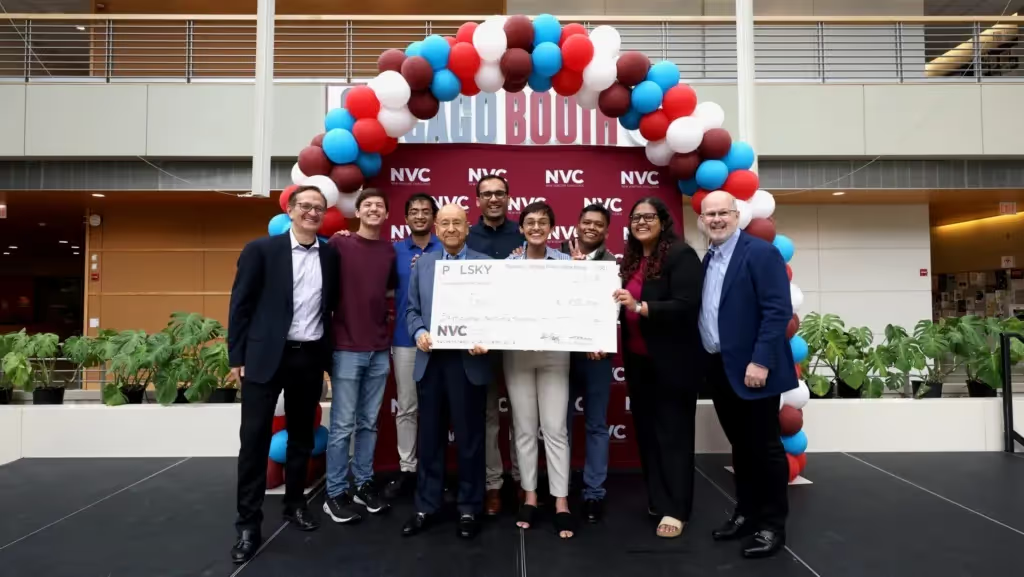
Take for example the Edward L. Kaplan, ‘71, New Venture Challenge (NVC) by the Polsky Center under The University of Chicago (that’s a mouthful 😝). The NVC invests more than $1 million in startups each year through the generosity of donors and investors. As a result, it claims to have graduated more than 600+ startups and created thousands of jobs in the process.
💡You can start small and help small or local alumni initiatives or businesses get their footing. An accelerator program doesn’t necessarily need to have a “shark tank” feel to it.

A casual, family-friendly, and low barrier of entry event you can consider is to host a movie screening on a suitable field, park, or similar campus area. It's an easy way for alumni to reconnect with the campus in a relaxed setting and is highly suitable for families and recent graduates. The communal experience of watching a film under the stars also makes for great material to promote on your social media channels.
💡 Movie screenings can also be an additional event on top of other events, say, a family weekend picnic or scavenger hunt.
Offer alumni exclusive access to a place not open to the general public. This could be a tour of a cutting-edge university research lab, the athletic team's new training facility, the university's special collections archive, or a local landmark led by a revered alumnus.

Looking outside the institution, you can plan small-scale outgoings for alumni to visit showcases, performances, museums, etc. You can book meals and other activities around the outings themselves so that your participants have time to bond and share their experiences.
💡 Need inspiration on what kinds of outings you can consider? Here are some examples you can look at:
- Wagner College - Moulin Rouge Alumni Outgoing
- Brown University - Private Tour of Stanford’s Cantor Museum
- Columbia College, NY - Asian Columbia Alumni Association’s Annual Lunar New Year Banquet
- USF Chicago Alumni Chapter - Millennium Park Summer Music Series
- Joint Ivy League (and select other university) Alumni - SF Opera’s Performance of Mozart’s Idomeneo
Based on your institution’s cultural heritage or alumni talents, you may be able to create a variety of incredibly personalized events for both general and specific alumni groups.

Dinner events can be surprisingly flexible. From small, recurring dinners for local alumni to reunion dinners as part of award ceremonies, you can make them as grand or as budget-friendly as you need them to be. These dinner events are also a great opportunity to build partnerships with local businesses and services. Even better if you can partner with an alumni-affiliated business!
Not all events need to be large parties or massive volunteering opportunities. Sometimes, a simple unfiltered town hall-style meeting between alumni and institution leaders or prominent alumni can help build trust and rapport within your community.
The best part is that these events can just as easily be in-person, virtual, or hybrid, making them one of the more flexible ideas on this list. It can also be a great follow-up to some of the other ideas we’ve presented throughout this list.
💡 These sessions can be repurposed into podcasts and key snippets can be used for other marketing material.
Pretty much any major alumni event today is powered by tools that handle minute details such as ticketing, giving, event pages, and more. Almabase offers a zero-code yet advanced set-up environment that streamlines how you plan your events from setting up pages and forms to integrated communications and enhancing guest experiences.
Yet Almabase is just one of many options available for advancement teams today. Depending on your needs and resources available, you may prefer a specialized tool just for events, or an integrated tool for which event management is just one of many modules.
Events remain one of the core pillars of alumni and donor engagement and the ideas and tools behind them have only continued to evolve. It’s certainly heartwarming to see that people and their experiences remain the ultimate goal of events and advancement teams as a whole.
If you’re looking for a partner to level up your upcoming events, request a personalized demo with us and we’d love to help!

10 Engaging Ideas for Your Next Alumni Event
Lorem ipsum dolor sit amet, consectetur adipiscing elit. Suspendisse varius enim in eros elementum tristique. Duis cursus, mi quis viverra ornare, eros dolor interdum nulla, ut commodo diam libero vitae erat. Aenean faucibus nibh et justo cursus id rutrum lorem imperdiet. Nunc ut sem vitae risus tristique posuere.
Homecoming is one of those rare chances to make nostalgia work for you — rekindling old ties, reminiscing, and building relationships that go the distance. A strong theme is essential to tie these together and set the vibe.
In this post, we have rounded up great homecoming themes and ideas, fresh takes on traditional homecoming activities, and creative ways to make your homecoming event unforgettable. Check out these awesome alumni homecoming ideas that work for everyone-
A time capsule is all about resurfacing the little moments that made your alumni feel at home—those unexpected corners where friendships formed, ideas took shape, and memories lingered long after the halls emptied. For example, take the Trojan Time Capsule.

For Homecoming 2024, USC carved out a snug recording booth beside Tommy Trojan and invited alumni to hit “record” and describe everything from midnight cram sessions in Doheny to dawn jogs around the Reflecting Pool. Each voice memo wove into a dynamic online soundscape, letting anyone—new students, returning grads, or visitors—virtually stroll through those treasured snapshots of campus life.
You can bring this same magic to your Homecoming. Pick a few of your campus’s most beloved or off-the-beaten spots and set up simple “Echo Booths” there. Then stitch those snippets into an interactive map or soundboard on your event site. Suddenly, “Echoes of the Campus” isn’t just a theme—it’s a living archive of your school’s heart and soul.
Imagine turning your Homecoming into an “Impact Week.” Take Hampton University as an example: their “Pirates Island” Homecoming in October 2024 welcomed 25,000 guests and infused roughly $3 million into Hampton and Coastal Virginia. When alums see their weekend reconnecting them to hometown businesses, it becomes more than nostalgia—it’s pride in tangible impact. That goodwill loop fuels participation: people RSVP earlier, bring friends, and share stories on social media. And when they return home, seeing how their dollars helped the local café or bookstore, they’re more inclined to open their wallets for the next big campaign, whether renovating an old lecture hall or funding the first‑generation student scholarship.

Hybrid homecomings merge on-site excitement with virtual inclusion. At Tokyo Tech’s Homecoming Day 2024, the “Team Tokyo Tech Meeting” welcomed their alumni in person and online. You can replicate this by live-streaming keynote lectures, matches, tailgate parties, opening virtual lounge chats, offering 360° campus tours, watch parties, running real-time polls, and pairing in-hall networking pods with Zoom breakout rooms—so every alum can cheer, connect, and contribute no matter where they are.
Kicking off your Homecoming hype with a signature hashtag and mini‑gigs gets everyone talking. Think along the lines of the GlowGreen Initiative by MSU, where students and alums lit up campus, front porches, windows, rooms, or any space in neon gear to create an online buzz about their 2024 homecoming event, ‘Come Home Spartans,’ which became a huge success.

Likewise, you could launch #BlueOutBrunch, inviting everyone to share sunrise tailgate pics over a live DJ set, or a surprise “Flash Cheer” squad that erupts into a chant in the student union under #RoarWithUs. These hashtag prompts and pop‑up gigs spark shareable moments, build momentum on socials, and have everyone counting down the days until kickoff.
A retro theme never misses the beat: it taps shared nostalgia across generations, needs only simple décor (neon signs, vinyl records, roller skates), and invites everyone to relive their favorite era. For example, Rockford University’s 2023 Homecoming transformed the campus into a nostalgic journey through the decades. Each day of the week celebrated a different era, from the funky 1970s to the early 2000s.

By hosting a retro-themed homecoming, students and alumni get to relive their favorite decades. Whether you stage a glow‑stick dance floor or dust off a classic arcade cabinet, retro vibes guarantee a full house—because who doesn’t love a trip down memory lane?
An inclusivity-themed Homecoming invites every voice to the celebration, and schools like Emory University are showing how it’s done. Their 2024 “Belonging at Emory” Homecoming series featured multicultural food trucks, international music nights, and panel discussions led by alumni from diverse backgrounds. To bring this to your campus, you could host a “Cultures on the Quad” festival with heritage booths, world cuisines, and student performances. Add community-led story circles or alumni spotlight walls featuring first-gen journeys and intersectional experiences. A theme rooted in diversity doesn't just build belonging—it turns your Homecoming into a mirror of the world your students will lead.
Pop culture–themed events are crowd magnets, especially when students and alumni get to step inside their favorite fictional worlds. In 2024, Lander University embraced this trend with their Homecoming theme, “Celebrating the Spirit of the New Millennium.” The event transported attendees back to the early 2000s, highlighting iconic fashion trends, unforgettable music, and the vibrant pop culture of the era.
Whether it’s MTV vibes, Y2K fashion, or throwback chart-toppers, the nostalgia hits different when it’s immersive. Themes like these can transform your typical reunion into a star-studded event. It will bring cinematic flair and nostalgia into the real world, making your Homecoming not just a weekend, but an immersive experience alumni won’t want to miss.
This year, why not let the quad double as a launchpad? Imagine rows of pop-up stalls, each run by alumni who turned dorm room dreams into thriving ventures— app prototypes, travel consultancies, organic bakes, and everything in between. During last year’s homecoming, the University of Rhode Island (URI) introduced the Rhody Marketplace. This initiative brought together alumni entrepreneurs to showcase their businesses at a live event, fostering connections between alumni, students, and the broader university community. So, an Alumni Marketplace isn’t just a celebration of entrepreneurial spirit; it’s a golden intersection of legacy and opportunity. By hosting a homecoming focused on this, you can provide the students a chance to shake hands with future employers, internship mentors, and role models who once sat in the same lecture halls. For alumni, it’s recognition long overdue—proof that their journey matters, and that their alma mater is still cheering them on.
What if homecoming was less about confetti and more about causes? When the community comes together not just to remember the good old days, but also to fundraise and support local needs, it creates real change. At Truman State University, homecoming transcended traditional celebrations by emphasizing charitable giving and making a tangible difference through collective efforts during homecoming festivities.

Unlike the usual fanfare of parades and tailgates, a cause-centered homecoming reimagines what it truly means to return home. It transforms nostalgia into action, inviting alumni not just to relive memories, but to create impact.
A scavenger hunt-themed homecoming event is a fun and interactive way to bring alumni and students together. For example, the University of Wisconsin–Madison hosted a family-friendly scavenger hunt during their homecoming with clues tied to the university’s history and traditions, fostering a sense of nostalgia and community.

While revisiting the favorite campus spots, participants work in teams to solve clues and find hidden items around campus. This kind of event builds school spirit and encourages participants to connect and reminisce about their time at the university.
Whether through the excitement of a scavenger hunt or the heartfelt connection of a nostalgia-themed event, the possibilities for bringing alumni together are endless. By embracing these unique ideas, universities can create lasting memories and strengthen their community spirit year after year.
Homecoming is the perfect moment to reignite alumni connections and build momentum for year-round engagement. We’d love to help you make your upcoming homecoming the kind that keeps alumni returning — not just for the memories, but for the community. With tools built for seamless event management, expansive digital engagement, and online giving, we help you build the homecomings of your dreams.
Want to see it in action? Request a demo and bring your next homecoming to life
Homecoming is an annual tradition primarily observed in high schools and colleges that celebrates school spirit and community by welcoming back alumni or former members to their alma mater.
Homecoming is typically in the fall and is a celebration of your school spirit and community. Prom is typically held in spring and is usually a formal dance marking the end of the high school experience.
It’s a week of dress-up days, pep rallies, parades, and other community events. A football game is usually the main event, with alumni in the stands.
Homecoming not only celebrates your institution’s spirit but also brings current students, faculty, alumni, and members of the local community together to create lasting memories and strengthen the overall community feeling.

10 unique homecoming theme ideas to plan the perfect event
Lorem ipsum dolor sit amet, consectetur adipiscing elit. Suspendisse varius enim in eros elementum tristique. Duis cursus, mi quis viverra ornare, eros dolor interdum nulla, ut commodo diam libero vitae erat. Aenean faucibus nibh et justo cursus id rutrum lorem imperdiet. Nunc ut sem vitae risus tristique posuere.
Sharada Koti
April 23, 2025
12 minutes
%201.svg)
%201.svg)
%204.svg)



.svg)