Learn 7 practical tips from Ashley Budd to write better alumni emails, improve open rates, personalize messages, and drive engagement with AI.

Sushmitha
Published:
October 21, 2026
Updated:
.png)
Summary
Ashley Budd’s webinar shares practical ways to write alumni emails that get opened, read, and acted on. The key takeaways are to write for people who skim, use clear subject lines, segment alumni based on their interests and engagement, lead with what matters to the reader, and make the main call to action easy to find. AI can help draft emails, generate subject lines, and personalize messages, but every draft needs a human review for accuracy, relevance, and tone.
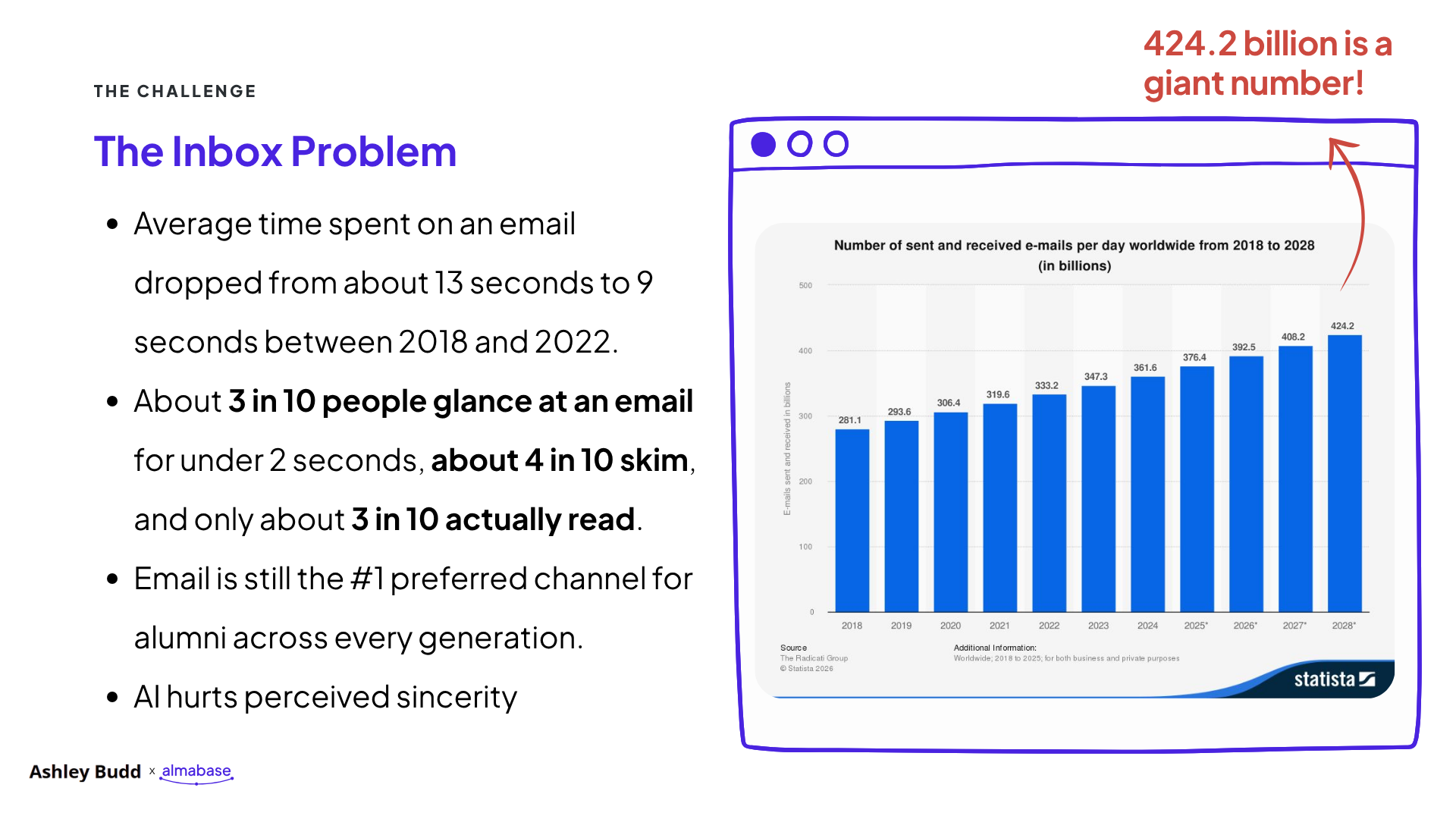
Over 400 billion emails get sent every single day! That’s a huge number, and maybe not too surprising when you look at your very own inbox and see 2,359 unread emails.
Yet, email remains one of the most effective ways to communicate with alumni.
So, how do we make our emails stand out?
To answer this, we caught up with Ashley Budd, nonprofit consultant, former Senior Marketing Director at Cornell University, and co-author of Mailed It! She has spent years working on alumni communications and has plenty of lessons to share.
In our recent webinar, How to Write Emails Alumni Actually Want to Open (Even in the Age of AI), Ashley walked us through what makes people open emails, read them, and take action.
Here are seven practical lessons from the session that you can try in your next alumni email.
Think about how you read your emails. Do you read every word? Or do you scan the subject lines, glance at a few messages, and open the ones that catch your attention?
Your alumni do the same.
During the webinar, Ashley shared research showing that the average time people spent reading an email dropped from around 13 seconds in 2018 to 9 seconds in 2022. About 3 in 10 people glance at an email for less than two seconds, while around 4 in 10 skim it.
That leaves you with very little time to get your message across.
Ashley's advice is simple: write for the two-second glance.
Try this: Open your next alumni email and look at it for two seconds. Then look away. Can you tell what the email is about and what the reader should do?
If you can't, it's time to simplify.
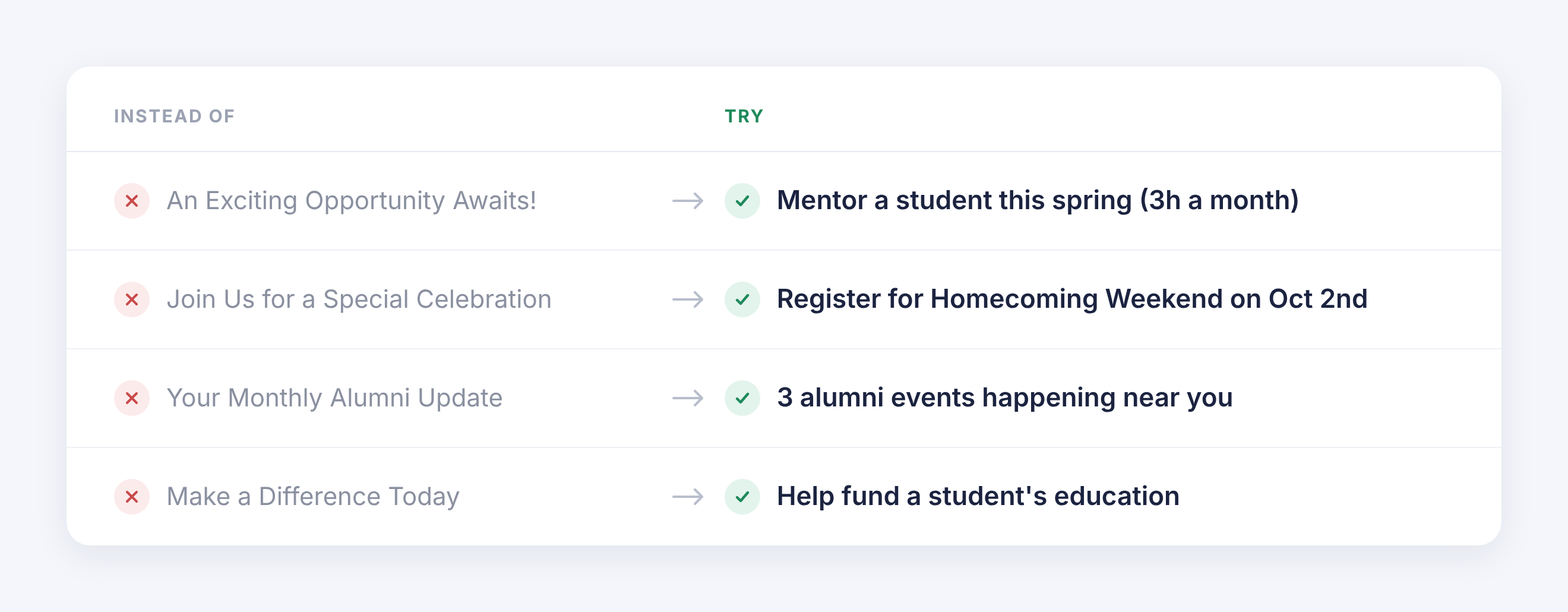
We spend a lot of time trying to write clever subject lines. But when people have hundreds of emails to get through, they want to know what each email is about.
During the webinar, we shared this example.
Option A: Alumni Newsletter | October 2026 | Issue 14 Option B: Homecoming photos and 3 alumni events near you
Which one would you open?
Option B gives readers a better idea of what they'll find inside. But there's a catch. If your alumni newsletter has built a strong reputation and people recognize its name, leading with the newsletter's name might work better. It all comes down to relevance. Think about what your audience recognizes, what they care about, and what would make them want to open your email.
Ashley recommends keeping subject lines to around six to nine words. Use simple language and give readers enough information to decide whether the email is worth opening.
Your sender name matters too. People check who sent an email before deciding whether to open it. Use a name your alumni will recognize, whether that's your institution, an alumni association, or a familiar staff member.
Try this: Before sending your next email, write three subject lines. Ask a colleague to pick the one that tells them the most about the email. Use that feedback to improve your final version.
Imagine you're hosting an alumni networking event in Boston. You send an invitation to every alumnus in your database, including people who live thousands of miles away. Some might be interested, but most won't be able to attend. This is where audience segmentation helps.
Ashley suggested grouping alumni into three broad categories based on their engagement.
Off-the-grid alumni: People you have trouble reaching. Their contact details may be outdated, or they haven't interacted with your communications in a long time.
Wallflowers: People who occasionally open your emails but rarely attend events, volunteer, or donate.
Engaged alumni: People who regularly open emails, click links, attend events, volunteer, or give.
Each group needs a different approach. Your engaged alumni may be happy to hear from you more often. Wallflowers may respond better to fewer emails with a clear reason to get involved. Off-the-grid alumni may need help reconnecting with your institution.
Start with the information you already have.
You can also ask alumni what they'd like to hear about. A short survey or a simple choice within an email can help you understand their interests. You don't need to build dozens of segments on day one. Start with two or three groups and see how the response changes.
If your team uses Beacon, Almabase’s fundraising marketing platform, you can segment alumni by giving history, location, and class year, then use dynamic content to tailor each email to the group receiving it. If you use Raiser’s Edge NXT, you can also use your existing segments directly, without exporting or uploading data.
Try this: Pick an upcoming event or campaign. Instead of sending the same email to everyone, create two versions for different groups of alumni. Change the opening, the details, and the call to action to suit each audience.
Then compare the results.
A common mistake in advancement emails is spending too much time talking about the institution. The email starts with the department, explains the program's history, and eventually gets to the reason for writing. By then, the reader may have moved on.
During the webinar, Ashley showed an example of a Giving Day email.
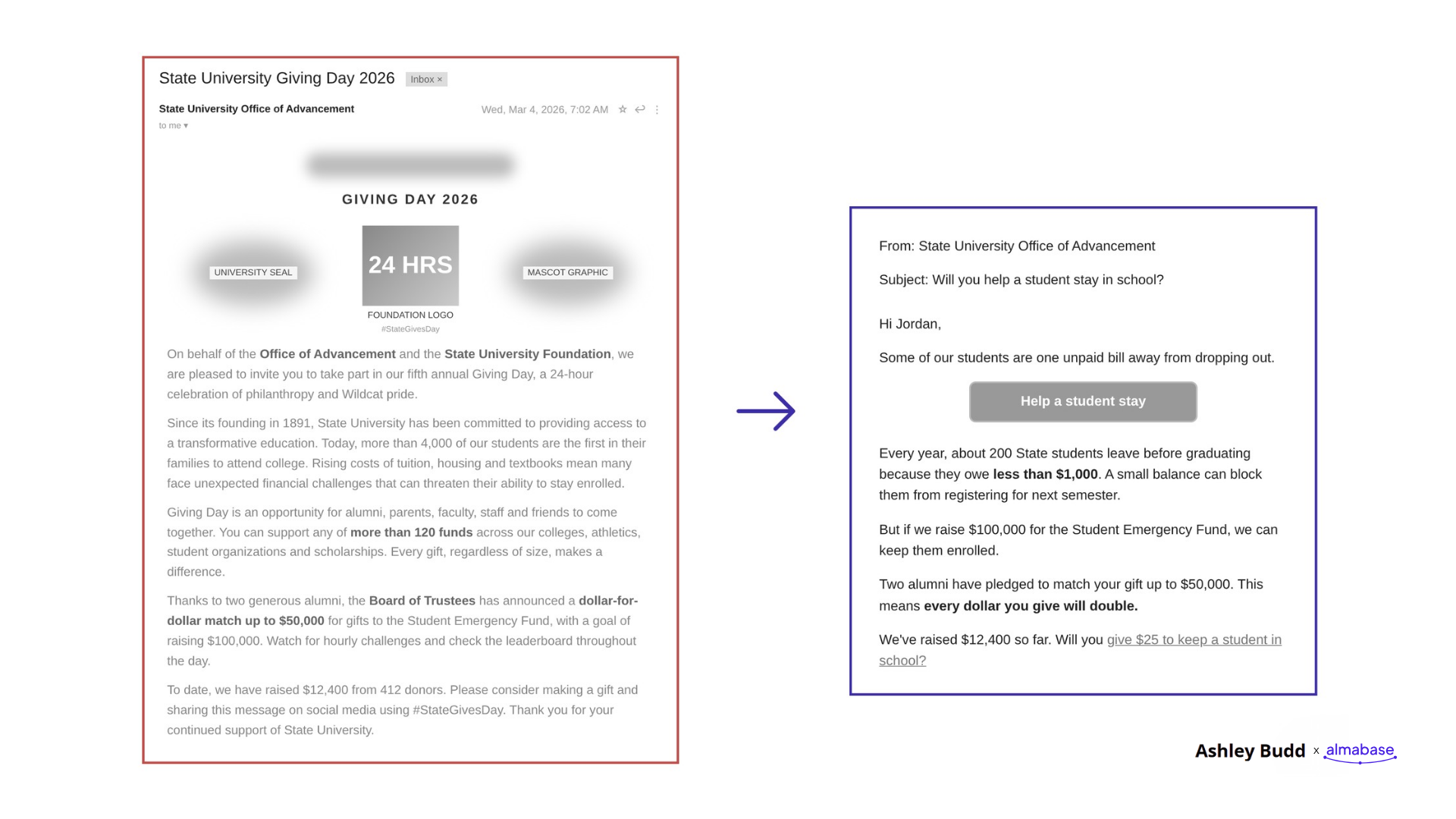
The original version included background about the foundation and its campaign. The revised version opened with a clear message:
Subject line: Will you help a student stay in school?
Opening line: Some of our students are one unpaid bill away from dropping out.
Call to action: Help a student stay.
The revised email quickly explains why the campaign matters and how the reader can help. This approach works for alumni events, mentoring programs, volunteer opportunities, and fundraising appeals.
Before writing your next email, ask yourself:
Use your answers to write the opening. For example, if you're promoting a mentoring program, you could write:"Help a student take the next step in their career. Share your experience as a mentor this spring."
This gives alumni a clear reason to get involved. You can add more information about the program further down the email.
Try this: Look at the first two sentences of your next email. Do they explain why the message matters to the reader? If they mainly talk about your department or institution, rewrite them.
Once someone opens your email, the next job is to help them understand what to do. Ashley shared five elements that can make emails easier to read and act on.
Ashley recommends writing at around a sixth- to ninth-grade reading level. This helps people understand your message quickly, especially when they're scanning it on their phones.
For example:
Instead of: "We invite you to participate in an opportunity to facilitate meaningful professional development for students."
Try: "Help a student prepare for their future career."
Read your email aloud. If a sentence sounds too formal or takes a second read to understand, rewrite it. Ashley suggested Hemingway Editor to check the reading level of your writing and highlights sentences that are hard to read.
Every email should have a clear purpose. Are you asking alumni to register for an event, make a gift, or sign up as a mentor? Choose one main action and make it easy to find. You can include other links when necessary, but make sure the primary action stands out.
Links such as "Click here" and "Learn more" don't tell readers much. Ashley recommends using a verb followed by an explanation of what happens next.
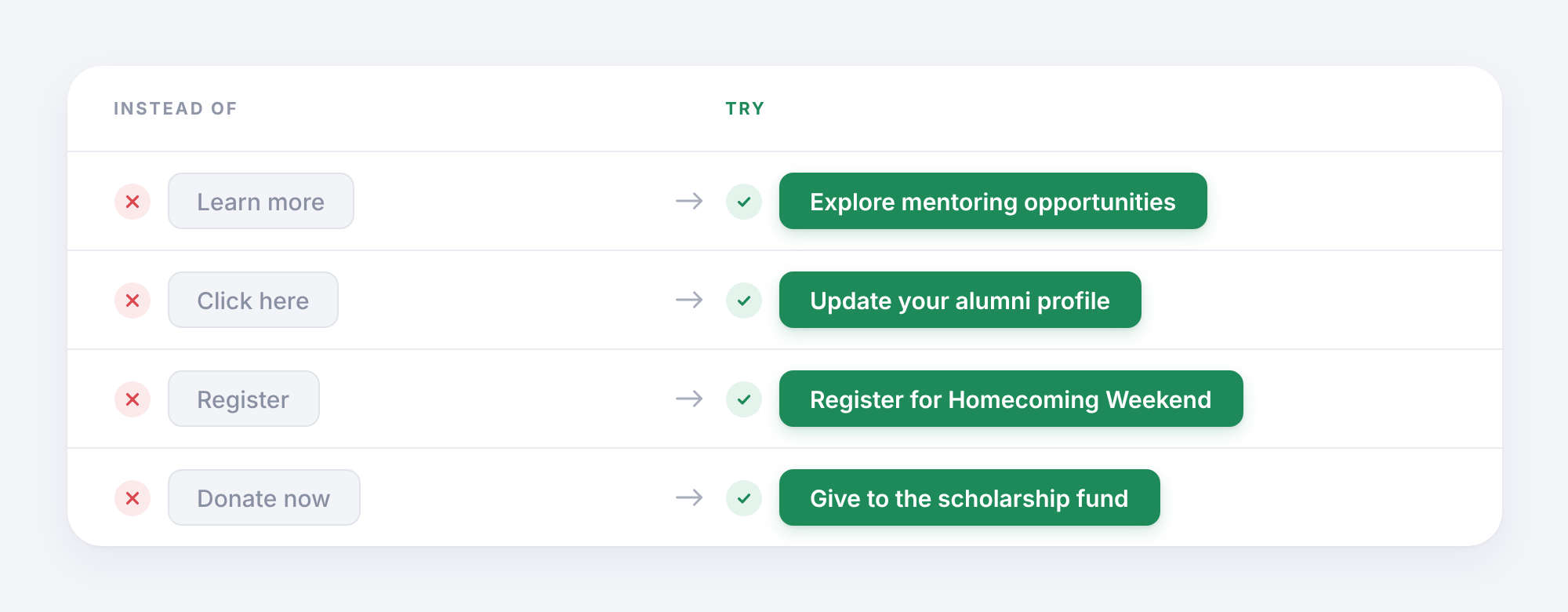
Clear link text helps readers understand where they'll go before they click.
Many emails place the call-to-action button at the very bottom, after several paragraphs of background information.
Ashley recommends placing the primary button near the top, after the opening message. People who are ready to act can do so immediately. Others can keep reading for more information.
Images can make an email look good, but people may skip over them while scanning. If your event date, location, or registration deadline appears only inside a graphic, readers could miss it. Include these details in the email text too.
Try this: Take your next email and check three things: Can readers understand the main message quickly? Can they find the primary button? Does the button explain what happens when they click?
Small changes here can make your emails much easier to use.
AI tools can help advancement teams write emails faster. They can suggest subject lines, create first drafts, and adapt messages for different audiences. During the webinar, we discussed several useful ways to bring AI into the writing process.
These tasks can save time, especially when your team has several campaigns running at once.
However, every draft still needs a human review.
AI can get names, dates, and facts wrong. It can also produce generic language that sounds nothing like your institution. In fundraising communications, these mistakes can affect the trust you've built with alumni and donors.
"Help me write an email for our alumni relations team.
Goal: [What do we want readers to do?]
Audience: [Who are we writing to? Include their graduation year, location, interests, or past engagement if relevant.]
Key details: [Add the verified information, dates, links, and other facts.]
Write a short email that:
Do not invent facts, names, statistics, or stories. Flag anything that needs checking. Give me three subject-line options and one email draft."
Once AI gives you a draft, read it carefully. Check the facts, add details from your own knowledge, and edit the language until it sounds like your team.
You don't need to spend hours reviewing every email. A short checklist can help you catch common problems before they reach your alumni.
Ashley reviewed several real advancement emails during the webinar, including a Homecoming invitation, an alumni networking invitation, and an alumni newsletter. Her feedback focused on making the message easier to follow, bringing key information forward, and helping readers find the next step.
Here's a checklist you can use with your team.
You can also ask a colleague to read the email for two seconds and explain what they understood. If they can't identify the main message, you have a clear place to start editing.
Writing better alumni emails starts with a few simple habits.
Make your subject lines clearer. Use the first sentence well. Send relevant messages to the right groups. Keep your language simple and make the next step obvious.
For your next campaign, choose one email and try three changes:
Then look at how your alumni respond.
Over time, these small changes can help your team build emails that people find useful and want to engage with.
This article is based on our webinar with Ashley Budd, How to Write Emails Alumni Actually Want to Open (Even in the Age of AI).
Watch here:
You can find Ashley's newsletter and more of her work at ashleybudd.com.
For more on creating relevant alumni communications, explore Almabase's fundraising marketing platform.
Subscribe
See how modern advancement teams bring alumni engagement and fundraising together.
Plan faster. Execute better
Explore free templates designed for alumni and fundraising teams.
.png)

.avif)
Sushmitha
%201.svg)
%201.svg)
%204.svg)



.svg)