Picture this — A giving day is on the horizon. You have hundreds of funds that you want to drive donations to. You’re expecting thousands of alumni from multiple classes and campuses to participate.
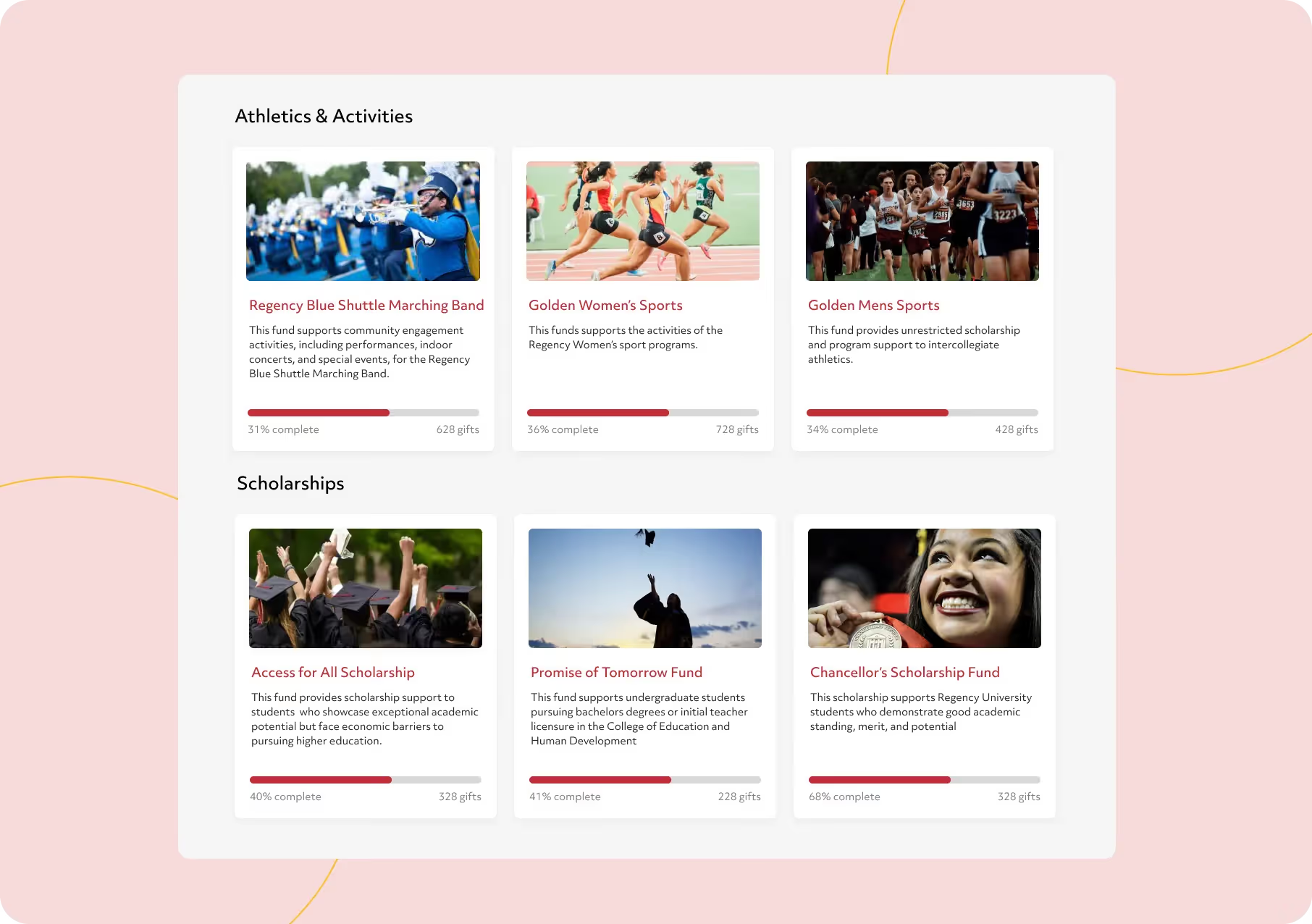
Picture this — A giving day is on the horizon. You have hundreds of funds that you want to drive donations to. You’re expecting thousands of alumni from multiple classes and campuses to participate. Directing this complex mix of audience to causes they care about while ensuring a smooth giving experience seems daunting and almost impossible.
With our newest addition to our P2P Crowdfunding page, donors are going to find it suprisingly easy to navigate to causes they want to engage and contribute to.
It's called Campaign Hub, and it’s here to transform how you create and organize giving campaigns.
Dive in to find out more.
Visualize the home screen of a desktop that has multiple folders. Just a double-click on any them reveals the contents of the folder. Easy way to organize things right?
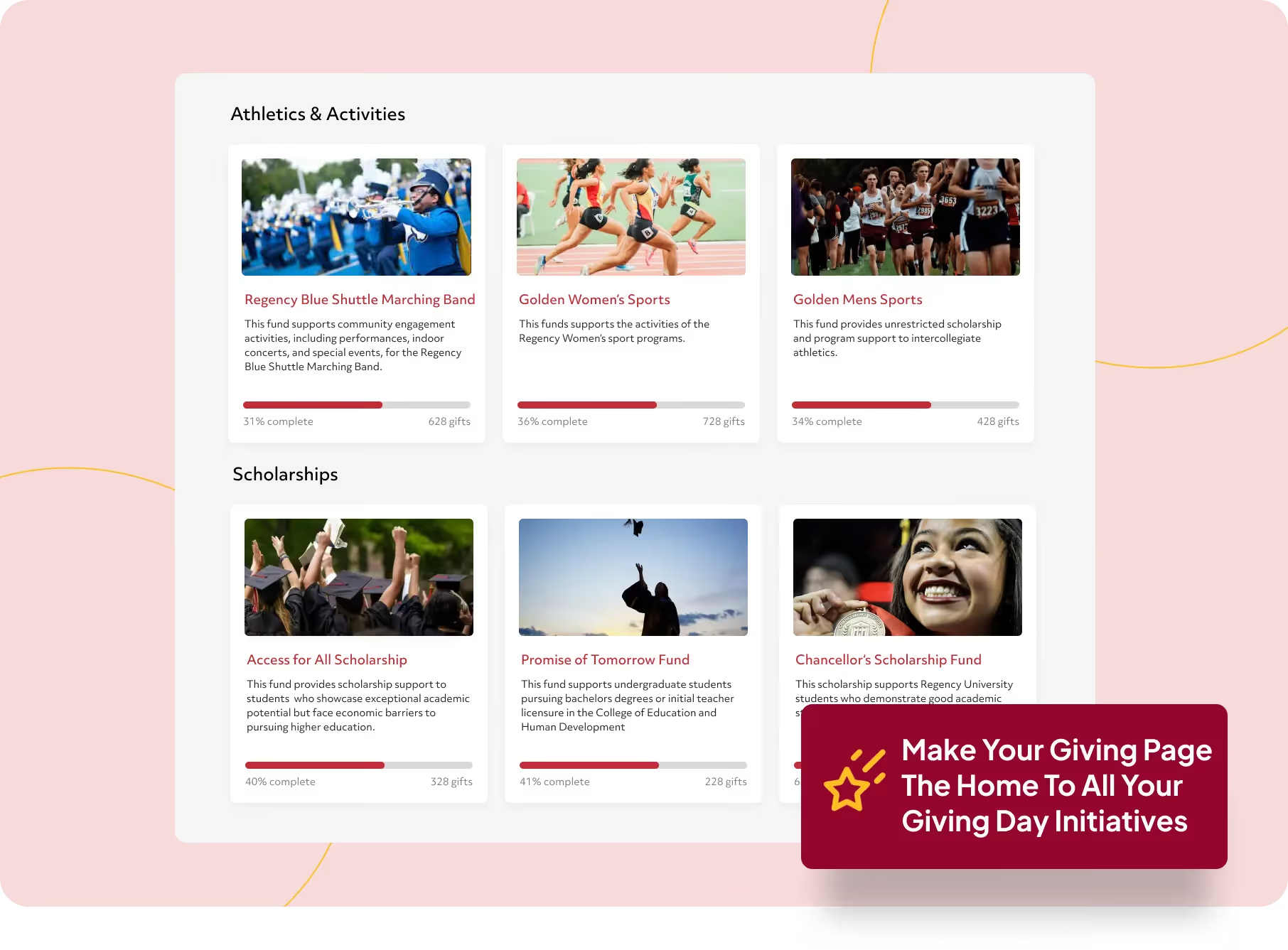
That’s why we took the same logic and applied it to Campaign Hubs. Now you can organize all your giving day initiatives on your giving page which in turn helps your donors quickly navigate to their preferred cause.
Think of Hubs as parent folders. You can name a hub to reflect a major cause. For instance, Athletics & Activities is an example of a major cause.
Now within a hub, you can create and organize multiple giving campaigns.
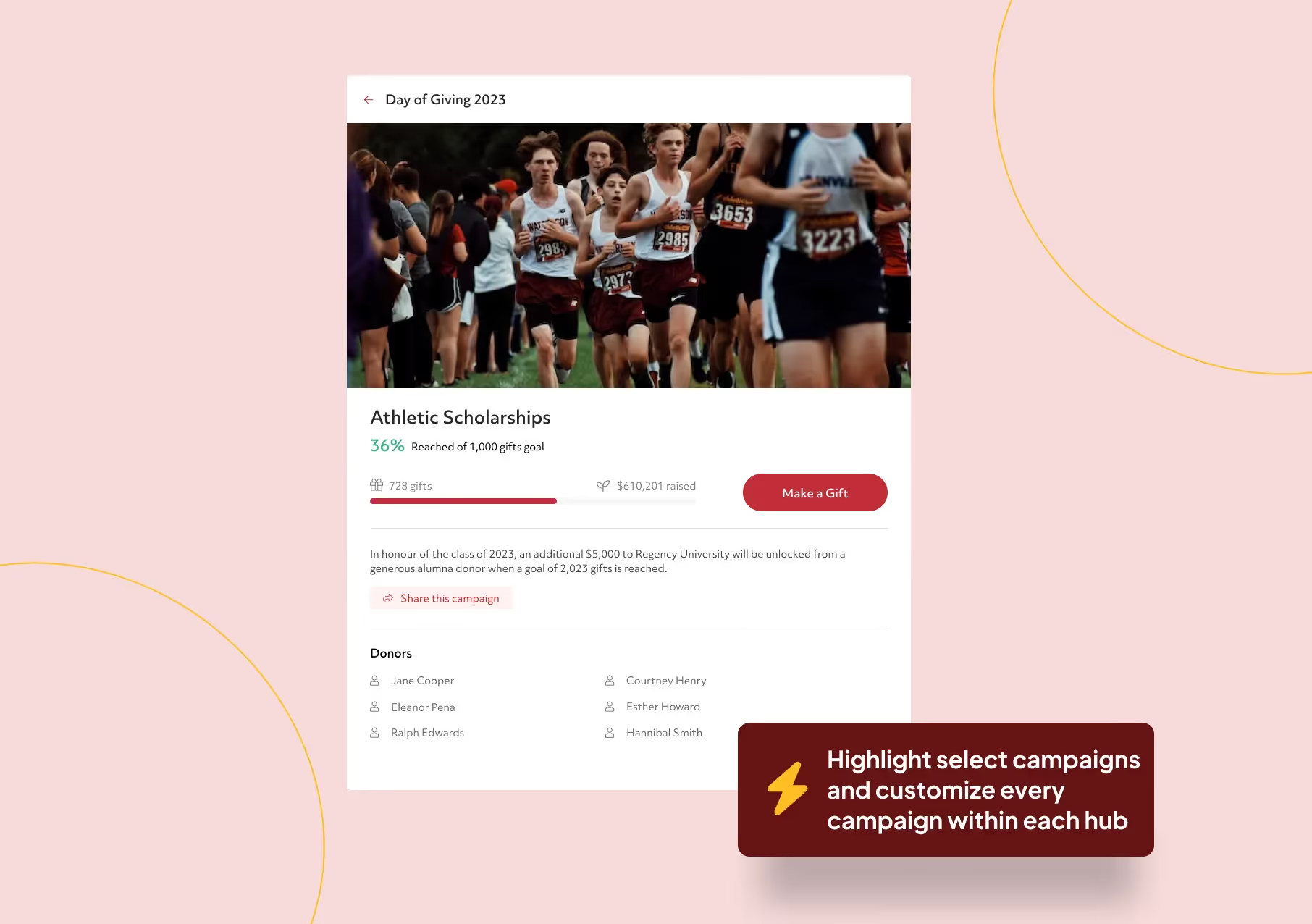
Each campaign that is part of a giving day has to tell a story, pique interest, and showcase healthy competition— in one quick glance. Not easy. Only you know what’ll strike a chord with your alumni.
That’s why we wanted you to have complete control over how you craft this story.
Feature an image of your choice: Draw alumni into your campaign with a catchy image that captures their attention or take the text-only route.
Add a description, short or long: Tell the story behind the campaign in two lines or two paragraphs.
Display hand-picked funds for each campaign: Your constituents won’t have the time to search through hundreds of funds. That’s why we built fund drive, a feature that let’s highlight select group of funds on a campaign. By eliminating choice overload, you are making giving straightforward for your constituents.
Set and showcase campaign goals to inspire healthy competition: You can set gift and participation goals for each campaign you create within a hub. A real-time goal progress thermometer appears on the campaign page whenever a goal is set. The best part — although all thermometers across campaign pages are independent of each other, they can be configured to add up to the primary thermometer of your pillar giving page.
Showcase donor names: Seeing a buddy's name on a campaign is likely to grab a potential donor's attention. You can choose to display or hide donor names for each campaign.
Create personalized campaigns with participation challenge: A participation challenge lets you create campaigns for a specific group of constituents based on conditions like affiliation, funds chosen, and more. So now it’s possible to create a campaign just for the class of 98’ or just for parents. Only the names and contributions of people that satisfy the conditions will be displayed on the campaign page that has participation drive enabled.
Unique shareable links for each campaign: Spreading the word for each campaign can’t get easier. Donors can share any campaign they are on with their peers. A unique link ensures potential donors see only campaigns that are relevant to them. More focused information. More focused giving.
Play around with the position of campaigns within a hub until you find the perfect order. This feature will help you spotlight campaigns that you want constituent’s to see first.
If you’re an Almabase customer, simply log into the platform to create your first Campaign Hub.
Table of Contents
Subscribe
See how modern advancement teams bring alumni engagement and fundraising together.
Often, institutions with hundreds of funds struggle to direct their donors to the relevant funds, which results in donors being unable to donate to the fund of their choice.
.jpeg)
With our recent updates, we've hugely simplified how donors participate in giving campaigns that have a plethora of fund options.
Let's dive in!
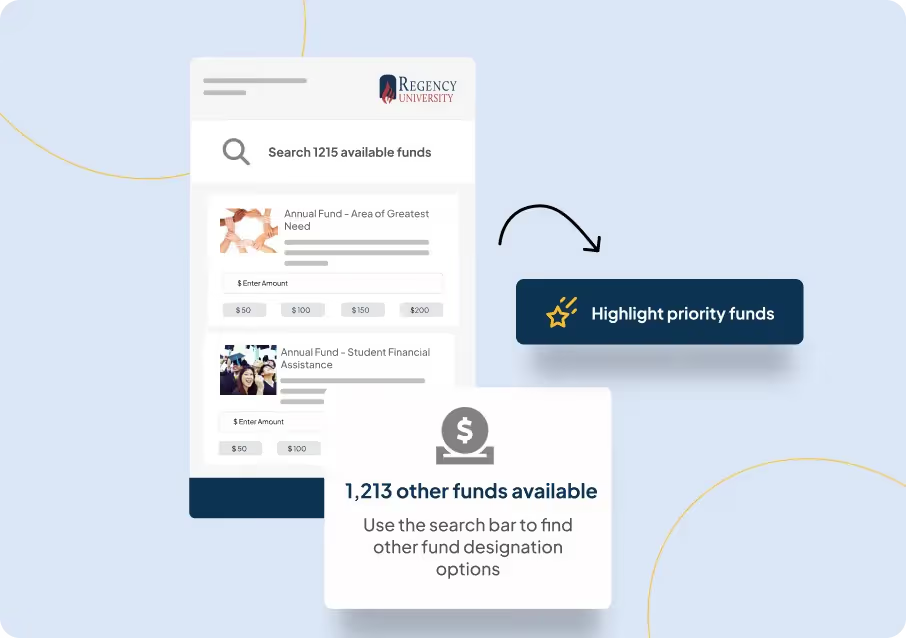
The feature lets you highlight funds that you want to drive attention to.
The highlighted funds ensure undecided donors— donors keen to participate in a Giving Day but don't know which cause to give to—don't get overwhelmed by the massive volume of fund options available.
For instance, if the Area of Greatest Need Fund is of high priority and all unsolicited donors should be able to view it at first glance, now you can highlight the fund on the giving form.
.avif)
Donors can now search through other funds and contribute to any fund of their choice. The capability ensures donors who know exactly what fund they want to donate to have a swift giving experience.
The capability comes in super handy when you are trying to list a large volume of memorial or scholarship funds.
.avif)
No two giving campaigns are similar. That’s why it’s crucial to have customization capabilities that let you tailor the giving experience.
With a push of a toggle you can decide if constituents can donate to multiple funds, if they can contribute to funds that haven’t been highlighted and if they can donate to a custom fund in case they don’t find a fund of their choice.
Giving just got more intuitive!
.avif)
The ability to showcase each donor's impact on the Giving campaign through various leaderboards by class years, location, athletic groups, and custom parameters help drive more urgency and build healthy competition.
Now, you can reorder these leaderboards according to your preference.
You can also hide default leaderboards if you are trying to create a Giving Page with minimal information.
.avif)
These features are only a small part of an exciting major update called Campaign Hub, which will be coming your way very soon. We know you'll love it because you will be able to create and organize campaigns like never before!
Stay tuned, there is (a lot) more to come!
.avif)
Now allow constituents to donate to even thousands of funds, and more.
Often, institutions with hundreds of funds struggle to direct their donors to the relevant funds, which results in donors being unable to donate to the fund of their choice.
Lorem ipsum dolor sit amet, consectetur adipiscing elit. Suspendisse varius enim in eros elementum tristique. Duis cursus, mi quis viverra ornare, eros dolor interdum nulla, ut commodo diam libero vitae erat. Aenean faucibus nibh et justo cursus id rutrum lorem imperdiet. Nunc ut sem vitae risus tristique posuere.
It can be terribly hard to keep data sane and organized, and even more so when your team’s working with different platforms to store constituent data.
Moving things across several platforms can be a daunting task, but we’ve got you covered. If your institution uses Blackbaud’s Raiser’s Edge NXT to store constituent data, Almabase’s state-of-the-art integration with RE NXT makes data management a breeze. The integration works right out of the box, and with a push of a button, you can have your data flow seamlessly between Almabase and RE NXT.
Read how Northwestern Health Sciences University leverages Almabase & Raiser's Edge integration for their engagement and fundraising needs.
Here’s everything you need to know about Almabase’s integration with RE NXT.
We started working on this integration with a simple goal – to ensure that your team won’t have to spend resources (and their time) on an expensive third-party solution. That’s why our integration works right out of the box, without the need to set it up manually. With the integration, Almabase and RE NXT can sync multiple data points with the push of a button. What’s more, the data that flows between the platforms is going to be clean and structured, without the hindrance of duplicates. This means that there will be zero compromise on the quality of your data when it flows between systems, which is a huge plus for your IT team.
We’ve approached our integration to sync data based on three distinct fields, which are:
Each of these fields relates to an engagement touchpoint that a constituent might create through different channels. For instance, imagine an alum makes a gift to one of your campaigns, or another registers to and participates in your next event. All of these data-points will be captured and relayed back to RE NXT through the integration.
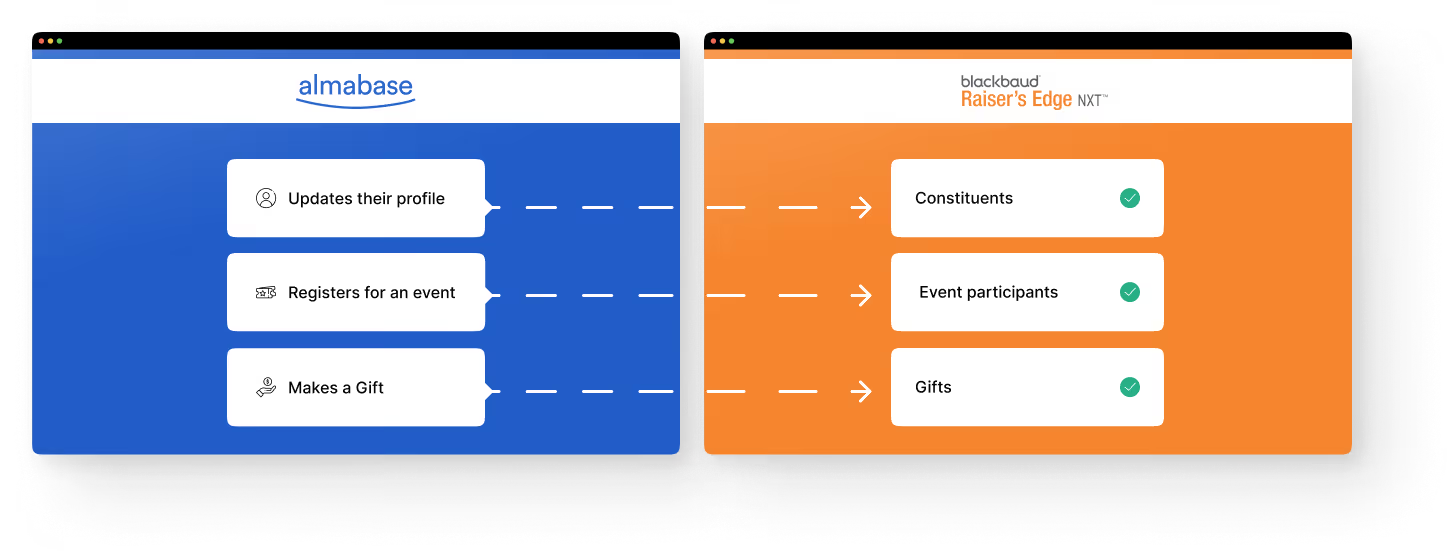
With Almabase, your alumni have the option to sign up using social sync (either through LinkedIn, Facebook, or Google). By using social sync to sign up, the platform automatically pulls the latest information of your constituent. This information will be fed back to RE NXT, where their records will be updated. Here’s a look at the data that gets collected and updated:
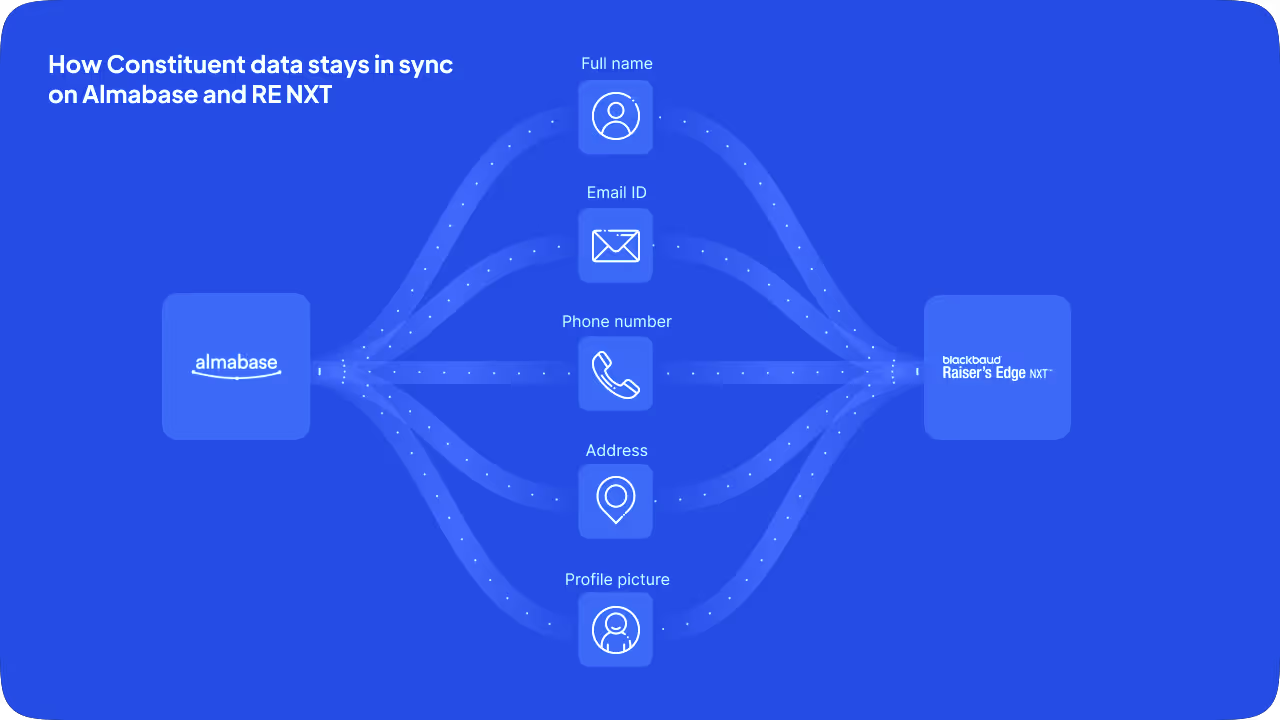
However, that’s not all. Any time a constituent updates their information while registering for, or participating in an event, the updated information automatically flows back to their record on RE NXT. All of this magic happens behind the scenes, without you or a team member having to lift a finger. This can be a huge time-saver for Advancement Services professionals.
Every time you create an event page on Almabase, the integration syncs key data points of this event (event name, date, description, ticketing details, and so on) with RE NXT. This means that all events created on Almabase will also be reflected in your RE NXT database.
Once an event page is live and open for registrations, you can go to the corresponding event page on RE NXT to view detailed participant information. Here are a few key details that get recorded on RE NXT as soon as your constituent completes their registration:
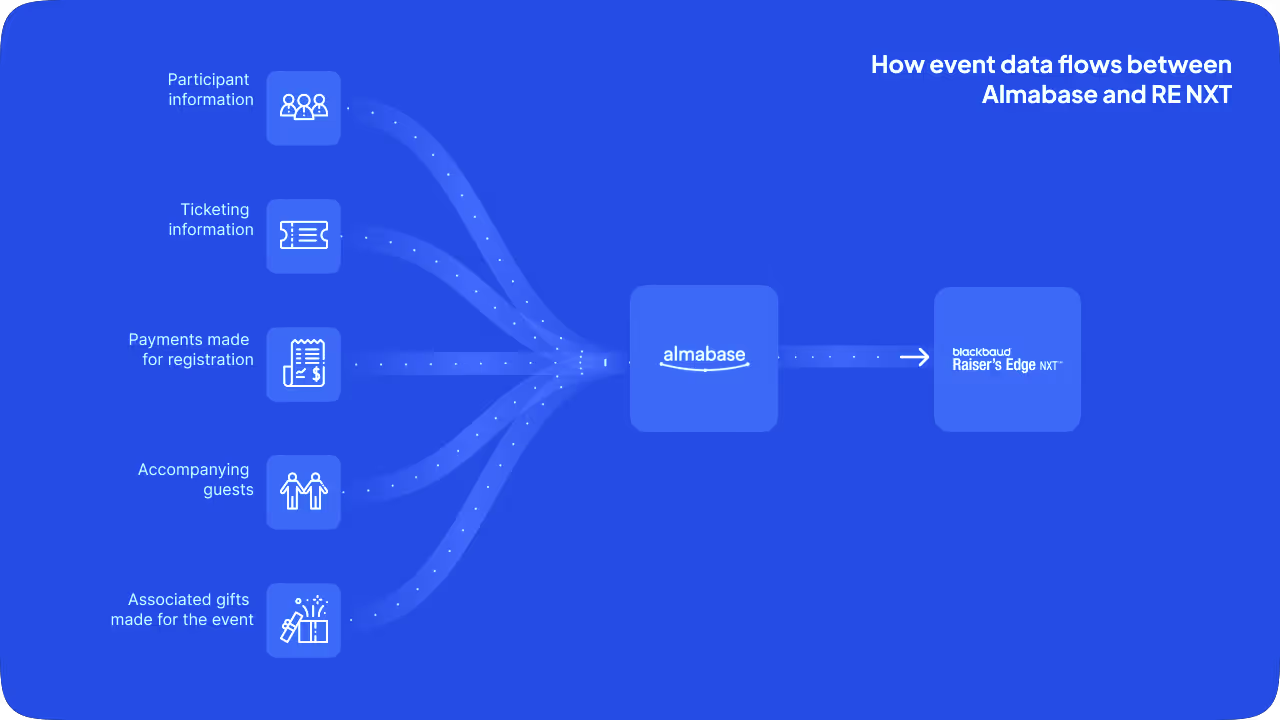
You can always create custom workflows to dictate how the data should flow back to RE NXT, and which fields they should correspond to. You also have a whole host of options when it comes to printing receipts. All of these features take the stress out of events for your event managers!
Every time a constituent pledges a gift to your giving campaign on Almabase, the data associated with each gift will be reflected on our versatile gift dashboard. Payments made on Almabase can be split into gift amount and services/tickets to accommodate any downstream processes as well. From the dashboard, you have the option of creating a batch of gifts, using a broad set of data filters. Once you’ve created a batch, you can run a workflow to import all the gifts corresponding to that batch into RE NXT. Here are some of the data points that get synced:
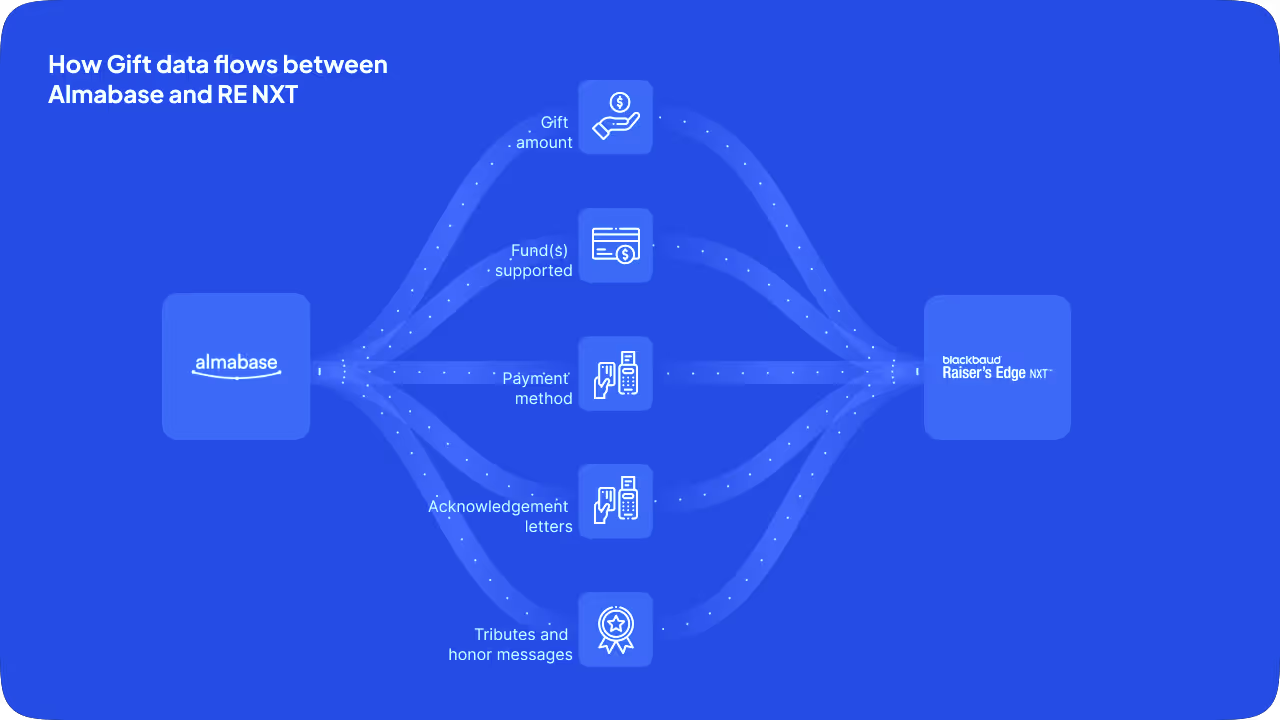
Creating a batch of gifts on Almabase is simple, as you have plenty of filters at your disposal. Once gift data flows to your RE NXT database, you can view all your gifts, and even make edits to gift details wherever needed. This can help professionals working with Annual Fund and Major Gifts to plan more effective campaigns and raise more funds.
**
So there you have it – an overview of Almabase’s best-in-class integration with Raiser’s Edge NXT. While we tried to cover most of how the integration works, there’s still a lot we couldn’t fit into this blog post, for obvious reasons.
If you want to learn more about how the integration can help set your Advancement Team up for success, we have a blog post just for that.
Get in touch with one of our Alumni Success specialists if you want to see the integration in action - we have a feeling you’re going to like what you see!
.avif)
.avif)
Almabase 🔁 RENXT | Simplified data processes for your educational institution
Almabase's industry-leading integration with Raiser's Edge NXT has saved Advancement teams from leading institutions in the U.S. countless hours and resources. Find out how the integration works, and see how all your data can move between Almabase and RE NXT.
Lorem ipsum dolor sit amet, consectetur adipiscing elit. Suspendisse varius enim in eros elementum tristique. Duis cursus, mi quis viverra ornare, eros dolor interdum nulla, ut commodo diam libero vitae erat. Aenean faucibus nibh et justo cursus id rutrum lorem imperdiet. Nunc ut sem vitae risus tristique posuere.

.svg)

.avif)
.webp)