Often, institutions with hundreds of funds struggle to direct their donors to the relevant funds, which results in donors being unable to donate to the fund of their choice.
.avif)
Often, institutions with hundreds of funds struggle to direct their donors to the relevant funds, which results in donors being unable to donate to the fund of their choice.
.jpeg)
With our recent updates, we've hugely simplified how donors participate in giving campaigns that have a plethora of fund options.
Let's dive in!
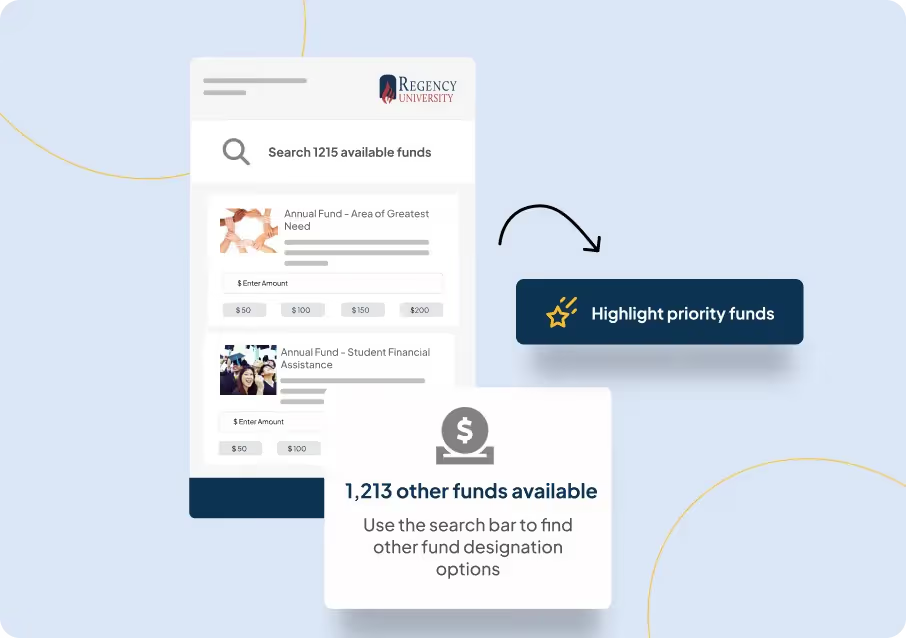
The feature lets you highlight funds that you want to drive attention to.
The highlighted funds ensure undecided donors— donors keen to participate in a Giving Day but don't know which cause to give to—don't get overwhelmed by the massive volume of fund options available.
For instance, if the Area of Greatest Need Fund is of high priority and all unsolicited donors should be able to view it at first glance, now you can highlight the fund on the giving form.
.avif)
Donors can now search through other funds and contribute to any fund of their choice. The capability ensures donors who know exactly what fund they want to donate to have a swift giving experience.
The capability comes in super handy when you are trying to list a large volume of memorial or scholarship funds.
.avif)
No two giving campaigns are similar. That’s why it’s crucial to have customization capabilities that let you tailor the giving experience.
With a push of a toggle you can decide if constituents can donate to multiple funds, if they can contribute to funds that haven’t been highlighted and if they can donate to a custom fund in case they don’t find a fund of their choice.
Giving just got more intuitive!
.avif)
The ability to showcase each donor's impact on the Giving campaign through various leaderboards by class years, location, athletic groups, and custom parameters help drive more urgency and build healthy competition.
Now, you can reorder these leaderboards according to your preference.
You can also hide default leaderboards if you are trying to create a Giving Page with minimal information.
.avif)
These features are only a small part of an exciting major update called Campaign Hub, which will be coming your way very soon. We know you'll love it because you will be able to create and organize campaigns like never before!
Stay tuned, there is (a lot) more to come!
Table of Contents
Subscribe
See how modern advancement teams bring alumni engagement and fundraising together.
Nonprofit and university websites have made significant strides in the past several years to improve the accessibility of their websites. Web accessibility means that your organization’s website pages, including your online donation page, are usable and legible for all visitors.
Making your donation page more accessible involves following accessibility guidelines, but it also includes your efforts to make your donation form more visible and recognizable across your website and other digital platforms.
Specifically, we’re going to look at four ways to craft a more accessible donation page:
.jpeg)
Offering supporters an accessible, easy-to-use donation process is the first step of your overarching donor stewardship plan. When your donation form is easy to use, donors will face fewer barriers to giving, providing them with a positive experience.
The first step in making your organization’s online donation page more accessible is following the Web Content Accessibility Guidelines (WCAG). These are universally-recognized regulations for creating web content that’s usable for all.
When it comes to nonprofit and university web accessibility, these guidelines provide a clear checklist to review when updating your organization’s website. Here are just a few of the features your online donation page should include, according to the WCAG:
A WebAIM study of the top 1,000,000 home pages found that the most common accessibility errors include low-contrast text, missing alternative text for images, and empty links. The study points out that addressing just a few of these most common errors would significantly improve accessibility across the web.
The same concept is true for your organization’s donation page. Just a few quick updates can dramatically improve the accessibility of the page, making it available to a wider audience.
Another aspect of making your donation form more accessible is ensuring that it’s usable on all devices. This includes desktops, tablets, and mobile phones.
Bloomerang’s guide to donation page best practices recommends the following tips for creating a mobile-friendly donation form:
With a mobile-friendly donation page, your audience members can give online whenever they want without having to pull out their laptops.
Calls to action (CTAs) are links, buttons, and other digital elements you use to direct traffic to your online donation page. CTAs make your donation form easier to find, reducing the time required to submit an online donation.
Your digital fundraising strategy should include a variety of CTAs across your online marketing platforms, including:
Use eye-catching colors and large font sizes to make your donation page CTAs stand out. Also, make sure any buttons you create follow the recommended WCAG color contrast guidelines.
You can also use strategic wording to vary your CTAs. For example, instead of saying “Donate Now” on every CTA, you might say “Show Your Support” or “Leave a Legacy.” This catches donors’ attention and helps draw the connection between their donations and your organization’s ability to make a positive impact.
Supporters will feel more comfortable filling out your donation form when it’s fully branded to your organization. Including your organization’s branding makes it clear that donors’ gifts will go directly to your organization.
Familiar branding makes your donation page more trustworthy for supporters, especially first-time donors who aren’t as familiar with your organization’s donation process.
For example, your donation form should feature your organization’s recognizable:
Ensure that these branding elements adhere to accessibility standards. For instance, make sure your font is large and legible, use simple language in your written copy, and ensure there’s sufficient color contrast between your brand’s foreground and background colors. Include accessibility policies in your web style guide so that all of your online branding is uniform and accessible.
Creating an accessible donation page can improve your organization’s fundraising results for any campaign, from your annual fundraising efforts to your giving day and more. Your accessible donation page will make your giving options available to a broader audience, creating a more user-friendly experience for your supporters.

4 Strategies to Make Your Donation Page More Accessible
Making your donation page more accessible ensures all supporters can easily access and fill it out. Incorporate these four donation page accessibility tips.
Lorem ipsum dolor sit amet, consectetur adipiscing elit. Suspendisse varius enim in eros elementum tristique. Duis cursus, mi quis viverra ornare, eros dolor interdum nulla, ut commodo diam libero vitae erat. Aenean faucibus nibh et justo cursus id rutrum lorem imperdiet. Nunc ut sem vitae risus tristique posuere.

December 13, 2022
12 minutes
Events are a key component of your alumni engagement strategy and Almabase supports all kinds of events — from a simple page where a user can RSVP in one click to a complex multi-day event like Homecoming.
We’re now introducing an ability for you to accept donations while users register for events. This is how it would work.
When you have a ticketed event, if you enable donations on it, users will see the option to add a gift along with choosing a ticket for the event. Users can choose from predefined amounts or enter a specific amount. Users can also choose exactly which campaign they want to support. These campaigns are automatically picked from the fundraising campaigns you have already listed on the platform so there is no additional maintenance required from you
The user then makes a single online payment that includes the tickets and the gift amount. On the admin panel, you will see an event registration as usual with the details of the gift associated with it. Also on the donations interface of the admin panel, you will see this new gift. When you export your event attendee list, this information is also provided there.
We have also provided for customization of the text displayed on this section. This is a feature that has to be enabled for each platform individually so if this seems like an interesting way to increase your gift participation, reach out to your customer success manager and they will help you out.
We’re excited to see how this helps. Please keep your feedback coming in!

Accept donations with event registrations
We’re now introducing an ability for you to accept donations while users register for events.
Lorem ipsum dolor sit amet, consectetur adipiscing elit. Suspendisse varius enim in eros elementum tristique. Duis cursus, mi quis viverra ornare, eros dolor interdum nulla, ut commodo diam libero vitae erat. Aenean faucibus nibh et justo cursus id rutrum lorem imperdiet. Nunc ut sem vitae risus tristique posuere.
St. Ignatius College Preparatory (SI) is a private, Catholic preparatory school in the Jesuit tradition, serving the San Francisco Bay Area since 1855.
On their second annual Giving Day, SI aimed to double their donors from the previous year and cross the 1,000 donor mark. If they reached their goal of 1,000 donors, they would be able to unlock additional matching gifts amounting to $80,000.
Hitting their hourly milestones much in advance, the SI Prep ended the day overshooting their day’s target by a huge margin!
Raised $254,008 from 1261 donors - making it 126% of the target 1000 donors
60% increase in donors and 80 % increase in money raised - compared to Giving Day 2016 using EverTrue
1. Social Giving: Tapping into their large following on Facebook, the day ended with 31% of their donors being influenced on social media
2. The Extra Mile Campaign: Replaced generic appeal emails with customized emails, with the current leaderboard standings of the prospects class
3. Frictionless Donation Experience: A completed donation in under 90 seconds, compatible on all mobile devices
4. Social Media Campaign: A joint social media marketing campaign with Almabase brought them over 200 first time donors
5. Raiser’s Edge Integration: Donor reconciliation made easy.

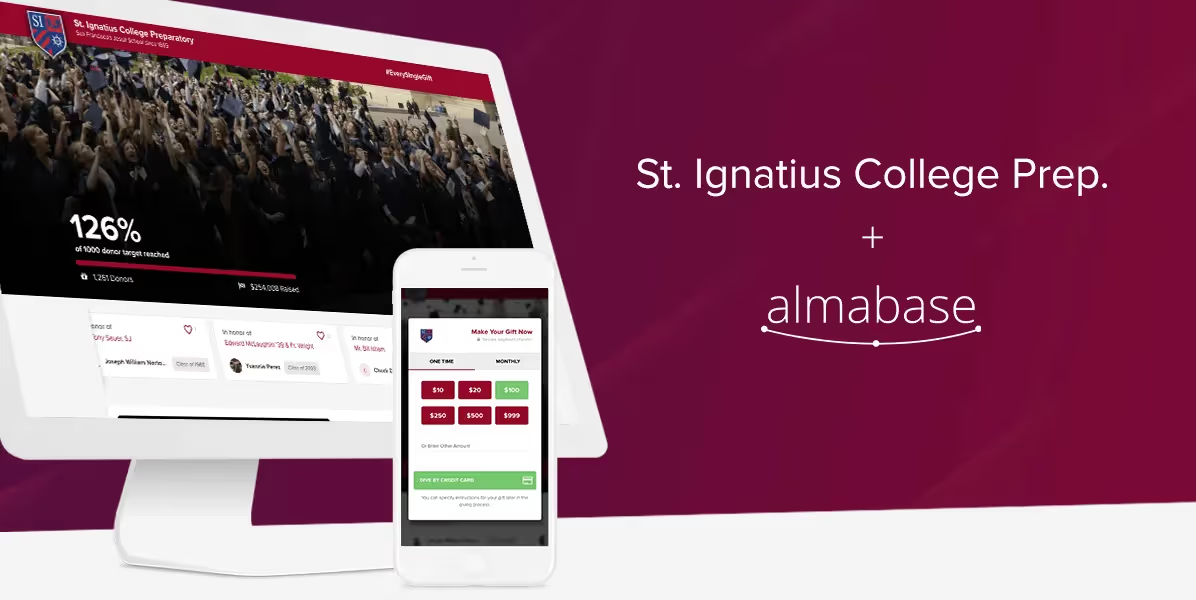
Raising Over $250k In One Day, SI Prep Increases Their Giving Day Donations by 80%!
Hitting the hourly milestones much in advance, St. Ignatius College Preparatory ended the day overshooting its day’s target by a huge margin! The institution saw a 60% increase in donors and 80 % increase in money raised.
Lorem ipsum dolor sit amet, consectetur adipiscing elit. Suspendisse varius enim in eros elementum tristique. Duis cursus, mi quis viverra ornare, eros dolor interdum nulla, ut commodo diam libero vitae erat. Aenean faucibus nibh et justo cursus id rutrum lorem imperdiet. Nunc ut sem vitae risus tristique posuere.

.svg)

.avif)
.webp)