Your supporters deserve a place to connect. Compare 7 nonprofit community platforms on features, CRM sync, and pricing to find your best fit.

Anwesha Kiran
Published:
November 18, 2026
Updated:

Ask anyone at a nonprofit who their community is, and you’ll likely find the answer to be a vibrant mix of different groups. It's the donors who give every December, the volunteers who turn up on Saturdays, the members who renew each year, the guests at your spring gala, and the advocates who share your posts. Sometimes it’s one person wearing some or all three of those hats! 🌻
But keeping all of them close between asks is getting harder. The Fundraising Effectiveness Project's Q2 2026 report found dollars raised up 6.6% year to date while donor counts fell 1.6%, and only 11.3% of donors acquired in 2025 had given again by mid-year.
That's the work a good online community platform takes on: keeping your community active, bringing people closer to each other, and helping them stay connected to your cause. The platforms in this list approach it in different ways. Some put community-building at the center, while others bring these features into a CRM, learning platform, or event and fundraising software.
Each has its own strengths, so we'll look at what they offer and where they fit best. The right choice for you depends on which of these looks most like the way your team already works.
An online community platform gives your nonprofits’ supporters a branded place to find each other, join relevant chapters and affinity groups, and hear from you. It's where you can help your community build and foster relationships that begin in the big moments, like your year-end gala.
Most platforms in this list offer one, multiple, or all of the following:
No platform on this list does all of these equally well, so it helps if you’re clear on your priorities going in.
Your CRM is the place for the record: who a supporter is, what they've given, and how your team has looked after them. A community platform, on the other hand, holds the interaction. So think about the event they came to or the student they agreed to mentor.
Facebook and LinkedIn groups are sometimes used for similar purposes and they are good for conversation. In fact, plenty of nonprofits start there. The catch is that the activity stays on the social network. Your team can't easily tie it to a donor record, segment on it, or hold on to it when the staff member who ran the group moves on.
Every action taken by a supporter, like an RSVP, volunteer shift, and membership sign-up tells you what they care about. This is very valuable information if you’re planning a fundraiser and deciding on the guest list. The FEP's Q2 2026 data shows just how few first-time donors come back on their own, so it’s worth going the extra mile to hold on to those signals.
They only help if they reach the donor record. When your community platform syncs with your CRM, or includes one, your gift officers and annual fund team can see engagement right next to giving history. This connection essentially closes the loop and presents the full story.
We looked at each platform the same way: what it is, who it suits, where it stands out, what you might need alongside it, and what it costs.
Almabase is an engagement and fundraising platform that works on top of the CRM you already use. Institutions and nonprofits use it to run their digital directory, affinity groups, mentorship, events, and online giving in one branded space. What supporters do within this space flows back to your CRM, so your team sees community participation alongside giving history. Almabase particularly shines in bringing community, data, and giving all in one place and tying it all together with integration that keeps your data consistent, saving your team lots of time.

Almabase is well-suited for nonprofits that already have a donor CRM they rely on and want community, events, and giving connected to it.
TrueSync for Raiser's Edge NXT updates profiles in both directions and sends gifts, event registrations, and guests into RE NXT, and you can even review changes before they land. There's also a native Blackbaud CRM integration and scheduled data exports for CRMs like Ellucian, Slate, Kindsight, Veracross, and DonorPerfect.
If you don’t already have a donor CRM, you might need to layer one on top since Almabase is designed to work with one, and is not one by itself.
Pros
Cons
Pricing: Pricing depends on which features and modules you need and on the number of records in your database. Request a demo for a quote.
Neon CRM is a donor management system you can extend with modules for memberships, events, and volunteers. Out of the box, you get donor profiles, campaigns, peer-to-peer fundraising, recurring gifts, email and text outreach, and a donor portal. With its Memberships module, your members get a portal, sign-up forms, auto-renewals, and directories.

Neon CRM is a good fit for small and mid-size membership organizations that want to manage the CRM and member portal with one vendor.
Neon CRM comes with predictable pricing. Every tier includes unlimited records, users, emails, and reports, and cost is tied to your annual revenue, so a growing database won't push up your bill.
Neon's community features center on the member portal and directory. If you want members talking to each other through discussion groups, mentoring, or an active feed, you may need to layer a separate community tool.
Pros
Cons
Pricing: Neon CRM starts at $99 per month, with tiers based on annual revenue. Add-on modules cost an additional 10% (Memberships, Volunteers) to 20% (Events) of your base CRM plan.
Givebutter is a fundraising platform with a free CRM built in. The free plan covers donation forms, fundraising pages, events, auctions, donor management, email marketing, and a mobile app, so a small team without a dedicated budget can run campaigns. Givebutter Plus adds paid features such as automated workflows and task management, more sophisticated reporting, video messages, and more.

Givebutter’s basic, free plan is perfectly suited for small teams on a tight budget running campaign-led fundraising. The free plan includes the CRM with unlimited contacts. With donor tips turned on, Givebutter charges no platform or processing fees on online transactions.
But for more community-oriented needs, you’ll still want a place for supporters to connect, such as directories, groups, or mentoring. For automated workflows, texting, or deeper reporting, you'll need Givebutter Plus.
Pros
Cons
Pricing: Free with optional donor tips. Givebutter Plus starts at $29 per month and scales by contact count.
Hivebrite is a community platform used by alumni networks, associations, and member-based organizations. Its Focus plan gives you a member directory with a map view, events, news, forums, a live feed, direct messaging, analytics, and paid memberships, with no cap on members.

It is well-suited to community-first organizations with large or distributed member networks, such as chapters and regional groups. It particularly shines at helping members find each other. The directory and map suit networks spread across cities or chapters. Its Custom plan adds advanced group features.
Hivebrite’s Focus plan does not come with CRM integrations, which are only available with the Custom plan. For donor management and fundraising campaigns, too, you'll need to add on separate tools.
Pros
Cons
Pricing: The Focus plan starts at $8,000 per year. The Custom plan is quoted after a discovery call, based on requirements.
Bloomerang is a donor CRM built around keeping the donors you already have, with separate products for fundraising and volunteer management. Its fundraising tools include donation forms, event management, auctions, and peer-to-peer capabilities. The giving platform brings fundraising, donor management, and volunteer engagement together.
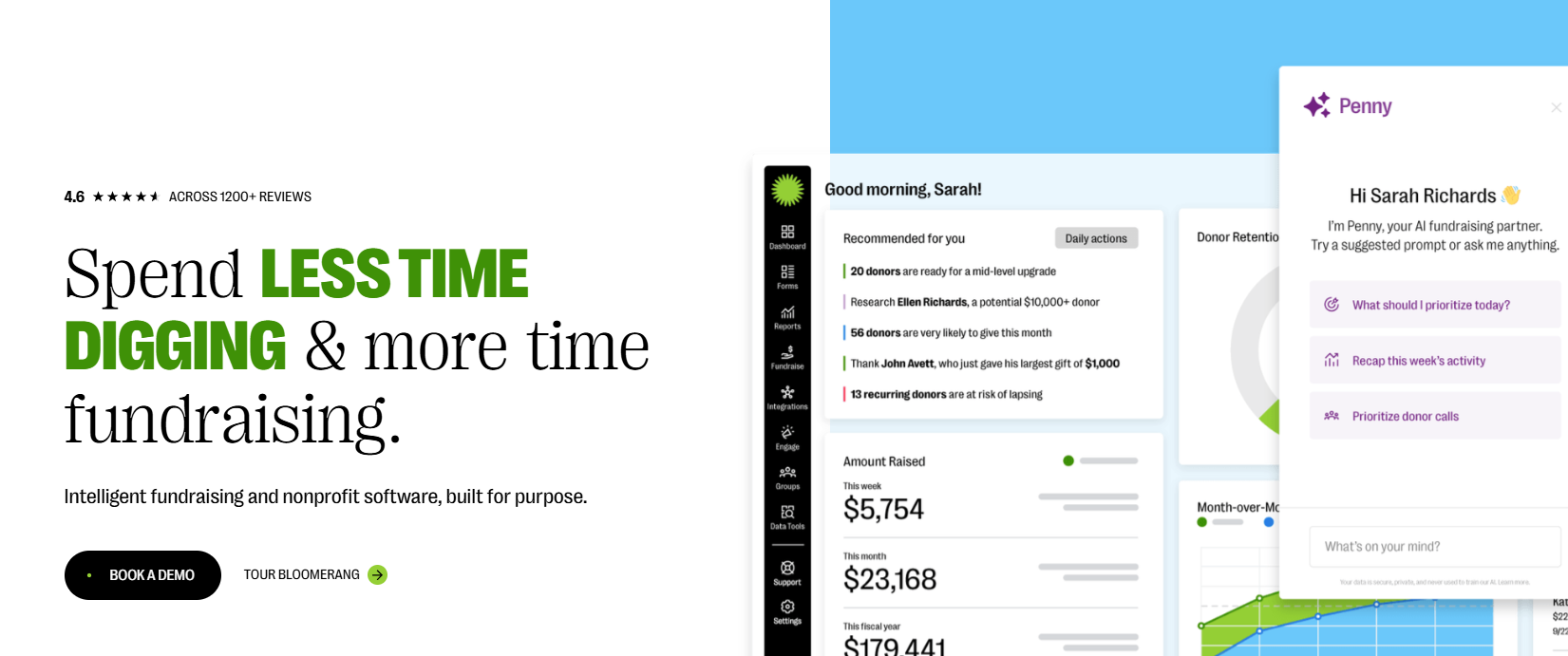
The platform is best-suited to nonprofits focused on donor retention and volunteer-driven programs. Your donors and volunteers are all in one place, which makes it easier to spot the people who give both time and money. Every plan includes unlimited users, so the whole team can log in.
However, for community-driven capabilities, you’ll still need a space where members connect directly with each other. Directories, groups, and discussions aren't among Bloomerang's current features.
Pros
Cons
Pricing: Quote-based and billed annually, with the price set by the number of records in your database. Every plan includes unlimited users, and the proposal covers core products, training, and onboarding.
Disco is a learning and community platform. It brings courses, cohort-based and self-paced programs, learning pathways, events, community chat, and a member directory together, with AI tools to help you build the curriculum for these courses and programs.

It’s a good fit for nonprofits with learning or training-led communities, such as volunteer training, certification programs, or member education. Disco’s strength is in bringing learning and conversation together in the same space. Its course tools include quizzes, assignments, prerequisites, and SCORM support, which helps if you're training volunteers or running a certification program.
But Disco does not come with a CRM or a donation tool. It connects through Zapier and Stripe, and the Scale plan adds API access and webhooks.
Pros
Cons
Pricing: The Create plan is $399 per month billed annually or $499 billed monthly. Scale starts at $999 per month. Disco does offer a nonprofit discount.
Mighty Networks is a community platform built for creators and organizations. Every plan comes with community feeds, courses, live streaming, events, unlimited members, and subscription or one-time payments. It’s a good fit for community-first organizations that want to add paid memberships or paid programs. You get a full community product at a low entry price, with events and live streaming already built in.
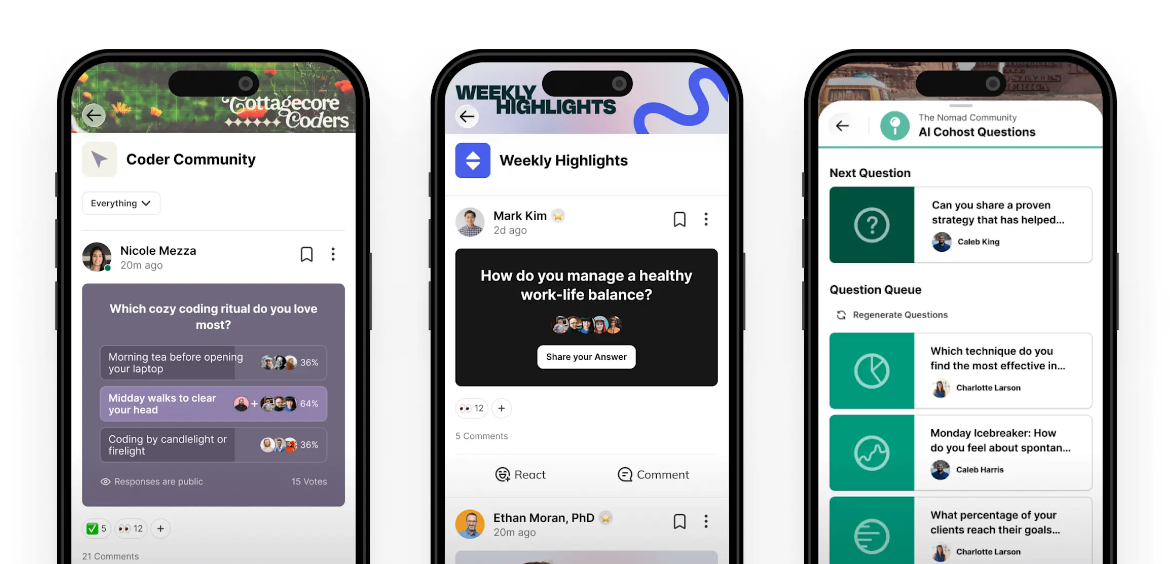
However, you’ll still need a donor CRM, since payments are set up for memberships and programs. The Mighty Pro plan also offers a branded mobile app.
Pros
Cons
Pricing: The Launch plan is $79 per month with a 2% transaction fee. Scale is $179 per month (1%) and Growth is $354 per month (0.5%). Mighty Pro is custom.
A good place to start is the program that already drives most of your engagement. Find it in the left column, then look at the platforms built for that kind of work.
You might see yourself in more than one row, and that's normal. A team with a big annual gala and an active volunteer base might pair an auction tool with a CRM-connected community platform.
Your CRM is your one source of truth. The community platform's job is to keep it supplied with accurate engagement data, so your team can act on the signals your supporters are sending.
Here’s what you should be syncing:
Profile updates are perhaps the most important here. When a supporter changes their email or employer in the community, that change should reach your CRM without anyone on your team retyping it.
Neon One, Bloomerang, and Givebutter come with a CRM, so engagement and giving data share one database. That's a good fit if you're choosing a CRM for the first time or you're ready to switch.
Almabase and Disco connect to the CRM you already run. Almabase offers two-way profile sync with Raiser's Edge NXT, a native Blackbaud CRM integration, and scheduled exports for other systems. Disco connects through Zapier, with API access and webhooks on its Scale plan. This route makes sense if your CRM holds years of history and you have no plans to move it.
Think about how your community is organized. Chapters, regions, volunteer cohorts, and board members need their own spaces and permissions. Check whether you can gate content by role or membership level, and whether members can find each other in a searchable directory.
Event needs vary a lot. A monthly volunteer meetup needs registration and reminders. A gala needs ticketing, table management, mobile bidding, and quick check-out at the end of the night. If auctions bring in a big share of your revenue, compare event-night tools closely as well.
Our blog comparing fundraising event software goes deeper into this.
Make sure the platform handles the payments you take today: one-time gifts, recurring gifts, dues, tickets, or paid programs. Then work out the real cost per transaction, including platform fees, processing fees, and how any donor tip model works.
Ask which records sync, in which direction, and how often. Two-way profile sync keeps contact details current in both systems. One-way exports are simpler to set up and leave more cleanup to your data team.
You'll want to see who engaged, how, and whether those people went on to give. Reports that put community activity next to giving data are the clearest way to show impact and what your community is worth.
Ask how long it takes to set up a typical event or campaign, what support looks like after launch, and whether members can take part easily from their phones. Branded mobile apps/experiences are likely saved for higher plans, so it’s best to be clear from the get-go.
If event sign-ups sit in one tool, donations in another, and volunteer hours in a spreadsheet, nobody on your team sees the whole supporter. A community platform can close that gap, as long as what supporters do there reaches the record your fundraisers work from.
If you're choosing a CRM for the first time, a platform with one built in keeps things simple. If your team already has a CRM it trusts, look for a platform that brings directories, groups, mentoring, events, and giving together and keeps that CRM up to date. This is exactly what we built Almabase to do.
See how Almabase works with your CRM. Request a personalized demo built around your current setup! 🙂↕️
It's software that gives your supporters a branded space to connect with each other and with you. Most include a directory, groups, events, messaging, volunteer or mentoring programs, and payments. Together, these turn one-off interactions into ongoing participation your team can see and track.
Yes, each does a different job. A CRM stores supporter records and giving history. A fundraising platform processes donations and runs campaigns. A community platform is where everyday interaction happens. Some products cover two of these, so most nonprofits end up with two or three tools. What matters most is that they share data.
Start small, with a group that already gets together, such as your volunteers, a local chapter, or a giving society. Create a reason for them to log in, like event sign-ups, a mentoring program, or member-only updates. Ask a few staff members and active volunteers to get early conversations going. Once that first group is active, invite the next one.
A community shows you who's engaged, before their first gift and in between gifts. Event attendance, volunteering, and group activity help your fundraisers decide whom to ask, when, and for what. When that activity syncs to your CRM, your annual fund and major gift teams can build it into their prospect lists.
Look at five things: community spaces and access controls, event depth, giving and payment options, CRM sync, and how much admin work it takes. Then weigh them against the program that drives most of your engagement today.
Keep an eye on active members over time, repeat event attendance, and participation in volunteer or mentoring programs. Then compare giving among your engaged supporters with giving across everyone else. You'll need community activity and gift data in the same place to make that comparison.
Subscribe
See how modern advancement teams bring alumni engagement and fundraising together.
Plan faster. Execute better
Explore free templates designed for alumni and fundraising teams.

Anwesha Kiran