.svg)
Blog Gallery
Build lifelong relationships
Latest stories, guides, and benchmarks from the world of alumni relations, fundraising, donor engagement, advancement services, events, and higher-education philanthropy
Blackbaud recently announced that support for Raiser’s Edge NXT’s database view and related functionality will end on September 15, 2027, affecting several Blackbaud products. These include Blackbaud Online Express and Blackbaud NetCommunity (BBNC). For advancement teams that have spent years building forms, pages, workflows, and other processes around the platform, this means choosing and migrating to a new platform. The prospect can feel like a lot to take on, especially if it wasn't something you'd anticipated.
If you're looking for an alternative, Almabase can help you replace the functionality you currently rely on across these products. We've already covered why teams might be thinking of a move off BBNC and how the main alternatives compare. In this article, we’ll be focusing on what happens once you've made that decision: what the migration process looks like, what your team can expect along the way, and how Almabase approaches the move.
In case you’re evaluating how Almabase stacks up against BBNC, check out our comparison blog here.
There’s also another question that comes up around a platform migration: How much is this going to cost?
This question extends beyond the immediate, visible technical costs. In fact, the technical side of the move might just be the simplest to figure out. It’s the broader, more abstract elements like shifting scopes, changing requirements, or even figuring out the right set of requirements in the first place that could end up costing the most amount of money and time, if not approached thoughtfully.
That's why we want to walk you through the Assisted Fast Pass Migration process upfront: what happens at each stage, what your team is responsible for, what our migration team handles, and where costs may come into the picture. We hope to give you a clear idea of what the move to Almabase will look like before you get started, so there are fewer surprises along the way.
Why transparency matters during a migration
A migration project always begins with an agreed-upon plan. But it’s also very likely that, a few weeks in, you discover a form that needs some additional customization or a request that seemed straightforward seems to fall outside the original scope, on second thought. These are perfectly reasonable hiccups during the migration, but if work is already underway, it could seem harder to understand what you're paying for, and even harder to plan around the rest of the project.
Clear expectations are at the heart of our migration approach, starting with total transparency around what extra requirements cost. With Almabase’s Assisted Fast Pass Migration, each stage gives you a chance to understand what's being proposed, what falls within the standard migration, and where something would require additional work.
Basically, you shouldn't find out about an extra requirement after the work has already been done. Your approval and sign-off comes first. The five steps in the migration process are built around this intention. Let’s get into them.
1. Kickoff: Getting the project off on the right foot
The migration process starts with a kickoff between your team, a dedicated CSM, and an implementation specialist. This is where we get the groundwork in place. This is usually access to your current site, your branding assets, and the dates your team needs to work around.
Another important step here is understanding your calendar and priorities. Your Giving Day, reunion, fiscal year-end, or another major event may determine what needs to happen first and we would be building the migration calendar around it. So, the migration sequence might look a little different for each institution, as each gets to choose which product goes first.
The kickoff is also a chance to flag anything unusual about your current NetCommunity setup.
After years on a platform, it's normal for your setup to have accumulated a few workarounds, custom configurations, or integrations that made sense when they were created. We don't need to solve all of those questions in the first meeting, but we do need to know about them.
That way, we can account for them during the next stage: the inventory. 🤗
Your team mainly needs to provide:
- Key dates and deadlines
- Relevant branding assets
- Access to your existing NetCommunity site
- Any known custom configurations, integrations, or unusual workflows
From there, you can let us take on the heavy lifting.
Your dedicated CSM and implementation specialist work with you throughout the migration, while your team focuses on the decisions and approvals. A migration shouldn't require your advancement team to take on managing a project full time on top of everything else they’re already handling.
Your data doesn't have to wait for the build
Your data migration is handled alongside the rest of the process. Almabase's bi-directional TrueSync integration connects with Raiser's Edge NXT and supports two-way syncing for configured entities and fields, including constituent, event, and gift data.
Admins can also decide which fields update automatically and which should be reviewed before they're pushed or pulled between systems.
That means your team doesn't have to wait until every page and workflow decision has been finalized before thinking about what happens to your data. The data side of the transition can move forward alongside the rest of the migration, with real time decisions being made.
2. Discovery and inventory: weeks one and two
Once kickoff is complete, your implementation specialist carefully starts building a complete inventory of what's currently running on NetCommunity: pages, forms, events, programs, memberships, and other key components of your site.
This process is useful in its own right, especially when taken on by someone external. After years on a platform, it's easy for a site to accumulate things that no one thinks about anymore, simply because they’re too involved in the process. The inventory gives you one place to see what's actually there, anything you might’ve forgotten about, and to make decisions about what needs to move vs what can be left behind.
Probably the most effective part of this is that it's a shared inventory that you can review alongside your specialist. If something looks outdated, doesn't need to move, or needs a closer look, you can flag it before it moves to the new product.
The inventory can surface things like:
- Duplicate or unused event pages
- Old forms or pages that are still live
- Site elements that don't need to be carried into Almabase
- Custom fields and configurations that don’t make sense on the new platform
This idea is to document your NetCommunity site so well that both teams end up on the same picture of what exists and what needs to happen next. The Almabase team handles the actual inventory work, and all you need to do is review the inventory and flag anything that should be changed, removed, or investigated.
3. Sign-off: deciding what moves forward
At this stage, the migration project starts taking on a more defined shape as you decide what you need to bring into Almabase. You and your implementation specialist review the inventory, decide what carries forward, and establish what the finished version should look like.
For each item being migrated, the team, along with you, defines the acceptance criteria before the building begins. If your existing alumni directory has eight fields and three filters, for example, those requirements can be documented as part of the scope. By the end of this discussion, everyone has arrived at the same definition of what needs to be delivered.
This is also where you’ll be able to clearly separate standard migration work from anything that requires additional effort.
If something falls outside the standard scope, you'll know before the work begins:
- What the additional work involves
- What's included and what's excluded
- The estimated effort
- The associated cost
You won’t have to decipher this from the invoice later on, because the work only moves forward once you’ve signed off on the scope.
This is exactly why your input here matters most. The Almabase team handles the building, but it’s you and your team deciding what is important enough to carry forward and what “done” needs to look like, within the standard process or with additional effort layered on.
4. Build and launch: 30 days for each product
Our team takes up building only once you’ve greenlit the scope. Each product gets its own dedicated 30-day track, with the order of products taken up built around your events and fiscal calendar.
This is to accommodate your calendar: giving days, reunions, Homecoming, we’ll build that product first so you’re ready in time for go-live day. If your immediate priority is your broader alumni site, we might begin with building that instead. The point is, even at this pace, you’re not forced to adopt a one-size-fits-all solution. Your implementation team works with you to determine what needs to come first.
The build itself happens on your Almabase pages, so you can review as it gets built while also familiarizing yourself with the new platform.
The timeline typically looks like this:
- 30-day build track: Each product moves through its own focused build.
- Weekly working session: Your team meets with the implementation team to review progress, provide input, and make decisions.
- Training as you go: Your team gets hands-on experience with the platform during the build, rather than waiting until everything is finished to start learning it.
- First launch: The fastest migrations can have their first product live around 45 days from kickoff, depending on the scope and sequencing of your project.
Having the scope agreed upon shows up in smoothness at this point: you can expect fewer decisions to make from scratch during this stage. Your team knows what's being built, your implementation specialist knows what they're working toward, and everything can move as planned, on track.
5. Cutover: moving from NetCommunity to Almabase
As you get closer to launch, the focus shifts from building to making the transition itself as smooth as possible.
The most important part of that is making sure people can still find the things they've been using. Your team receives a redirect map that pairs each carried-forward NetCommunity URL with its new Almabase destination. You'll also want to review where those old links appear outside NetCommunity: your main institutional website, email templates, QR codes, printed materials, and any other places where an old URL may still be in circulation.
The redirect map gives you a clear list of what needs to change and no one has to discover old links one by one after launch.
Before each product goes live, your team gets to review it thoroughly and explicitly approve the launch.
The aim, with these five steps, is to get your Almabase programs ready before your NetCommunity access ends, so the transition remains smooth and doesn't become a last-minute scramble.
What happens when something doesn't fit the standard scope?
Not everything that comes up during a migration falls neatly into the original plan. But there's also an important conversation to be had: what counts as additional scope and what is a limitation in the platform itself?
If something requires work beyond the standard migration scope, that's identified and quoted before the work begins. You can then decide whether you want to take it on.
But if there’s a requirement you have that Almabase cannot support yet, we’ll be fully transparent with you. Essentially, you haven’t asked for too much, we’re just not there yet. Depending on what you need, the team can look at a workaround or determine how the functionality could be addressed after launch.
This conversation is also one of the reasons the earlier stages matter. The shared inventory, defined acceptance criteria, and upfront scoping give everyone a common reference point throughout the project.
That's really the principle behind the entire migration process. You're not expected to know every detail of what needs to happen before the project starts. The process itself is designed to show you those details early, give your team a chance to make the calls that matter, and keep the build moving while minimizing unexpected, last-minute surprises.
Ready to make the move?
A BBNC migration may not have been on your roadmap, but that also doesn't mean it has to become a project that takes over your team's calendar.
With a clear process, an agreed scope, and the right support, you can move the parts of NetCommunity that matter to your team and work for your institution without having to figure everything out as you go. The Almabase team handles the build and migration work, while your team stays in complete control of the decisions, priorities, and final approvals.
And because the scope and any additional costs are addressed before the work happens, you can go into the migration knowing what to expect.
If you're planning your move away from BBNC, let's talk about what it could look like for your institution.
Talk to the Almabase team about your BBNC migration →

Moving from BBNC to Almabase: The Assisted Fast Pass Migration
Blackbaud is sunsetting support for Raiser’s Edge NXT’s database view and related functionality in September 2027. Learn how Almabase replaces your current functionality and how our Assisted Fast Pass Migration makes for a smooth switch without disrupting your campaigns or operations.

Anwesha Kiran
September 10, 2026
12 minutes
A paddle raise (also called a fund-a-need) is a great and simple fundraising format for nonprofits. It is easy to host, fun, and similar enough to auctions that if you have experience in one, you can easily incorporate the other.
All this is to say that, with proper planning, it is one of the most effective ways to get donations for your nonprofit or a particular project.
In this blog, we’ll look at what makes a typical paddle raise work, its benefits, and the essential steps to start hosting one on your own.
What is a Paddle Raise?
A paddle raise, also often called fund-a-need, is a live, direct appeal during a fundraising event such as a gala where donors pledge a financial contribution to a nonprofit, charity, or a particular cause. This is usually done by raising paddles containing varying numbers or ‘levels’, or through bidding devices and software.

Unlike charity auctions though, there aren’t any items or art involved, and attendees will not be bidding on a piece. An ask is made, and donors willing to contribute that amount raise their paddles. Due to the simpler setup and direct contributions, paddle raises have high ROI and are generally considered to be very effective.
How does a Paddle Raise work?
Usually taking place at the peak of the fundraiser, a paddle raise takes around 10-20 minutes (it happens quite quickly). This is typically how it unfolds:
- A designated speaker or emcee gets the event rolling by showing a video or narrating a quick story that introduces and emphasizes the impact of your mission.
- The emcee announces the fundraising target for the night, or if there are multiple causes, the goals for each.
- Tiers of contributions are planned beforehand ($10k, $7.5k and so on), and the emcee starts with the highest tier and works their way down to the lower tiers. When they ask for contributions, attendees express their willingness by raising numbered paddles.
- Volunteers and staff keep track of all the pledges and note it down.
- After going through all the tiers, the pledges are processed, and the total amount raised is announced. Attendees are thanked for their contributions and the event draws to a close.
Now that we’ve gone through what a paddle raise is and how it usually plays out, let’s get to how you can run one of your own.
How to Run a Successful Paddle Raise (Step-by-Step)
While paddle raises are simple enough in concept, they do require proper planning and coordination to capture pledges accurately and create good energy overall.
Here’s how you do it:
1. Pick the right cause/project for your targets and set your targets
Paddle raises are a lot more effective if you can tie them to a specific initiative that makes donors feel like they’re making a meaningful impact. It could be an annual raise for cancer, providing education to underprivileged children, etc.
Set a tangible goal and be clear on where the money goes. Sharing this with your donors builds trust. The goal shouldn’t be so high that hitting it feels impossible. All in all, you want to set a realistic but fairly ambitious figure.
2. Decide the contribution levels or tiers
You should aim for 5-10 levels and make sure it’s inclusive of everyone’s giving capabilities. You can discuss with your pre-committed donors (more on that later) to decide amounts for the higher giving tiers (or conversely for lower giving tiers depending on the situation).
This is where having a regularly updated donor database helps greatly, as you can base your levels off of giving history and data.
A basic example would be to have $15k as the highest tier, followed by $10k, $5k, $2k and so on all the way to $50. Remember that you have to be inclusive, so don’t skimp out on small or micro-level contributions.
3. Pick your emcee or host
The emcee is critical in setting the stage and the energy before the raise begins. An enthusiastic crowd can make a massive difference in contributions. If possible, hire a professional emcee who has been on the mic for other charity events before. You know your donors best; use that knowledge to pick out a host that can connect with them and elevate the room accordingly..
Alternatively, if your organization has deep ties with the attendees, you could consider a leadership figure (directors, chair, etc.) for familiarity. Of course, they need to be a good orator as well.
4. Decide the schedule and script
Since a paddle raise is relatively short, decide when the paddle raise should take place during your fundraising event or gala. You should aim to host the raise during the peak of the fundraiser, when everyone is energetic and receptive to instructions from you or your host.
Come up with a script, including your opening statement, tier announcements, anecdotes, and expressing gratitude at the end. Have alternative scripts ready for different scenarios since you can’t always predict if you’ll hit your target, overshoot it, or come close.
5. Pick the right tools for your event
You can choose to host your paddle raise with either physical paddles or through bidding software, though incorporating the former is heavily recommended.
You’ll need to assign numbers to each attendee and give them a paddle with the corresponding number. When a certain giving tier is called out, they can choose to pledge that amount by raising the paddle while volunteers keep track of it.
If you’re opting for a digital process, look for mobile-friendly bidding platforms. There are some other options as well like scanning QR codes to pledge. However, keep your attendees’ preferences in mind and try to find a balance between their experience and your team’s feature set. This is important, since the bidding and giving data will need to be synced to your CRM.
6. Running the paddle raise itself
When opening your event, it helps to set the energy high. Start with the mission statement and targets you set earlier. Here’s where the emcee does the heavy lifting. Videos and stories with emotional angles work really well at establishing a connection with your donors and creating empathy for your cause. If you have first time donors in the mix, a quick explanation of how the paddle raise works would also be helpful.
Make sure your volunteers are in place to clearly record everything. The emcee announces the levels in succession, starting with the highest one and working their way down.
Seeing major contributions right at the start might encourage the others to go beyond what they had originally planned. Make sure that the emcee acknowledges and celebrates pledges briefly for each tier before moving on to the next one.
How your staff records the pledges is up to you. You can use an app, spreadsheets, or simply pen and paper. Choose whichever would be the most convenient and accurate for your team.
7. Gratitude and stewardship
After going through all the levels, tally the total amount raised and announce it as the event draws to a close. Celebrate the impact everyone has created on the day. Tying the money raised to a tangible outcome (for example, 50 scholarships granted for struggling children, or feeding 100 people) creates even more positivity and really drives home a sense of accomplishment and giving.
After your fundraising event, follow up with your attendees to collect the pledged amounts, preferably within a day. Include key details like their paddle number, amount they pledged, and multiple payment options. Thank all the participants, regardless of whether they donated or not.
A Few Tips to Enhance Your Paddle Raise
Here are a few extra things to ensure you get the most out of your paddle raise(s):
- Pre-committing a handful of donors: Reach out to some of your long time supporters, and ask for an early commitment to a particular level, especially the higher ones. Hesitation in the opening rounds of the raise can affect the overall contributions negatively. When attendees see paddles being raised immediately even at higher tiers, it gives them confidence to donate more.
- Host it at the right time: If your paddle raise is part of a larger fundraising event (as is most common), avoid doing it right after a meal break when attendees are a bit languid, or at the very end of the event when a lot of them have left already.
- Celebrate milestones during the raise: Every time you get significantly closer to hitting the day’s target, celebrate it. For example, if your goal is to raise $30000, then announce and celebrate when the contributions reach $5000, $15000, maybe hit a gong at $25000, and so on. Also, make sure to recognize all contributions, big or small, with equal excitement.
Almabase - A Powerful Tool for Hosting Your Paddle Raise
At its core, a paddle raise is fairly simple. But behind that simplicity is a lot of manual tracking like volunteers noting down pledges, someone tallying totals, and follow-up calls or emails to actually collect what was pledged. This is usually where a platform like Almabase can take some of that load off your team.
Instead of clipboards and spreadsheets, Almabase gives you a real-time dashboard of the event as it unfolds, so pledges don't need to be re-entered after the fact. Since collecting payment is often the trickiest part, you can also capture a guest's card at registration and charge pledges automatically once the raise wraps, rather than chasing donors down individually.
A couple of other things worth mentioning: contributions can be routed straight to the fund or project they were raised for, and everything syncs directly with your CRM so your donor records stay accurate without extra data entry.
None of this replaces a great emcee or an emotionally engaged room, but it does mean less time spent staring at numbers, and more time celebrating what you raised.
Request a personalized demo to see how this would look for you!

How to run a successful paddle raise (fund-a-need) at your event
Learn what a paddle raise is, how you can run one successfully, as well as a few tips to make your paddle raise stand out.

Hari Govind
September 4, 2026
12 minutes
Modern donors expect deeply relevant, personalized communications, especially when it’s alumni hearing from their alma mater. Generic messages won’t cut it, but it can also be difficult to make your appeals stand out when you’re making the same ask every year. To develop annual fund appeal letters that drive revenue and deepen relationships, you need a strategic approach.
Annual fund appeals succeed when they have refined messaging, emotional resonance, and enough variation to win donors’ support outside of flashier, major campaigns. In this post, we’ll explore a few key ways to elevate your university’s next ask.
1. Center Authentic Student Storytelling
Donors give to people, not institutions, making personal narratives one of the most effective fundraising and marketing strategies you can use. By shifting the focus from university-wide achievements to the tangible success of individual students, you foster a direct emotional connection with your audience and demonstrate the real, lasting impact of their donations.
Instead of relying on generic asks for annual fund appeal letters, incorporate the stories of individual students and the scholarships and programs that empower them to thrive. For instance, you might share how a first-generation nursing student used a grant to complete their clinical rotations, or include a quote from a scholarship recipient about how attending your university made their dreams a reality.
No matter how you incorporate storytelling into your appeals, Meyer Partners recommends using the three R's of storytelling to make them as impactful and ethical as possible:
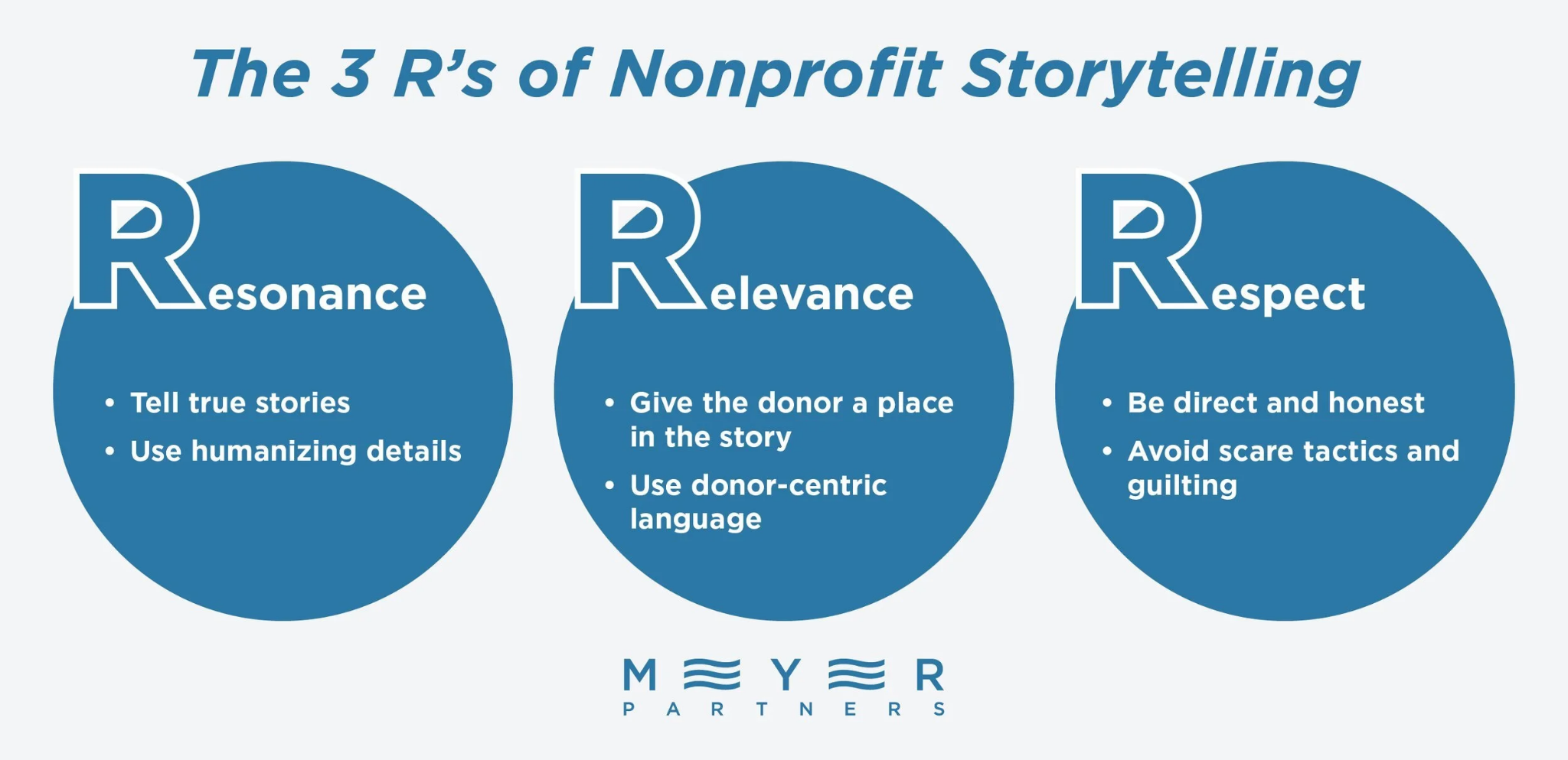
- Resonance: Every story should include real, humanizing details that resonate with donors. Let students tell their stories in their own words, and pair testimonials with photos whenever possible.
- Relevance: Make sure the donor can clearly understand their role in the story. Use donor-centric language that appeals directly to supporters’ values, inspiring them to become the changemakers who support the next generation of students.
- Respect: Respect both your readers and your storytellers by maintaining authenticity. Be direct and honest about what donations can achieve, and always focus on positive emotions like empowerment rather than guilt or scare tactics.
Incorporate these stories into multiple elements of your annual fund campaign to ensure maximum visibility and consistency. For example, you might include quotes from a student in your direct mail appeals, then post a selfie video of the same student telling their story on social media.
2. Highlight Impactful Giving Opportunities
To maximize revenue and increase average gift sizes, ask for more than standard, one-time cash gifts in your annual appeal letters. Offer additional giving options that provide greater flexibility and can increase donors’ long-term impact. These opportunities are often more compelling, especially for young alumni looking for accessible options and for high-capacity donors looking to make the most of their donations.
Specifically, use your annual appeals to highlight opportunities like:
Matching Gifts
The easiest way to make supporters’ donations go further is to double them. Typically, donors can double the impact of their gifts at no extra cost in one of two ways:
- Your university offers a matching donation challenge. Organizations often partner with a major donor who commits to matching every dollar donated within a set timeframe, up to a certain amount. These challenges motivate individual donors to give urgently so they don’t miss out on the match.
- Donors request corporate matching gifts from their employers. At any time, donors who work for participating companies can independently request matching donations from their workplaces. If the request meets the employer’s guidelines (e.g., a donation between $10 and $100 to a registered 501(c)(3) nonprofit), they’ll match their employee’s gift.
Either way, donation matching is a powerful motivator, especially during year-end giving season. Feature matching gifts prominently in your annual fund appeals, explaining how to participate and why these donations are so impactful.
Recurring Giving
Imagine you’re a recent graduate just starting your career and trying to pay off student loans. You wouldn’t want to donate $1,000 to the university you left last year, but it might be feasible to give $20 a month. In this case, you’re much more likely to respond to an appeal that highlights recurring giving.
Recurring gifts offer a more manageable opportunity to support your university while deepening donor relationships. In your annual fund appeal letters, include the option to give monthly and provide several accessible donation tiers.
Legacy Giving
Plant the seed for long-term support by introducing planned giving and bequest options in your annual appeals, too. These avenues empower alumni to leave a lasting mark on your institution without requiring an immediate, large-scale donation.
Even if most donors aren’t ready to commit to a legacy gift right now, just including information about planned giving in your appeal can get them thinking about it. Include links in emails and QR codes in direct mail letters so supporters can easily learn more on your university’s website or request a meeting with your major gifts officer. Note each donor who shows interest in the program so you can cultivate the relationship over time.
3. Leverage Donor Data for Highly Personalized Appeals
The best fundraising strategies reflect the unique relationship each supporter has with your university. Highly personalized appeals show each donor that you value them as an individual and respect their unique contributions.
Use your donor and alumni data to tailor your asks as much as possible. Go beyond addressing recipients by their preferred names—reference their specific past involvement, giving history, and personal connections to the university. Acknowledging that an alumnus was on the debate team or that a donor consistently supports the engineering department validates their identity and gives them clear, specific reasons to give again.
Segment your donor lists in several ways to maximize relevancy, and regularly audit your donor database to ensure all contact information and engagement records are accurate before sending appeals.
If you aren’t sure how to best segment your audience, hone in on the highest-value potential donors, or match supporters with the right requests, consider professional donor analytics services. Experienced fundraising consultants who specialize in data analysis can help you optimize your strategy for this year’s annual fund appeal and well into the future.
An effective annual fund approach relies on deep personalization, authentic narratives, and a variety of flexible giving options tailored to your audience. Upgrading the underlying strategy of your communications with these tips will help you build stronger relationships with alumni and secure the financial future of your core programs.

3 Ways to Build a Better Annual Fund Appeal for Higher Ed
Asking for donations to your annual fund can feel repetitive, but your appeal letters shouldn’t be. Learn how to develop better annual fund appeals here.
.jpg)
Alyssa Jefferies
September 3, 2026
12 minutes
LinkedIn continues to stay relevant for alumni outreach in 2026 as it is one of the most comprehensive self-updating directories from an advancement standpoint. Over 50% of LinkedIn’s user base holds a higher-education degree, and ~53% of US college graduates are active on the platform.
That means your alumni not only present but also likely engaging with a variety of content. But as far as reaching out to them goes, being present on LinkedIn and being reachable are two different things, and the wrong outreach strategy can disinterest or even alienate alumni.
In this blog, we’ll go through whether LinkedIn is worth your time for alumni outreach and how you can get your alumni’s attention effectively.
Is LinkedIn outreach worth the investment?
Let’s start with understanding why LinkedIn is different from the other channels
LinkedIn InMail gets a 10–25% response rate while cold email, by comparison, sits at 1–5%. The platform’s natural context is also a big factor here because when an alum receives an InMail from their alma mater, it’s in a different environment to when they’re sorting through personal emails and family messages. They log on to LinkedIn with a certain mindset, which makes them more open to professional conversations.
LinkedIn also gives outreach teams more context about who they’re reaching before they begin the process such as:
- Where an alum works currently
- What they’ve recently posted
- What groups and communities they’re in
- Who the common connections are
That’s a lot of helpful material to tailor the first message that will hopefully be the start of a donor’s journey. Combine all of this with the social media nature of the platform and you get a channel that has a lot of potential if you approach it right.
LinkedIn Alumni Outreach Strategies
Now that we’ve established that LinkedIn is at least worth a look, let’s set your team up for success so that your messages don’t go ignored.
1. Build an Active Presence Before You Send a Message
Advancement teams (and most teams in any field, to be fair) tend to treat LinkedIn outreach the same way they’d treat a cold email campaign. They find the person, write the message, hit send, and hope for the best.
But LinkedIn is, at it’s core, a social network. Your alumni notice who’s following you, who’s commenting on your posts, and whether your institution has a solid presence on the platform. If your university’s LinkedIn page hasn’t posted in months and the last post was a stock photo of a campus building, it hurts your cause already.
Before you start an outreach campaign, make sure you tick all these boxes::
- First, make sure your institution’s LinkedIn page is active. Posting once per weekday helps you reach 60% of your followers in a month. You should be aiming for consistent presence over viral content.
- Secondly, look for mutual connections, a shared connection increases reply rates by 27%. If a colleague or another alum is already connected,
- Thirdly, follow the alum you plan to message and leave a genuine comment on something they’ve posted. If possible, build and nurture your online relationship with them. You should be looking to gain a follow-back. This can be crucial since alumni who already follow your institution are 81% more likely to respond to your InMail.
2. Build a Segmented List
Use your CRM along with LinkedIn's alumni search tool to understand who you will be sending your messages to. Many alumni engagement tools also allow you to better find, segment, and automate outreach to the right people.
The segmentation itself will be crucial as personalization is a big part of making your message stand out (as we will explain later), so take your time and make sure all your segments and alumni information is updated, synced, and ready to go.
3. Get the Subject Line Right
LinkedIn InMail by default gives you a 200-character subject line limit. When an alum receives your InMail as a notification, they see roughly 25 to 40 characters before the preview cuts off.
For this reason, short, specific, and personalized subject lines can work really well. For example: “A quick question from [University]” or “Connecting with [Name] re: mentorship”.
What won’t work on the other hand, is anything that sounds like a mass email campaign. Something like “Exciting news from the alumni office!” might feel generic or may confuse recipients.
4. Keep the Message Short and Simple
LinkedIn’s own data shows that InMails under 400 characters get higher response rates. Many institutions sometimes write messages much longer than this and have their messages scrolled past.
For your first message, your alums only need enough to understand what you’re asking and if it's worth their time. If you have more context to give and more reasons to say why this outreach matters, that can follow later.
Write a ~300-character message that asks one clear question. The message can address the basics such as who you are, why you’re reaching out, and your one specific question.
5. Personalize Beyond the Name
Alumni can tell if a message was written for them or if someone just replaced a mail merge field, so you’ll want to go further than just swapping people’s first names. Here’s a few things that might help with personalization:
- Spend a couple of minutes on the alum’s profile; personalized InMails increase acceptance rates by about 40%, according to LinkedIn data. Mention a recent post they made, a project they were publicly credited for, a career transition they just went through, or a shared connection.
- Find a good natural connection between what you discover about them and what you’re reaching out about. If you’re inviting them to a career mentorship panel and they’ve been posting about early-career development, mention that. If you’re reaching out around their 10-year graduation anniversary, you definitely want to acknowledge it.
- Avoid mentioning generic and obvious things like “I see you graduated from [University].” Good personalization shows you’ve paid attention to their life after graduation and you have a brief window that you want to make the most out of, especially for less-engaged alumni.
6. Templates for Common Outreach Scenarios
Here are some templates that you could borrow and build on to personalize your next outreach message on LinkedIn:
General reconnect:
"Hi [Name], congrats on the move to [Company]. I'm on the alumni relations team at [University]. We're putting together a small group of alumni at your career stage to get some honest input on our programs. Would a 15-minute call work?"
Mentorship opportunity:
"Hi [Name], I work in alumni relations at [University]. Saw your recent post on [topic] and thought you'd be a great fit for our mentorship program. We're matching alumni with students in [field]. Would you have 30 minutes to hear more?"
Upcoming event:
"Hi [Name], I'm with alumni relations at [University]. We're hosting a small dinner for [City] alumni on [date] and wanted to make sure you were on the list. Can I send you the details?"
Giving day:
"Hi [Name], [University]'s giving day is [date]. This year all gifts are going toward [initiative]. Wanted to reach out personally before things kick off. Can I send you a bit more context on what it supports?"
What each of these has in common is one clear ask and customization that shows the sender did their homework before reaching out.
7. Time Your Outreach Well
LinkedIn data shows that Friday and Saturday see 4% and 8% fewer than average responses, respectively. Your alumni may want to relax and disconnect from the professional world on the weekends, so Monday through Thursday is a good window. However, depending on your event calendar, and past alumni engagement data, this can vary a bit so do double check!
Going back to the mentioned window, Sprout Social's analysis of nearly 2 billion engagements across major social platforms points to Tuesday through Thursday, 11 a.m. to 5 p.m., as LinkedIn's peak activity window. That's when professionals are most actively checking and responding on the platform, so it's your best shot at being seen before your message gets buried.
8. What to Do When Alumni Reply
Your next message after an alum replies sets the tone for the entire conversation that follows and the subsequent relationship. So here’s a few things to keep in mind:
- Reply quickly, ideally within a few hours of seeing their response.
- Thank them by name and reference something specific from their reply.
- Remember that this is a conversation on a social platform.
The goal should be to establish that your team and, by extension, your institution has a real interest in keeping in touch with them after graduation. For this reason, you’ll want to:
- Find out what they’re working on.
- Ask follow-up questions.
- Make it clear that there is no immediate ask attached.
💡This doubles as an opportunity to get updated information in case their profile information hasn’t been updated in a while.
Alumni who are connected to their institution are 23 times more likely to donate than those who aren’t. That connection, however, has to be built through consistent, genuine interaction over time. So, when it’s time to make an ask, it’s coming from the context of the conversation.
Build a LinkedIn Alumni Community (and not just another contact list)
At the end of the day, one-on-one outreach can only take you so far. Advancement and alumni relations teams that are able to keep alumni engaged are also building environments where alumni feel like they want to stay engaged.
If we are sticking to the platform at hand, LinkedIn Groups are a great way to do this. You can organize alumni groups around:
- Your institution
- Graduation cohorts
- Academic departments
- Regional chapters
- Donor groups
- Matching gift opportunities
…and much much more
AdvancementForm looked at what the institutions running active alumni groups have in common. Here are the main takeaways:
- Stay active every day: Keith Hannon of Cornell University shared that two-thirds of alumni relations professionals running thriving LinkedIn communities log in daily. That includes posting, answering questions, responding to comments, and engaging with what other members are sharing.
- Give alumni the spotlight: Spotlighting a graduate's career achievement or resharing something they wrote brings their audience into your content. Even the simple act of tagging alumni where needed will ensure that their network is notified as well.
- Share career resources such as job postings, industry reads/insights, career advice for alumni at different stages and make sure they are updated frequently. This is the content that consistently performs well as it provides a clear reason to engage.
- Mix up your content formats: Posts with images get a 98% higher comment rate than those without, and posts with YouTube videos (that play directly in the feed) get a 75% higher share rate. Varying your formats will keep the feed from feeling like a broadcast channel.
- Ask alumni to help current students: Academic Impressions flags this as an especially meaningful way to engage alumni because it gives them an opportunity to give back give back, even without a financial element. Posting something like "What do you wish someone told you in your first year in [industry]?" gets replies from alumni who would otherwise never comment on, say, an event announcement.
- Run polls: Lebanon Valley College asked their alumni "What career field are you currently in or looking to enter?" and it sparked a lively, ongoing discussion among their alumni. Polls can be a great icebreaker and contextualizing them to recent events, career stages, or other segmented needs is even better!
- Add in the nostalgia angle: Questions and posts about campus memories or institutional history give alumni interactive content that serves as a break on their feed from the usual LinkedIn content while also reminding them of why they feel connected to their school.
Finally, if you're thinking about content ratios, keep it weighted toward value-first content, career resources, alumni recognition, and conversation, with campaigns and event promotion playing a supporting role, not leading the feed.
Measure Your Progress and Know Your Blind Spots
You need to know whether your efforts are paying off. So, if you’re running structured outreach campaign on LinkedIn, here are the metrics which will help you track what's working:
- Connection acceptance rate: You generally want to aim for ~20% or above. If you're below that, check whether you're warming up contacts before sending requests and whether your institution's page looks active and credible.
- InMail response rate: With personalized, well-targeted outreach, this should sit between 10–25%. Single-digit numbers are an indication to look at your message length, your subject line preview, and how specific your personalization is.
- Conversation-to-action rate: This tracks what percentage of replies converts into whatever your goal is, whether that’s an event registration, a scheduled call, or a gift.
The Council for Advancement and Support of Education (CASE) tracks alumni engagement across four modes: philanthropic, volunteer, experiential, and communications.
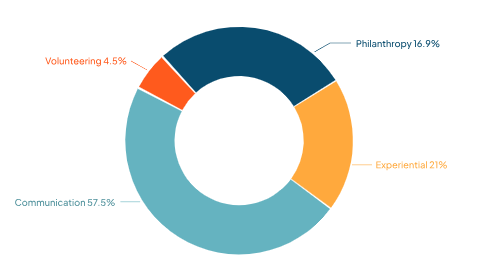
LinkedIn activity can feed into your experiential and communications metrics. If you’re not tracking LinkedIn engagement as part of your overall alumni engagement scorecard, you should consider starting now.
A few common blind spots that can be avoided include:
- Reaching out only when there's an ask: If alumni only hear from you around giving day or annual fund season, the outreach feels transactional. Only 27% of alumni who donate give to their alma mater. The most common reason others don't give is because they don't feel connected enough to make it a priority.
- Writing LinkedIn messages like emails: Avoid long messages, formal language, attached PDFs when LinkedIn is conversational. Keep messages short, and the tone conversational.Save the documents for follow-up conversations.
- Ignoring alumni who engage with your posts: When an alum comments on something your institution shared, respond to them, thank them by name, and if appropriate, send a connection request with a brief personal note referencing what they said.
- Not knowing what comes next when someone replies: Replying to a message without a clear next step might waste the opening you had spent time and effort on. Know what you’re trying to accomplish before you send the first message so that when someone replies, you’re ready to take the conversation forward.
Final Thoughts
We hope we’ve been able to give you and your team plenty of things to keep in mind. While LinkedIn outreach may seem like a simple game of numbers at first glance, any outreach campaigns involving social media rarely tend to be so predictable and you definitely want to keep that in mind.
To wrap things up, keep personalization (and segmentation by extension) at the heart of your strategy, have a consistent presence on LinkedIn just as you probably do with Facebook or Instagram, and make sure you are thinking about how to take the conversation forward many weeks ahead of time so that alumni feel appreciated after reacting to your outreach.
If you are looking for an alumni engagement platform to help you plan, execute, and measure your alumni outreach and engagement strategy, Almabase is built just for that so feel free to book a personalized demo with us!
How to Reach Out to Alumni on LinkedIn and Get Responses
Our article takes you through LinkedIn alumni outreach and how your team or institution can ensure that your alumni don't ignore your messages.

Prajnya Yelamali
September 2, 2026
12 minutes

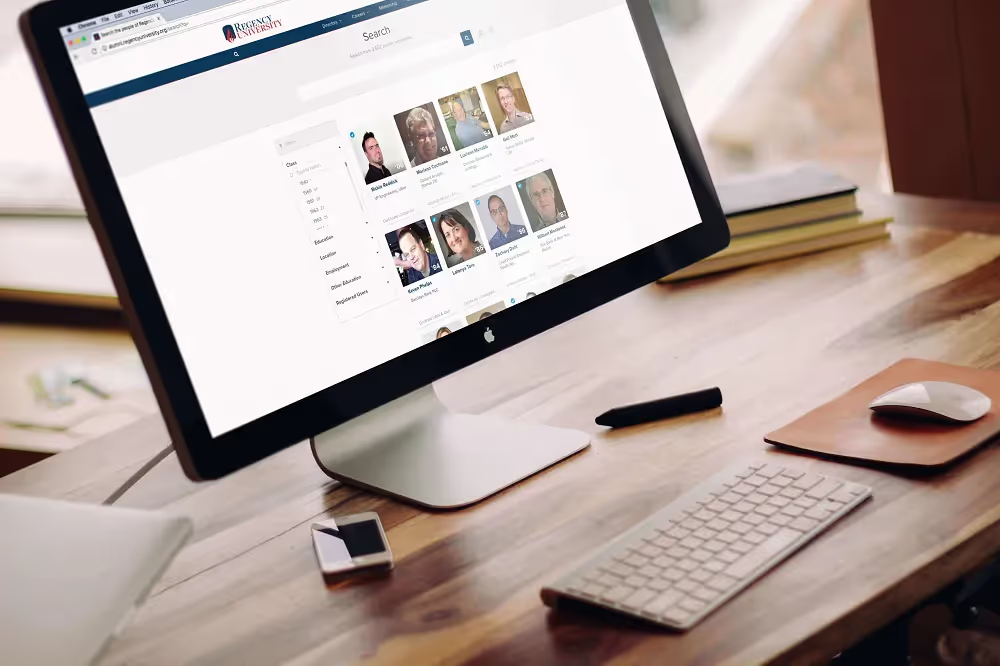
Every time you need to look up someone on your database, you would normally need to open your web browser, go to your alumni website, log in if you aren't already and use the quick search bar on your homepage to look somebody up. If you have to do this often, we have a few things you could do to make this a whole lot easier.
Identifying the search address
The search address is the URL that you see on the search page on your website. It should look something like 'http://alumni.regencyuniversity.org/search?q=' . This search address can be used on different apps (listed below) to jump you straight into your search page.

Now that you have your search address prepared, let's jump into some ways you can quickly run a search query through your database.
Method 1: Using Alfred (for Mac OS)

Alfred is a great tool that I personally love to use, it's hard to imagine life without it after you get used to it. It is essentially a replacement for Spotlight on macs and for those of you who are used to Apple's great spotlight search, you should love Alfred even more. Once you download Alfred (which is Free), you can easily access it using a short cut that you set. By default it should be set to option + space bar , it will bring up the alfred console on your display, which is where you will be typing in your keyword to trigger your database search.
Here is how you need to set up alfred to enable quick search.
Step 1 : Go to alfred's preference window.
Step 2 : Navigate to Features > Web Search, and 'Add Custom Search'

Step 3 : In the search URL field, add the Search address for your alumni website and add {query} to the end . The result should look like this : http://alumni.regencyuniversity.org/search?q={query}.
In the Title field, enter " Search Alumni database for {query} ".
You can enter any keyword that you would like to trigger the search, for the sake of generalization, we are going to use the keyword 'alumni', but you can set it to something shorter like your schools initials.Save your settings to complete setup.
The next time you need to run a quick search on your alumni database, you can simply type in your keyword into Alfred, followed by the search query you would like it to run. If you would like to look up for a person named steve, you can type in 'alumni steve' to quickly search through the database for 'steve'.

Method 2: Using Google Chrome

A similar arrangement can be set up using Google chrome too using the Custom Search Engine feature that you can find under the advanced settings in your preferences.

At the bottom of the list of existing search engines, you can add your alumni database as well. Add a name to the search like 'Alumni Database', and a keyword that will trigger the search. Just like in the earlier example, we are going to use 'alumni' as the keyword, but you can set this to anything you like.
In the URL field, add your search address appended with %s . So your URL should look something like this : http://alumni.regencyuniversity.org/search?q=%s
And that's about it . You're all set . Now if you'd ever need to quick search your alumni database, simply type in the keyword you selected, 'alumni' and the query you want to run into the address bar on Google chrome .

Keep watching this space for more tips on more ways to quick search your alumni database on almabase . Let us know what you think in the comments . Do you think a quick lookup feature helps ? what are some of the things you try to look up during a quick search?

How to: Quick lookup your alumni directory on Almabase
Every time you need to look up someone on your database, you would normally need to open your web browser, go to your alumni website, log in if you aren't already, and use the quick search bar on your homepage to look somebody up. If you have to do this often, we have a few things you could do to make this a whole lot easier.
Product updates
Are your fundraisers centered around getting results? While it may seem obvious, many institutions don’t approach their fundraisers with concrete goals in mind. And without clear goals, it’s nearly impossible to tell if you’re succeeding.
Setting goals enables you to track progress and provides you with the information you need to adjust your strategies as you go. So how can you be sure that you’re setting effective goals?
We’ve worked with a range of causes to reach their fundraising goals. After overseeing thousands of campaigns, we have a strong idea of what works (and what doesn’t) when selecting and progressing toward goals. Using this firsthand experience, we’ve pulled together four actionable steps to help set and meet objectives. Ready to enhance and exceed your campaign goals? Let’s dive in.
1. Check that your goal passes the SMART method
One of the most popular goal-setting methods is the SMART framework, which many industries have adopted. As your institution creates its fundraising goals, walk through each part of the five-step model below to make sure your objectives are clear and actionable to inspire your supporters. Here’s what criteria your goals should meet:
- Specific – It’s not enough to say, “We want to raise more than we did last year.” Select the KPIs you want to monitor. What specific amount do you want to collect, and what programmatic impact do you want to achieve? As a general best practice, use historical data as a reference point and select goals that are marginally higher based on past trends. For instance, let’s say you want to increase funding for a specific program. Two years ago, donations to the program increased by $4,250 compared to the previous year, and the next year, it increased another $6,000. It’d make sense to set a specific goal of $7,500 for the upcoming year.
- Measurable – Are you able to measure the goal? Without a quantifiable objective, you won’t be able to measure progress. For example, if your goal is to raise “a lot” of money, everyone will have their own interpretation of what that means.
- Attainable – You want the goal to be difficult to reach to foster inspiration and growth, yet not so high that it seems impossible which will only be a discouragement to both donors and fundraisers. Understanding your donor base’s giving capacity and affinity will help substantially here. For instance, do you expect several donors to give $15, or a few major donors to give $1,000?
- Relevant – People value actions that make a difference, so you should know the “why” behind all fundraising goals. Ensure goals are directly related to your mission. For instance, if you’re raising money for a sports team, your goal could be to raise $1,000 to buy new uniforms. That way you are raising toward a mission-driven goal, not to meet a number on a spreadsheet.
- Time-Based – Clarifying when the deadline is to participate will create a sense of urgency. Plus, a timeline makes it easy to track progress. If you’re two weeks into a month-long fundraiser and you’re nearly halfway to your goal, you’re in a good position. If you’re falling behind, you’ll know to step up promotional efforts.
Walking through this framework will allow you to create actionable goals that help your cause reach new fundraising heights, rather than goals that don’t quite get the job done.
SMART Goal Example
Now, let’s discuss an example so you can gauge what a SMART goal looks like. Let’s say you work for a local nonprofit that provides school supplies to children in need. Your annual campaign is coming up, and during last year’s campaign, you raised $12,375.
Based on last year’s results, you decide on an ambitious yet reasonable goal of $16,000 to supply 600 students with new school supplies. Your campaign will begin on August 4th and run through September 1st, giving you one month to reach the goal.
Notice how there are specific, measurable criteria in place that allow you to track progress. There’s also a clear start and end date to motivate your community to contribute.
A goal like this effectively communicates your mission and need for support. In turn, people are much more likely to participate than if your goal is to “raise money to buy supplies for students.”
2. Set suggested giving levels
Once you’ve set your primary campaign goal, it’s time to plan how you’ll meet (and hopefully exceed) those objectives. Every dollar you inspire donors to give adds up, and setting strategic giving levels is one effective strategy that nonprofits use to accomplish this.
When setting your suggested giving levels, base them on your past campaign results and set amounts that are marginally higher than the average donation amount. Go one step further by pairing incentives with each giving level so supporters can envision their impact.
Consider that you work at an institution that feeds children through an afterschool program. Take the following campaign incentives for example:
- A gift of $25 feeds a student for a week.
- A gift of $100 feeds a student for a month.
- A gift of $450 feeds a student for the semester.
- A gift of $900 feeds a student for the entire school year (180 days).
Tying tangible outcomes to donations will effectively demonstrate the impact that each donation can make. In turn, this can inspire prospects to potentially increase their contributions.
3. Keep your donors updated
According to Fundly’s crowdfunding statistics, campaign owners who update their supporters at least every 5 days raise an astounding 3 times more in donations than less communicative campaigns. That’s because keeping your supporters in the loop allows them to take action.
The key is transparency. Of course, everyone wants to hear that the campaign is in line with the goals you set, but they also need to know if you’re facing roadblocks and what they can do to help. If you’re falling behind, donors will know to step up their efforts, whether that means donating again or proactively sharing your campaign with friends and family.
One of the easiest ways to remain fully transparent with supporters is by featuring a fundraising thermometer. Donation thermometers help users visualize progress toward fundraising goals. Take a look at this example from Current Builders:
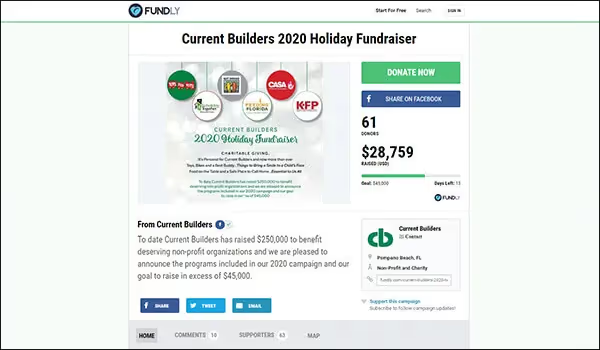
Notice how the thermometer is prominently displayed and effectively conveys progress. In addition to donation thermometers like this one, be sure to provide general updates on social media and your website to keep donors informed. If you’re hosting a crowdfunding campaign, you can also post these updates on the campaign page itself.
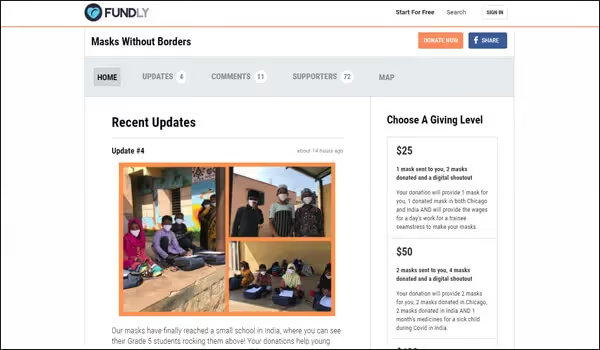
Setting up a system to update donors is crucial for success. According to 360MatchPro’s fundraising statistics, 48% of nonprofits use an editorial calendar to organize their campaign outreach. Whether you set a schedule to provide timely updates or share progress when you reach certain milestones, consistent updates convey that you’re personally invested in your campaign and encourage donors to do the same.
4. Analyze your campaign results
Your campaign isn’t quite over until you analyze the results. As you finish up, take the time to record what went well and what to improve for future campaigns.
Start with your data. Did you reach your campaign goal? If you fell short, how far off were you? If you exceeded your goal, how much more did you raise than anticipated? How many new donors did you gain?
Then consider why you received the results you did. For instance, did you notice surges in giving after you shared updates? Did you sufficiently tie your campaign back to your mission? Did you run into any unforeseen obstacles?
Strategize with your team to figure out how you can implement them in your nonprofit fundraising strategy. And don’t forget to share these results with your donors. After all, they’re the ones who donated their hard-earned money to your cause.
Beyond a statistical analysis, it’s also smart to also gauge your audience’s perspective on the matter. This is a prime opportunity to develop stronger relationships with donors one last time through your campaign by sending a survey to donors and anyone else who contributed to the success of your campaign.
Ask what they liked about the campaign, what could’ve been done to motivate them to give more, and any other suggestions they’d like to share. Not only will they appreciate that you’re asking for their opinion, but they can provide an outside perspective and help you pinpoint improvement opportunities that you might otherwise overlook.
To wrap things up, every campaign should start with a SMART goal. From here, you can effectively move forward with a plan to achieve those objectives, such as setting suggested giving levels and providing consistent updates on progress. Keep in mind that every campaign finds success in different methods, so keep a close eye on what works during and after your campaign.
With these tips at the forefront of your strategies, you’ll be more likely to inspire donors to step up their giving to reach the concrete goals you set. Good luck!

Setting & Meeting Fundraising Goals: 4 Tips to Drive Results
Setting and meeting the right goals is essential to nonprofit fundraising success. Drive campaign results with these simple tips for setting actionable goals.
Fundraising

Here are two main reasons why Online Giving is the best place to invest your time and talent.
1. It is the hottest form of giving right now – Online giving in Education sector has risen by a staggering 12.3 % and 15 % in last two years.
2. It has seen the largest adoption rates by the Millennials
62% of donors worldwide prefer to give online
Our experience with over hundred partner schools across the world had taught a few things about various friction points on Giving Pages. Some common examples include:
1. excessive steps or clicks in the giving process
2. multiple or conflicting calls-to-action, non-essential buttons, menus, or navigational elements.
Simple math tells us that:
1. Even under the assumption of a very conservative conversion rate of 1 % for every 1,000 visitors, you will have 10 donors.
2. For the same 1,000 visits to your online donation form, if 3% of them convert into donors, you’ll have 30 donors. That’s a 200% improvement! And depending on your average gift amount, this could equate to a significant increase for your organisation.

.%20money-card-business-credit-card-50987-1920x1280.avif)
7- Effective Online Giving Practices
Here are two main reasons why Online Giving is the best place to invest your time and talent.1. It is the hottest form of giving right now – Online giving in Education sector has risen by a staggering 12.3 % and 15 % in last two years.
Fundraising
One of the key goals of Almabase is to empower you with rich insights on each of your alumni and help you make decisions. Right now, when you view a profile on Almabase you get to know their class, where they live, where they work, etc. Wouldn’t it be great if you can see exactly how each of your alumni are engaging with your institution on Facebook ?
We’re proud to announce our latest feature — Facebook engagement insights. With Facebook engagement insights, you can see all engagement from each of your alums on all your Facebook pages.

For every alum who has connected their Facebook account on the alumni platform, we will track their engagement with your Facebook pages in real time along with all the historical engagement. You get to see all their comments and reactions (like, wow, haha, thankful, sad, angry) as a summary and also as a timeline. Some of the ways we see our customers using this include:
1. Identify alumni who have recently engaged on Facebook and get in touch with them.
2. Identify alumni who have historically engaged actively on Facebook but haven’t made a gift and pass that information to the development office.
3. Find what posts your donors are engaged with on Facebook and personalize your messaging to them.
Like with our other features, we’re sure each of you will find your unique ways of using them. We’re excited to see all the different ways in which you will use this data.
To connect your Facebook pages and start tracking your alumni engagement on Facebook, please get in touch with your customer success manager. They will guide you with the steps you need to take. It’s a surprisingly simple process for what you get in return
Please do take a moment to send us any feedback that you have.
.%20coverfb-1920x1409.avif)
Facebook engagement insights
One of the key goals of Almabase is to empower you with rich insights on each of your alumni and help you make decisions. Right now, when you view a profile on Almabase you get to know their class, where they live, where they work, etc. Wouldn’t it be great if you can see exactly how each of your alumni are engaging with your institution on Facebook ?
Product updates
Having differentiated access on the platform for various types of users is essential and we’ve heard this from many of you. We’ve built just that, with access control!
Access Control is going to be your one-stop place to control access to various features on the platform.

A view of the access control:
You can add all kinds of restrictions to features on the access control. For example,
1. if you wanted to restrict access to internships only to students and not alumni.
2. if you wanted to restrict access to events only to alumni and students, but not staff.
3. if you wanted to ask users to upgrade to a certain membership to get access to the alumni directory.
There are three key improvements we made:
1. You can control access based on not just memberships but also roles. If your platform doesn’t use memberships feature, you can still restrict based on roles.
2. You can control access to many features on the platform, as opposed to just directory earlier.
3. It’s easy to view and change all your access controls in one place.
This is the kind of page your users will see if they can’t access a feature because their current membership doesn’t allow access to that feature.

Similarly, if a user is restricted from accessing a feature due to their role (which they can’t change) they’re shown a much simpler message as shown below.

We are excited to see how you’ll use this feature for your alumni office. Talk to your customer success manager to know more and please let us know if you have any feedback.
Access Control
Having differentiated access on the platform for various types of users is essential and we’ve heard this from many of you. We’ve built just that, with access control!
Product updates
See how leading institutions put these ideas into action