Blackbaud is sunsetting support for Raiser’s Edge NXT’s database view and related functionality in September 2027. Learn how Almabase replaces your current functionality and how our Assisted Fast Pass Migration makes for a smooth switch without disrupting your campaigns or operations.

Anwesha Kiran
Published:
September 10, 2026
Updated:

Summary
Recent global disruptions — pandemics, economic shocks, social justice movements, and political divides — have reshaped our innate need for genuine connection and belonging. When education human interactions become unbridled, they need to show how engagement translates into real participation, better retention, and long-term giving. Just tracking activity numbers doesn't cut it anymore. And as alumni populations become more diverse and scattered across the globe, the playbook must evolve to keep up.
Blackbaud recently announced that support for Raiser’s Edge NXT’s database view and related functionality will end on September 15, 2027, affecting several Blackbaud products. These include Blackbaud Online Express and Blackbaud NetCommunity (BBNC). For advancement teams that have spent years building forms, pages, workflows, and other processes around the platform, this means choosing and migrating to a new platform. The prospect can feel like a lot to take on, especially if it wasn't something you'd anticipated.
If you're looking for an alternative, Almabase can help you replace the functionality you currently rely on across these products. We've already covered why teams might be thinking of a move off BBNC and how the main alternatives compare. In this article, we’ll be focusing on what happens once you've made that decision: what the migration process looks like, what your team can expect along the way, and how Almabase approaches the move.
In case you’re evaluating how Almabase stacks up against BBNC, check out our comparison blog here.
There’s also another question that comes up around a platform migration: How much is this going to cost?
This question extends beyond the immediate, visible technical costs. In fact, the technical side of the move might just be the simplest to figure out. It’s the broader, more abstract elements like shifting scopes, changing requirements, or even figuring out the right set of requirements in the first place that could end up costing the most amount of money and time, if not approached thoughtfully.
That's why we want to walk you through the Assisted Fast Pass Migration process upfront: what happens at each stage, what your team is responsible for, what our migration team handles, and where costs may come into the picture. We hope to give you a clear idea of what the move to Almabase will look like before you get started, so there are fewer surprises along the way.
A migration project always begins with an agreed-upon plan. But it’s also very likely that, a few weeks in, you discover a form that needs some additional customization or a request that seemed straightforward seems to fall outside the original scope, on second thought. These are perfectly reasonable hiccups during the migration, but if work is already underway, it could seem harder to understand what you're paying for, and even harder to plan around the rest of the project.
Clear expectations are at the heart of our migration approach, starting with total transparency around what extra requirements cost. With Almabase’s Assisted Fast Pass Migration, each stage gives you a chance to understand what's being proposed, what falls within the standard migration, and where something would require additional work.
Basically, you shouldn't find out about an extra requirement after the work has already been done. Your approval and sign-off comes first. The five steps in the migration process are built around this intention. Let’s get into them.
The migration process starts with a kickoff between your team, a dedicated CSM, and an implementation specialist. This is where we get the groundwork in place. This is usually access to your current site, your branding assets, and the dates your team needs to work around.
Another important step here is understanding your calendar and priorities. Your Giving Day, reunion, fiscal year-end, or another major event may determine what needs to happen first and we would be building the migration calendar around it. So, the migration sequence might look a little different for each institution, as each gets to choose which product goes first.
The kickoff is also a chance to flag anything unusual about your current NetCommunity setup.
After years on a platform, it's normal for your setup to have accumulated a few workarounds, custom configurations, or integrations that made sense when they were created. We don't need to solve all of those questions in the first meeting, but we do need to know about them.
That way, we can account for them during the next stage: the inventory. 🤗
Your team mainly needs to provide:
Your dedicated CSM and implementation specialist work with you throughout the migration, while your team focuses on the decisions and approvals. A migration shouldn't require your advancement team to take on managing a project full time on top of everything else they’re already handling.
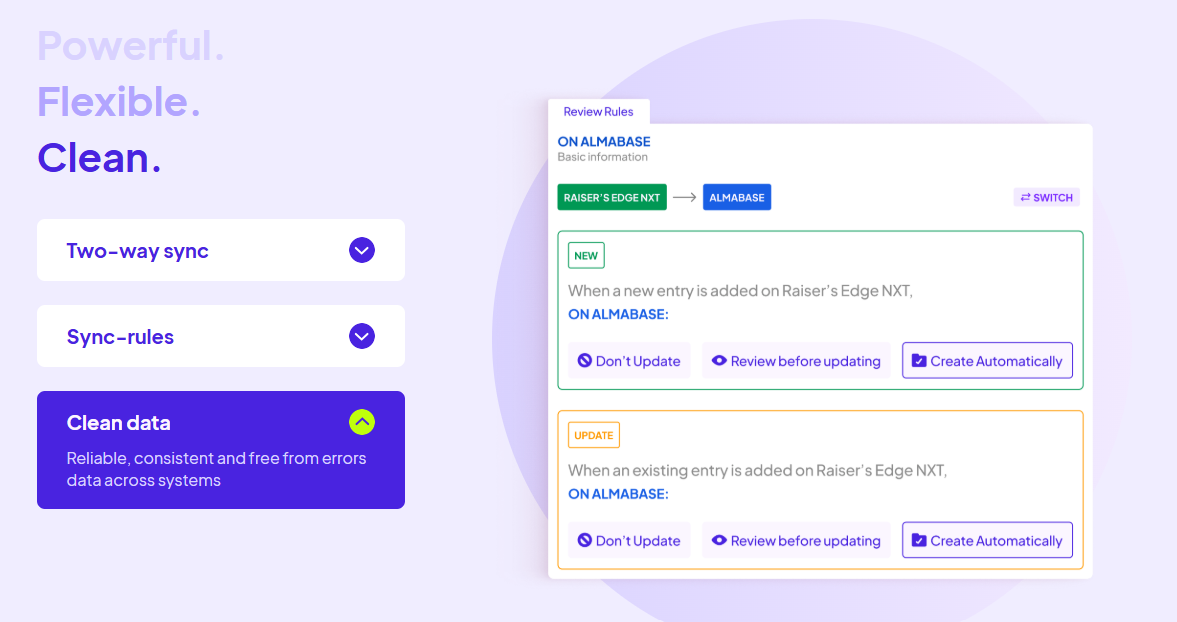
Your data migration is handled alongside the rest of the process. Almabase's bi-directional TrueSync integration connects with Raiser's Edge NXT and supports two-way syncing for configured entities and fields, including constituent, event, and gift data.
Admins can also decide which fields update automatically and which should be reviewed before they're pushed or pulled between systems.
That means your team doesn't have to wait until every page and workflow decision has been finalized before thinking about what happens to your data. The data side of the transition can move forward alongside the rest of the migration, with real time decisions being made.
Once kickoff is complete, your implementation specialist carefully starts building a complete inventory of what's currently running on NetCommunity: pages, forms, events, programs, memberships, and other key components of your site.
This process is useful in its own right, especially when taken on by someone external. After years on a platform, it's easy for a site to accumulate things that no one thinks about anymore, simply because they’re too involved in the process. The inventory gives you one place to see what's actually there, anything you might’ve forgotten about, and to make decisions about what needs to move vs what can be left behind.
Probably the most effective part of this is that it's a shared inventory that you can review alongside your specialist. If something looks outdated, doesn't need to move, or needs a closer look, you can flag it before it moves to the new product.
The inventory can surface things like:
This idea is to document your NetCommunity site so well that both teams end up on the same picture of what exists and what needs to happen next. The Almabase team handles the actual inventory work, and all you need to do is review the inventory and flag anything that should be changed, removed, or investigated.
At this stage, the migration project starts taking on a more defined shape as you decide what you need to bring into Almabase. You and your implementation specialist review the inventory, decide what carries forward, and establish what the finished version should look like.
For each item being migrated, the team, along with you, defines the acceptance criteria before the building begins. If your existing alumni directory has eight fields and three filters, for example, those requirements can be documented as part of the scope. By the end of this discussion, everyone has arrived at the same definition of what needs to be delivered.
This is also where you’ll be able to clearly separate standard migration work from anything that requires additional effort.
If something falls outside the standard scope, you'll know before the work begins:
You won’t have to decipher this from the invoice later on, because the work only moves forward once you’ve signed off on the scope.
This is exactly why your input here matters most. The Almabase team handles the building, but it’s you and your team deciding what is important enough to carry forward and what “done” needs to look like, within the standard process or with additional effort layered on.
Our team takes up building only once you’ve greenlit the scope. Each product gets its own dedicated 30-day track, with the order of products taken up built around your events and fiscal calendar.
This is to accommodate your calendar: giving days, reunions, Homecoming, we’ll build that product first so you’re ready in time for go-live day. If your immediate priority is your broader alumni site, we might begin with building that instead. The point is, even at this pace, you’re not forced to adopt a one-size-fits-all solution. Your implementation team works with you to determine what needs to come first.
The build itself happens on your Almabase pages, so you can review as it gets built while also familiarizing yourself with the new platform.
The timeline typically looks like this:
Having the scope agreed upon shows up in smoothness at this point: you can expect fewer decisions to make from scratch during this stage. Your team knows what's being built, your implementation specialist knows what they're working toward, and everything can move as planned, on track.
As you get closer to launch, the focus shifts from building to making the transition itself as smooth as possible.
The most important part of that is making sure people can still find the things they've been using. Your team receives a redirect map that pairs each carried-forward NetCommunity URL with its new Almabase destination. You'll also want to review where those old links appear outside NetCommunity: your main institutional website, email templates, QR codes, printed materials, and any other places where an old URL may still be in circulation.
The redirect map gives you a clear list of what needs to change and no one has to discover old links one by one after launch.
Before each product goes live, your team gets to review it thoroughly and explicitly approve the launch.
The aim, with these five steps, is to get your Almabase programs ready before your NetCommunity access ends, so the transition remains smooth and doesn't become a last-minute scramble.
Not everything that comes up during a migration falls neatly into the original plan. But there's also an important conversation to be had: what counts as additional scope and what is a limitation in the platform itself?
If something requires work beyond the standard migration scope, that's identified and quoted before the work begins. You can then decide whether you want to take it on.
But if there’s a requirement you have that Almabase cannot support yet, we’ll be fully transparent with you. Essentially, you haven’t asked for too much, we’re just not there yet. Depending on what you need, the team can look at a workaround or determine how the functionality could be addressed after launch.
This conversation is also one of the reasons the earlier stages matter. The shared inventory, defined acceptance criteria, and upfront scoping give everyone a common reference point throughout the project.
That's really the principle behind the entire migration process. You're not expected to know every detail of what needs to happen before the project starts. The process itself is designed to show you those details early, give your team a chance to make the calls that matter, and keep the build moving while minimizing unexpected, last-minute surprises.
A BBNC migration may not have been on your roadmap, but that also doesn't mean it has to become a project that takes over your team's calendar.
With a clear process, an agreed scope, and the right support, you can move the parts of NetCommunity that matter to your team and work for your institution without having to figure everything out as you go. The Almabase team handles the build and migration work, while your team stays in complete control of the decisions, priorities, and final approvals.
And because the scope and any additional costs are addressed before the work happens, you can go into the migration knowing what to expect.
If you're planning your move away from BBNC, let's talk about what it could look like for your institution.
Talk to the Almabase team about your BBNC migration →
Subscribe
See how modern advancement teams bring alumni engagement and fundraising together.
Plan faster. Execute better
Explore free templates designed for alumni and fundraising teams.
.png)

Anwesha Kiran
Blackbaud NetCommunity (BBNC) has been the default choice for institutions on Blackbaud Raiser's Edge for a long time now. It still handles the basics well enough; things like a simple donation form, a straightforward event RSVP, or an email blast to contacts off of an existing list.
But advancement work has grown more complex, and there are tasks modern teams need done that BBNC hasn’t been able to keep up with, simply because it wasn’t built for these tasks.
In this blog, we’ll walk you through some of these tasks that users have come to realize that BBNC cannot handle well, and how Almabase closes that gap.
This is a well-documented pain point that BBNC users face when scaling their events: email lists have to originate from a Raiser's Edge (RE) query. If you have a list of addresses that didn't come from RE, there's no way to feed it in directly. These could be lists procured from an event partner or from around a campus, but it cannot be used to send email blasts unless recreated as a query within RE first.
The email builder itself offers limited design flexibility without a modern interface, so anything beyond a simple layout takes real effort to construct. Even then, there’s no way to know for sure that these emails would look the same in the recipients’ inbox.
Another related limitation is that unsubscribes work at a single level: a constituent who wants out of event emails but wants to keep getting annual fund appeals has no way to say so. They either get everything or nothing.
BBNC's analytics cover opens, bounces, and opt-outs, which is fine for knowing what happened to an email. It doesn't tell you what the constituent did next. There's no link-level click attribution and no behavioral data, like page visits or email-to-gift conversion paths, flowing back into the CRM.
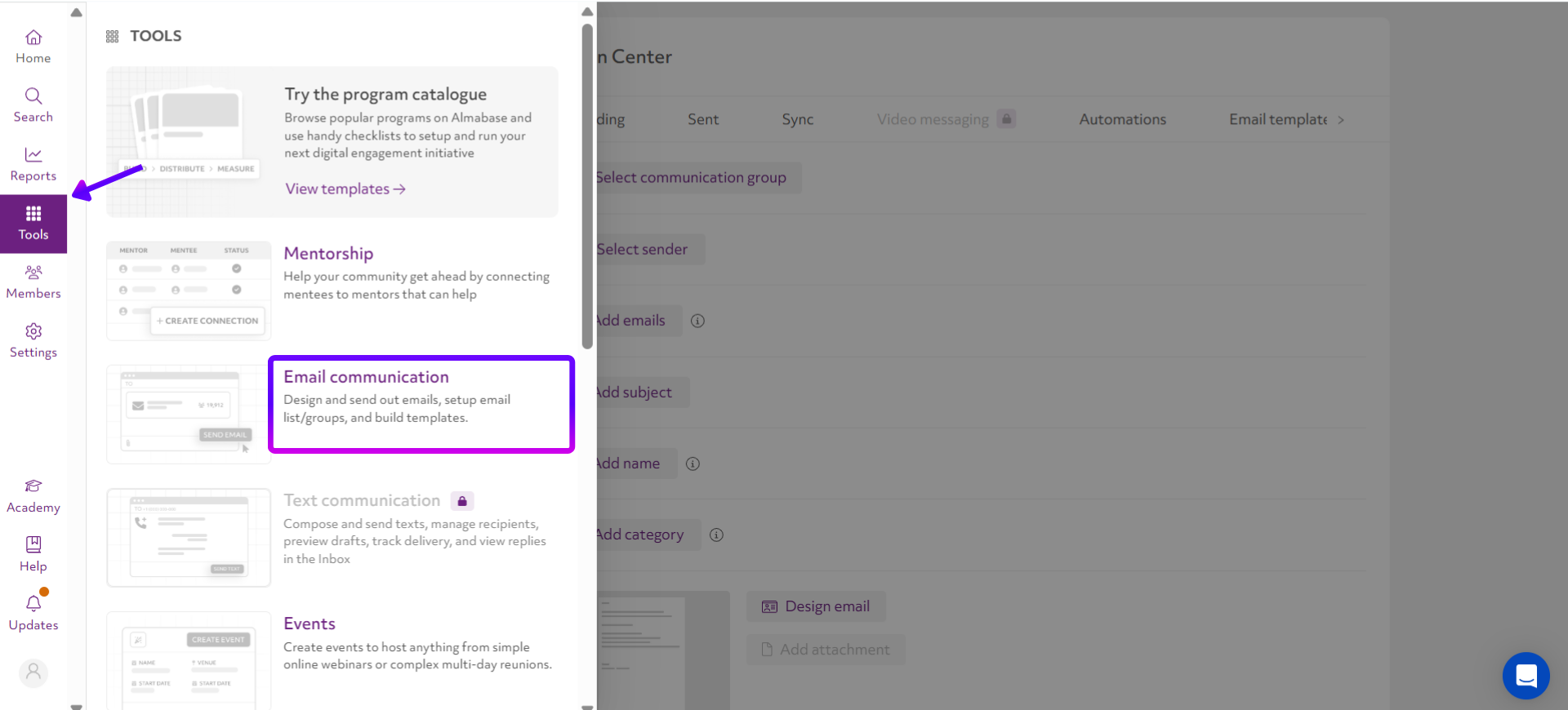
Almabase's drag-and-drop email builder works from any list, whether that means uploading a spreadsheet or building a segment directly inside the platform.
Email layouts also render consistently on mobile, and unsubscribes are handled through category-level preference centers, so a constituent can opt out of one kind of communication while staying on others.
Because Almabase's engagement data flows back to the constituent's RE NXT tile through TrueSync, your team can see which emails someone opened, which links they clicked, and which giving pages they visited before they gave, all without pulling a separate report.
BBNC works just fine for a simple, single-fund "give now" page. It really starts to struggle when institutions begin to get more ambitious with their scale: campaign hubs, fund-level thermometers, leaderboards, time-based matching challenges, or a mobile checkout handled cleanly with only a few clicks. Institutions running multi-event giving days or homecoming weekends with sub-events where more is required from the platform find that BBNC doesn't have the building blocks for it.
The workaround is obviously to layer on a different tool to handle the campaign mechanics BBNC can't. That solves the giving day experience but reintroduces the exact data problem BBNC's RE sync was supposed to prevent. Gift data now lives in the third-party tool and Raiser's Edge, and neither talks to the other automatically. For complex events, this could mean up to a week of manual data reconciliation for your team.
Almabase solves this problem by building this natively. Branded campaign hubs support fund-level goals with rollups, live leaderboards, and matching challenge banners, all with mobile-first checkout that doesn't ask donors to navigate multiple screens.
Every transaction captured during the rush of a giving day flows into RE NXT in real time through TrueSync, so there's no separate reconciliation step because there's no separate system generating a second set of records to begin with!
Faster reconciliation isn't just about efficiency. With Almabase, MSUM reduced Giving Day reconciliation from four weeks to four days, giving the advancement team time to launch a stewardship campaign that generated an additional $40,000 in follow-on gifts.
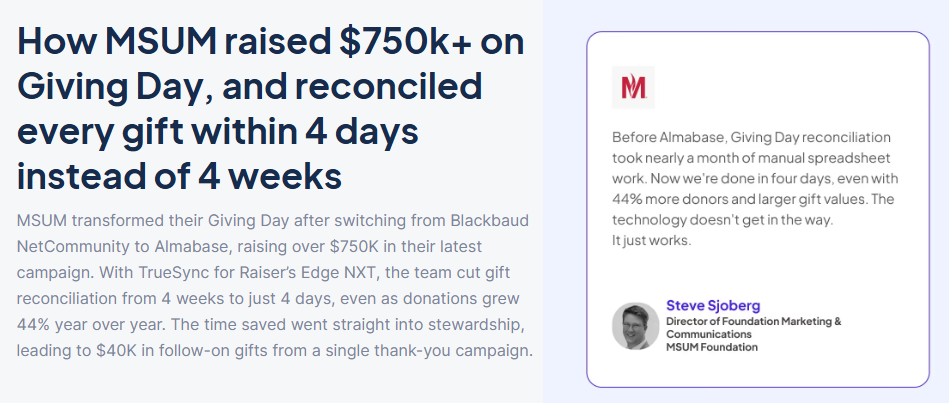
Read the full case study here.
BBNC's own connection to Raiser's Edge handles transactional data reasonably well. Gifts link to the right funds, registrations flow into the correct event records, and email lists continue pulling from your existing queries. For teams using BBNC largely as-is, the native connection does what it's meant to do.
Where it falls short is context. BBNC's RE integration records that a gift happened, but not what led up to it. There's no lead scoring, no engagement history on the constituent record, and no way for a gift officer to see that a prospect opened three campaign emails and visited the Giving Day page four times before finally making a gift.
Those kinds of signals are the ones that help teams decide who to reach out to and when, and unfortunately, these never make it into Raiser's Edge. Instead, advancement teams are left relying on campaign-level reports and educated guesses, even though RE NXT is already where they're doing most of their work.
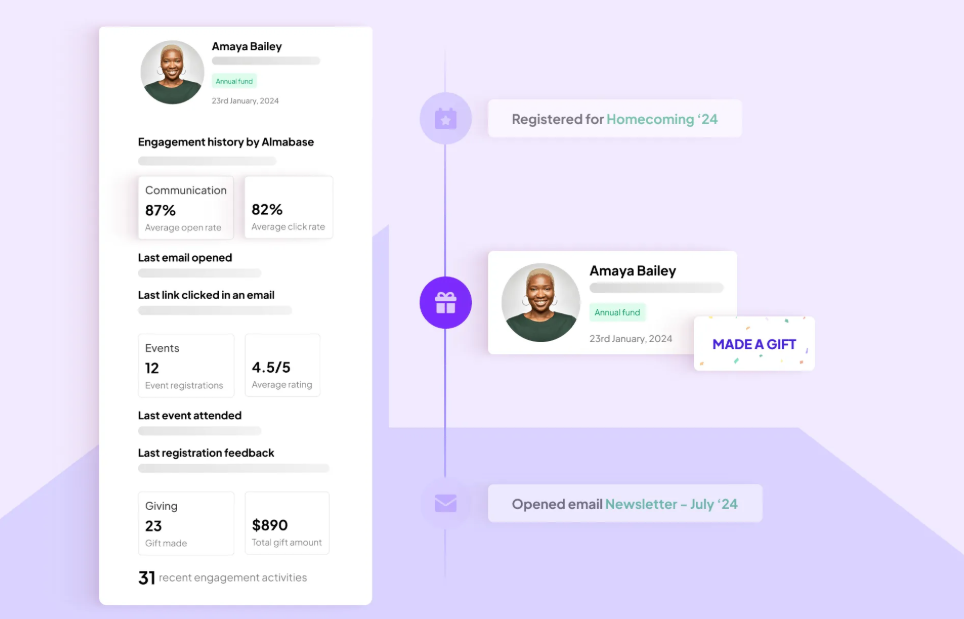
Almabase's TrueSync integration fills in those missing pieces by surfacing engagement data directly on the RE NXT constituent record at no additional charge. Gift officers can see which emails someone opened, which links they clicked, where they've been engaging, and where their gifts are directed, all without leaving the CRM. Instead of a record that simply logs transactions, they get a much clearer picture of how someone has engaged over time.
BBNC's event registration works well for straightforward events, but it starts to show its limits as complexity increases. It doesn't support sub-event management, ticket-level fund designation, guest forms for collecting meal preferences or accessibility needs, QR code check-in, or conditional registration based on class year or affiliation. A multi-day reunion weekend or a Homecoming with parallel events across departments is basically more than what BBNC was built to handle.
At that point, once again, institutions turn to third-party tools. The trade-off is that the same event often has to be built twice: once in BBNC to maintain the connection with Raiser's Edge, and again in a third-party platform to deliver the registration experience attendees need. That creates another data silo, doubles administrative work, and makes it harder to keep track of who's attending what.
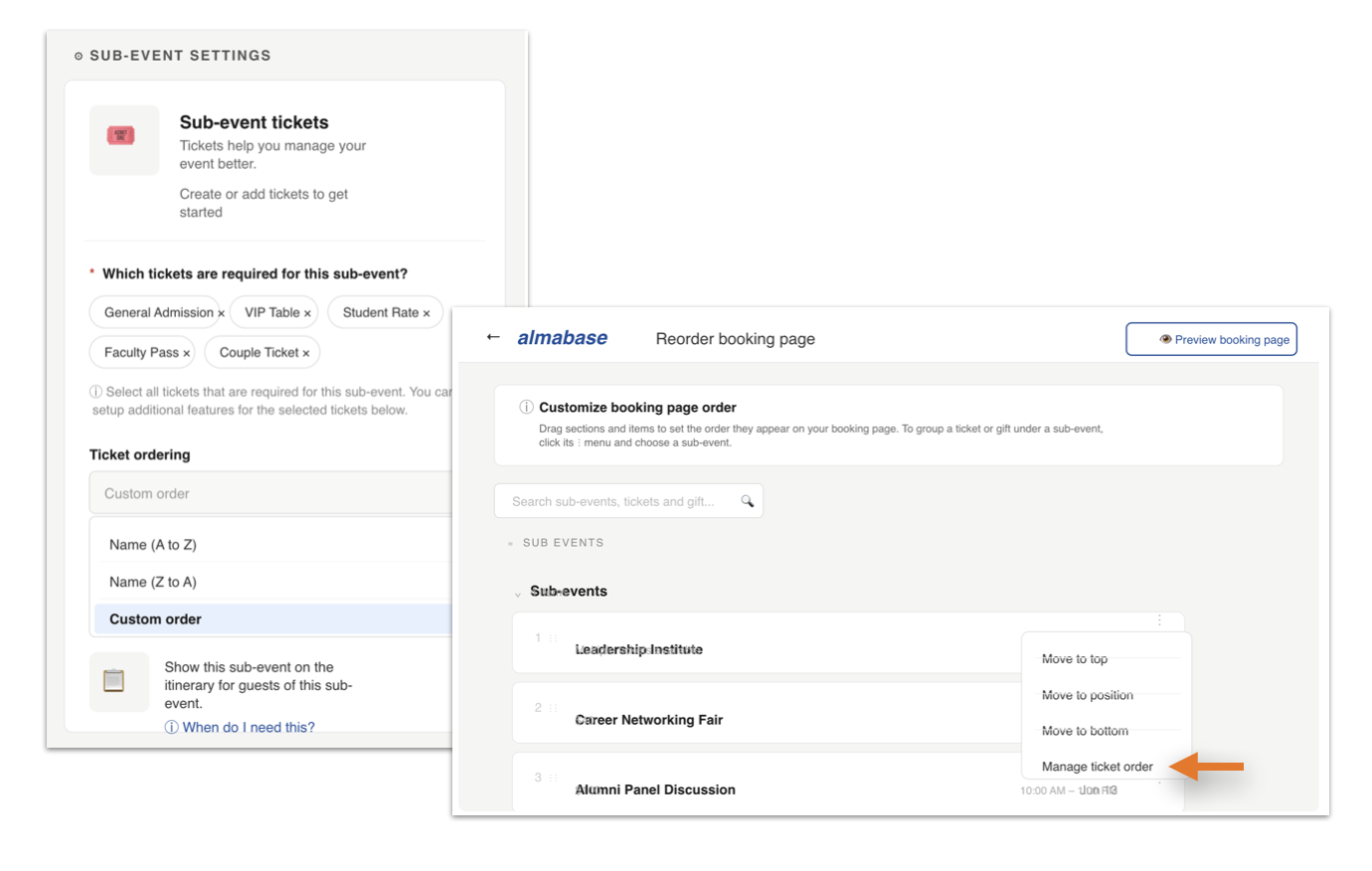
Almabase handles those more complex events within a single registration flow. A 15-event Homecoming weekend can live under one event instead of a dozen separate registration pages. Staff can check in attendees with QR codes, register walk-ins, and accept on-site payments from a mobile device.
Through conditional questions, the form adapts in real time based on who is registering and how they respond. Alumni, parents, volunteers, or specific class years can each see a different set of questions, while nested follow-up fields appear only when they're relevant.
Attendees can register themselves and manage one or more guests, choose sub-events, select meal or accessibility preferences, and complete everything in a single, mobile-friendly checkout experience.
BBNC's page editor gets the job done for basic pages, but customization is limited. Anything beyond a simple layout: adding a promotional video banner, updating the color scheme, creating a modern grid, or building a more polished landing page requires code-level changes. In 2026, maybe it is not the most reasonable to have to depend on a developer to make minor changes to your donation pages.
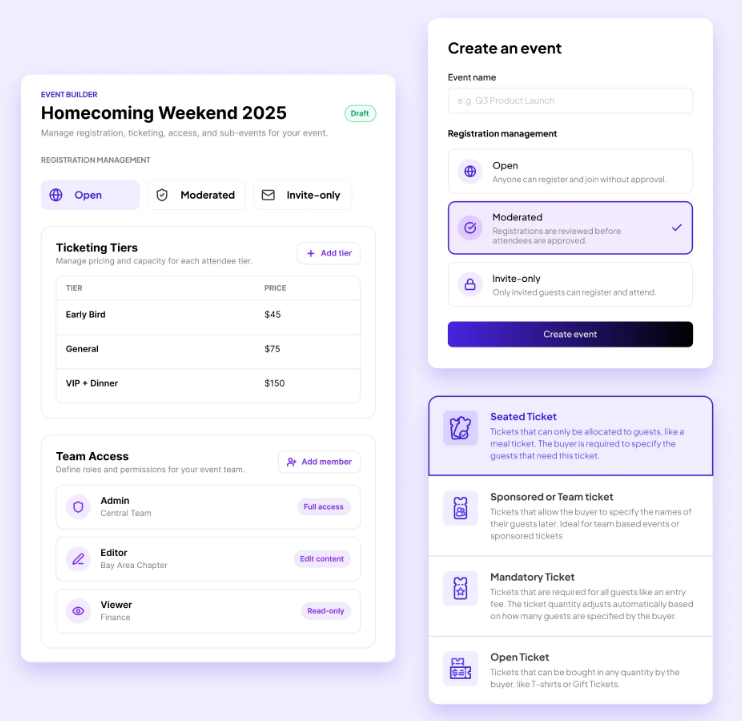
Almabase gives advancement teams a no-code way to build branded, mobile-responsive pages themselves. Event pages, giving forms, and campaign microsites can all be created, launched, and updated without writing code. Teams can embed donation asks directly into the registration journey, delegate event management with role-based permissions, and make last-minute updates without waiting on IT or a developer. This flexibility can be especially valuable in the weeks leading up to a launch, when messaging, visuals, and calls to action might need to change in real time as you make adjustments to your campaign strategy.
Check out our blog that compares Almabase with BBNC for a deeper look at how these two platforms stack against each other.
No platform does everything perfectly, and it's worth calling out the areas where BBNC still has an advantage.
BBNC can surface information stored in RE NXT's relationship tables, such as spouses, children, congregation membership, and other family or affiliation records directly on a constituent's profile. Almabase doesn't currently sync those relationship records from RE NXT, although anniversary dates are supported.
For institutions that rely heavily on family or congregational relationships as part of stewardship, that's an important consideration to discuss during the evaluation process.
In practice, many teams continue to treat RE NXT as the source of truth for that information, with gift officers referring to those records when relationship context is needed.
RE NXT supports a wide range of address types, all of which BBNC can surface. Almabase currently supports two: Home and Office. During onboarding, one RE NXT address type is mapped to each, which is sufficient for most institutions' day-to-day communication and stewardship.
The main consideration is for schools that maintain several distinct address types, such as seasonal residences, business addresses, or separate international mailing addresses. Those institutions may need to decide which addresses should remain primary and which can be consolidated.
RE NXT lets institutions manage email consent for each individual email address. That means a constituent can choose to receive communications at a personal email while opting out of a work address, or vice versa.
Almabase takes a simpler approach by managing consent at the constituent level. If someone opts out, the preference applies across all of the email addresses associated with their record. For most institutions, this wouldn’t make a huge difference. But if your team regularly works with constituents who maintain separate personal, professional, or other email addresses, it's a distinction worth understanding before implementation.
Some BBNC institutions maintain different subdomains for different audiences; for example, ‘alumni.school.edu’ and ‘parents.school.edu’, each with its own branding, navigation, and experience. Almabase brings those audiences together under a single subdomain.
This distinction, of course, can still be retained with Almabase: different audiences can be served through dedicated landing pages, conditional content, and tailored navigation within the same site. But if your current setup depends on entirely separate subdomains, it's something to account for when planning your migration.
Migrations from BBNC generally follow the same path as any move to a new advancement platform. Our blog on migrating from BBNC covers the process in more detail, but the short version is this: most implementations take anywhere from three weeks to two months, depending on the amount of data cleanup, testing, and staff training involved.
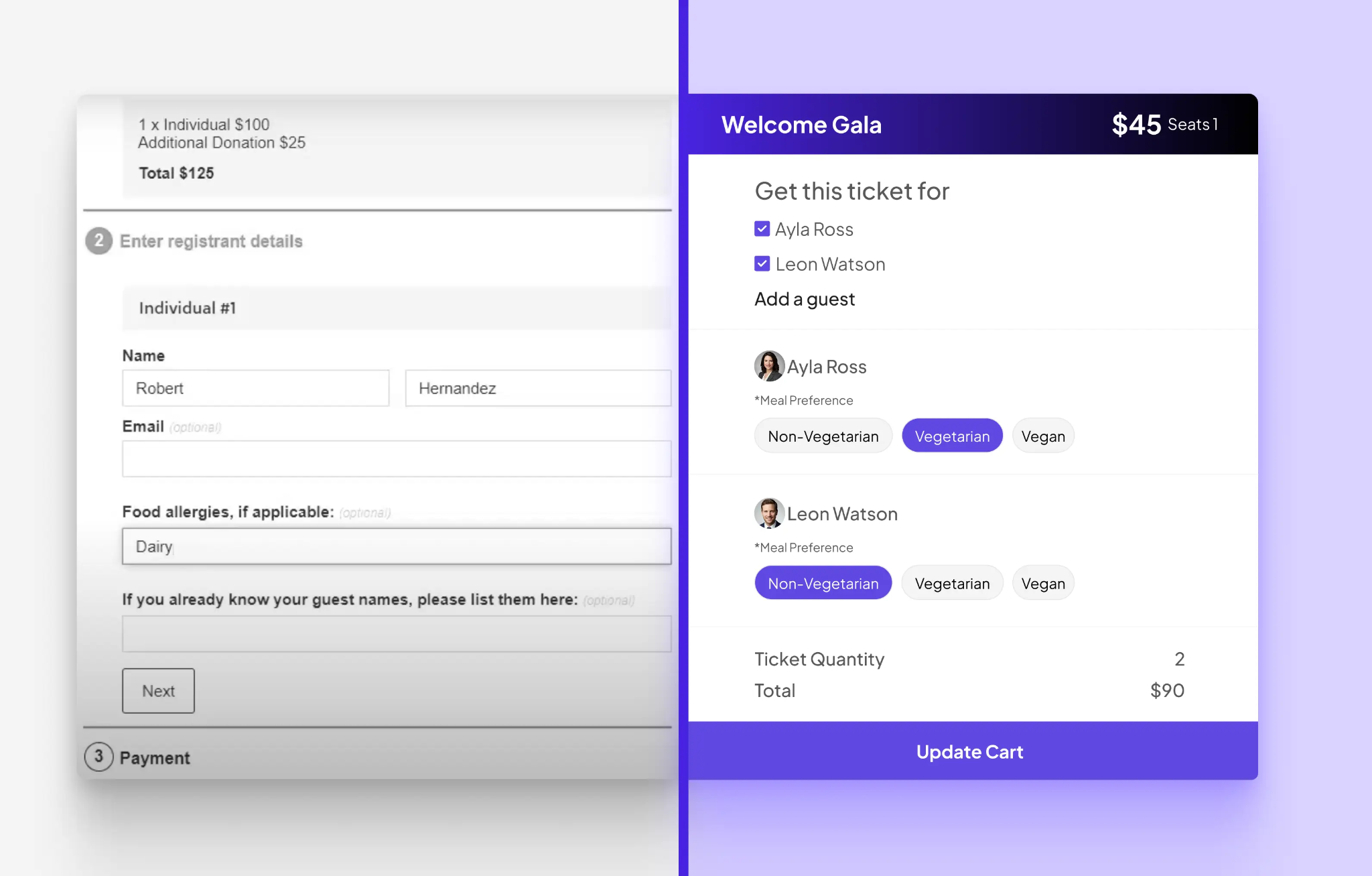
Almabase starts reducing that work before implementation even begins. A free 30-minute integration audit with a solutions engineer reviews your current data structure, naming conventions, integrations, and migration goals so potential issues are identified upfront instead of during go-live.
From there, TrueSync configures the two-way sync between Almabase and RE NXT while preserving your existing field mappings and naming conventions. Your team also decides how data should flow, whether updates from Almabase sync automatically into RE NXT or require review before they're committed to the CRM.
Cornell College manages a community of 15,000 to 17,000 alumni with a lean advancement team. Before moving to Almabase, staff were piecing together BBNC and other tools, and spending valuable time managing disconnected systems instead of building relationships with alumni.
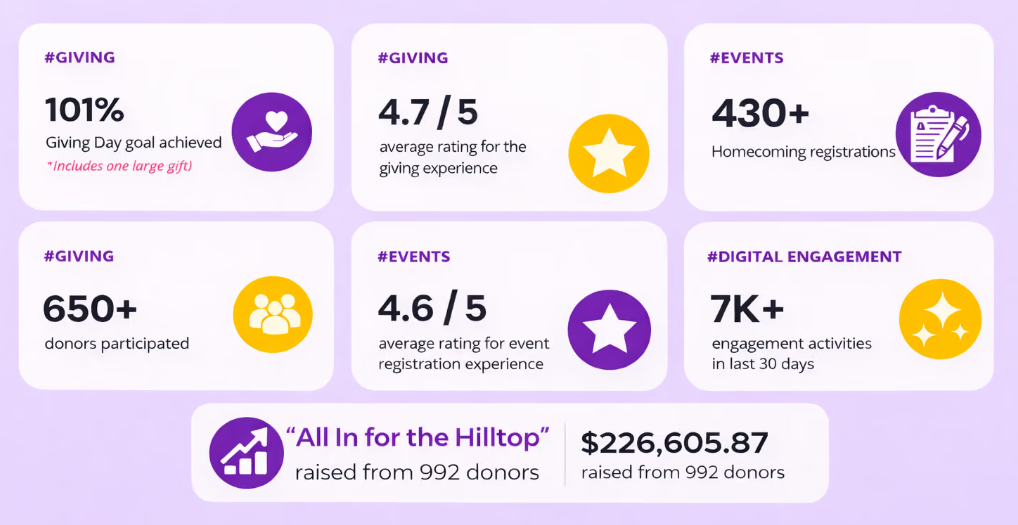
With giving, events, email, forms, and community engagement all in one platform, registrations flowed smoothly, alumni could update their own records, and the team spent less time on administration.
The results followed: 1,008 donors on Giving Day, a 4.7/5 participant rating, more than 430 Homecoming attendees, and over $226,000 raised from 992 donors during the "All In for the Hilltop" campaign.
Here’s the full scoop on Cornell College for more on how that shift played out.
None of the limitations above are deal-breakers on their own. Exporting a CSV takes only a few minutes. Building an event in two systems isn't impossible. Even manually reconciling registrations after a campaign can become part of the routine for an event or two.
But dealing with all of these together and operating with workarounds that cost in manual hours is not what your team should have to experience.
A few things to think about:
For some institutions, the existing setup might still be the right fit. But if the workarounds are starting to consume more time than the work itself, it's a good signal that it's worth evaluating what's changed.
As budget planning comes around, ask your team the right questions: "What does this platform cost?", but also, "How much time are we spending working around it?".
If your team is constantly exporting data, reconciling spreadsheets, or jumping between tools for events, email, giving, and community engagement, those hours add up. The question is whether the operational savings from keeping everything in one place outweigh the cost of continuing with a stack of disconnected tools.
Ready to see how you could run your events without the workarounds? Request a demo today.

Blackbaud NetCommunity vs. Modern Advancement Needs: A Closer Look
Lorem ipsum dolor sit amet, consectetur adipiscing elit. Suspendisse varius enim in eros elementum tristique. Duis cursus, mi quis viverra ornare, eros dolor interdum nulla, ut commodo diam libero vitae erat. Aenean faucibus nibh et justo cursus id rutrum lorem imperdiet. Nunc ut sem vitae risus tristique posuere.
Anwesha Kiran
July 21, 2026
12 minutes
It’s never an easy decision to switch to a new platform and if you’ve been a frequent user of Blackbaud NetCommunity (BBNC) for a while, you might have a fair amount of questions about moving elsewhere.
In case you’re on the lookout for BBNC alternatives, we’ve rounded up 5 potential replacements for you and your team to consider. Our choices are based on a variety of factors which we’ll be getting into first.
While evaluating alternatives, you might feel like most platforms have similar feature lists with a few differences here and there. But the way those features are organized and how they work together can reveal the best fit for your team.
Here's what to evaluate:
For most BBNC users, Raiser's Edge NXT is already at the center of donor management. The rest of your advancement tools must work seamlessly alongside it and help your team stay coordinated.
That means having giving, events, email, and community engagement data flow into your CRM automatically and in real time. When a donor makes a gift, your team should be able to see it right away in RE NXT.
Most advancement teams likely do not have a dedicated tech person. The people using these tools should find it easy to navigate (and this shouldn’t only be the most tech-savvy member in your team!).
This means your team should be able to create event pages, build audience segments, send emails, and manage campaigns with confidence, because doing all this on the platform feels intuitive to them. Some platforms pay close attention to the user experience and take special care to make it easier for them to work on.
Just as important is the experience for alumni. The more alumni can do for themselves, the easier it is for your team to keep data current and engagement high. Features like profile updates, event registration, class note submissions, and communication preferences give alumni greater control while helping you maintain accurate records.
The platform you choose today should still work for you down the line as your alumni community grows and fundraising efforts expand in scale and complexity. Whether you're managing 5,000 alumni or 50,000, the experience should remain consistent.
This is particularly important for colleges and universities planning for long-term growth. The best platforms scale alongside your institution, making it easy to increase capacity and expand programs without disrupting day-to-day operations. As your needs evolve, your team can stay focused on engaging alumni and advancing institutional goals rather than managing technology transitions.
If you've spent years juggling multiple systems, you've probably accepted a certain amount of friction as part of the job. This could look like pulling different places or reports that take longer than they should. As a result, your team spends more time making sense of information between platforms instead of building relationships with alumni and donors.
So moving platforms becomes an opportunity to look for a platform that does the work your old platform was doing, but does it better, and preferably, in one place.
On paper, many advancement teams have everything they need: tools for fundraising, events, email, and alumni engagement. But if those systems don’t work together smoothly, your team could find itself in a bit of a fix, managing tools when they could be managing experiences for attendees and donors. It's rarely a major problem on any given day, but the time and effort add up over the course of recurring issues across events.
In fact, we saw something similar firsthand at Almabase: Cornell College moved from managing alumni engagement across BBNC and multiple tools to one integrated platform, and the shift eliminated the constant back-and-forth that was taking up their team's time.
Before we get into the deep-dive, here is a quick look at the platforms we’ve listed for you:
Almabase was built with advancement teams in mind. Instead of juggling separate tools for giving, events, email, and alumni engagement, teams can manage everything in one place. It also integrates closely with Raiser's Edge NXT, helping data flow naturally between systems and giving staff a more complete view of alumni activity.
Best for: Institutions on BBNC struggling with complexity, looking to simplify their tech stack by bringing key advancement activities together on a single platform. It is a great fit for colleges and universities of all sizes.
Key Strengths:
Almabase in action:
Cornell College manages a community of 15,000-17,000 alumni with a remarkably lean advancement team. Before Almabase, staff were piecing together BBNC and other tools, spending valuable time managing disconnected systems and manual processes.
After moving giving, events, email, forms, and community engagement into Almabase, event registrations flowed in smoothly and alumni could update their own information. With an alumni community that cares about staying connected, the college was able to elevate their Giving Day experience with leaderboards, campaign pages, and real-time participation tracking.
After the switch, Cornell exceeded its Giving Day goal, reaching 1,008 donors and earning a 4.7/5 participant rating. Homecoming attracted more than 430 attendees, and their "All In for the Hilltop" campaign raised over $226,000 from 992 donors.
Watch the team from Cornell College share their experience here.
.avif)
What it's not great at: Almabase does not include prospect research or wealth screening tools. If major gifts research is a priority, you'd need to layer in a separate platform.
Pricing: Custom pricing based on institution size and needs.
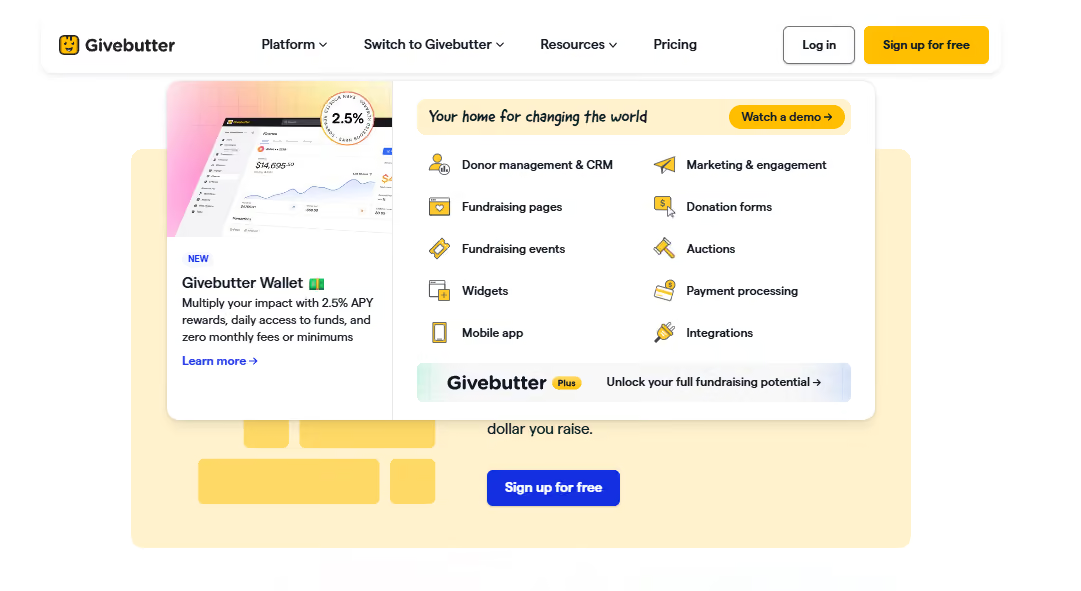
GiveButter is an all-in-one fundraising platform designed to help nonprofits raise funds, engage donors, and manage donor relationships through customizable donation forms, embedded donation widgets, and various payment options. The platform is known for its transparent pricing model, operating on a "tip-or-optional-fee" basis, meaning nonprofits receive 100% of their donations with no hidden fees.
Best for: Organizations looking to launch peer-to-peer campaigns without a subscription commitment, schools running crowdfunding initiatives on a low budget, and nonprofits seeking easy-to-navigate platforms for both staff and donors.
Best for: Organizations looking to launch peer-to-peer campaigns without a subscription commitment, schools running crowdfunding initiatives on a low budget, and nonprofits seeking easy-to-navigate platforms for both staff and donors.
Key Strengths:
What it's not great at: GiveButter primarily caters to nonprofits and may not be as experienced with educational institution's needs, especially volunteer management and alumni engagement like platforms built specifically for higher education. If you’re looking for advanced alumni networking, community engagement, or multi-day event management at institutional scale, you'll likely need to supplement GiveButter with other tools.
Pricing: The platform’s core features are available at zero platform fee when optional donor tips are enabled. If you turn off tips, a flat 3% platform fee applies.
Givebutter Plus, which is their paid tier, starts at $29/month and provides advanced automation and analytics.
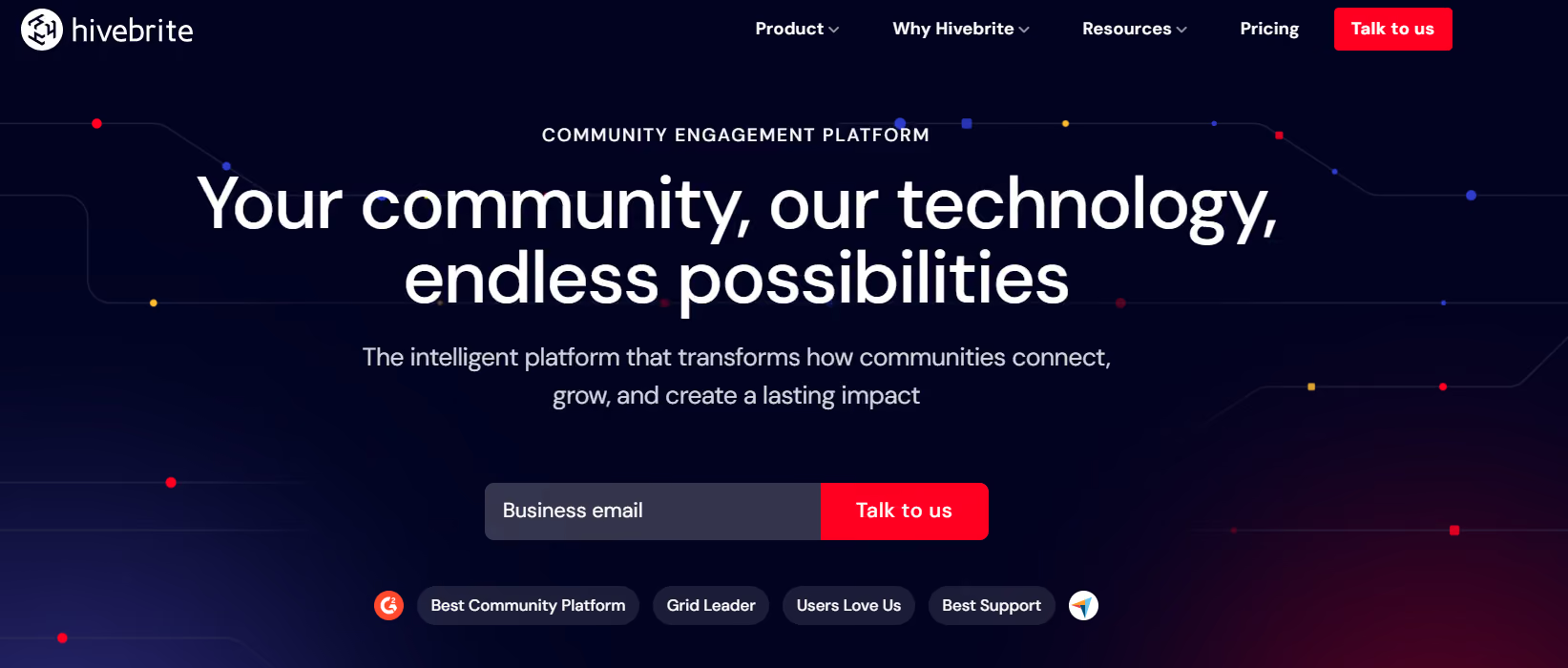
Hivebrite started as a community platform and has evolved into a comprehensive alumni engagement hub. If your priority is building a place where alumni actively engage with each other (not just receive messages from the institution), Hivebrite delivers that experience.
Best for: It's a great pick when your goal is fostering actual peer-to-peer connections: discussion spaces, networking, job boards, and mentoring. It works well for schools with large, geographically dispersed alumni networks that want to position the platform as a living community.
Key Strengths:
What it's not great at: While Hivebrite features direct, bidirectional integrations with major CRMs like Blackbaud Raiser's Edge NXT and Salesforce to prevent manual data syncing, its transactional giving modules are still not at the center of operations. If your team requires advanced fundraising toolsets like gamified giving day leaderboards or major gift prospect tracking, you will likely need separate, dedicated tools alongside it.
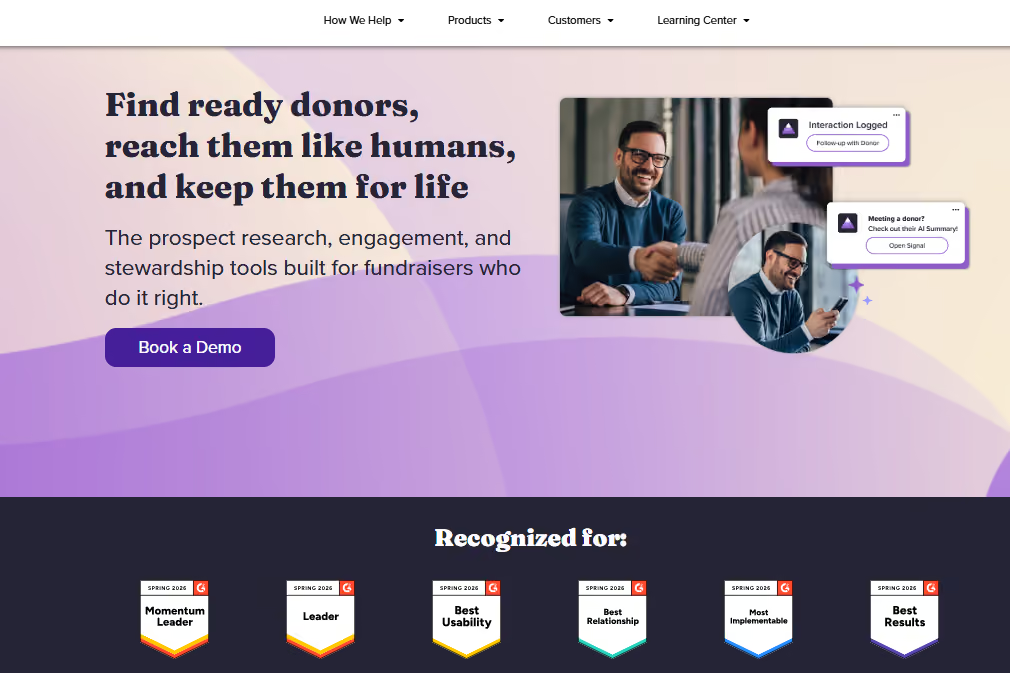
EverTrue brings prospect research and wealth screening directly into the platform. It's built for institutions focused on major gifts and looking to connect engagement data with donor intelligence. It really stands out with helping teams identify which alumni are most likely to give and when. This is fundamentally different from the other platforms in that it's more specialized than all-in-one.
Best for: Institutions with a dedicated major gifts program and the capacity to leverage wealth screening and engagement data together. Works best for universities managing alumni records where prospect identification directly feeds major gifts strategy.
Key Strengths:
What it's not great at: It’s not a full platform replacement. You still manage separate systems for events, email marketing, and community. Best used alongside other tools, not instead of them.
Pricing: EverTrue offers custom pricing based on institutional requirements.

360Alumni is an all-in-one platform similar to Almabase, but leans more into networking and community as the centerpiece. It's built for schools that want to give alumni a branded, customizable space to connect and engage while also managing fundraising and events. The platform launched in 2013 with a specific mission: help institutions deliver value through their alumni network, not just extract giving.
Best for: Institutions wanting a modern, integrated alternative with strong community and engagement features. It works well for colleges prioritizing alumni network building alongside fundraising, particularly schools at earlier stages of alumni relations sophistication.
Key Strengths:
What it's not great at: CRM integration maturity is less established than some other platforms on this list. The community-first approach can mean fundraising and advancement workflows feel secondary. Smaller user base means fewer case studies and peer reference institutions compared to more established platforms.
Pricing: EverTrue offers custom pricing for institutions based on alumni count and feature requirements.
Setting expectations around things like how data migration will work, what resources your team will need, and what “success” looks like in the first few months will help you and your team down the line.
Before you commit, it helps to get clear on a few key areas:
Get answers to these before you sign anything:
1. Data migration: Think about all the logistical parts:
2. Timeline: What's a realistic implementation schedule? If a vendor suggests a short implementation window, like a week, for a full migration, it might be time to invoke some healthy skepticism. Most implementations take 3 weeks to two months when you factor in data cleanup, staff training, and testing.
3. Training and onboarding: What does the platform’s ongoing support look like after go-live? Will you get a dedicated implementation manager, or are you on your own, and does that work for you?
4. CRM integration: Work out the specifics: will it be real-time or batch sync? How often do you sync? What happens if something breaks, who takes the responsibility to troubleshoot?
5. Costs: Consider implementation, ongoing licensing, and any integration fees you might not have anticipated. Ask for a three-year cost projection, not just the first-year number.
6. Contingency: What happens if you need to run both systems in parallel? Can the vendor accommodate that, or are there any additional costs there?
Your current platform isn't disappearing tomorrow. You have time to approach this strategically.
Running parallel systems briefly costs less than rushing the transition and spending months fixing mistakes. Early vendor conversations will tell you a lot about their implementation approach and about gaps in your own readiness. Budget time for staff training alongside platform setup. Even the best platform in the world won't work out if your team doesn't know their way around it.
Choosing the best alternative to BBNC is a chance to make day-to-day work easier for your team and create a smoother experience for alumni and donors. We've seen institutions get the most value when they reduce the number of disconnected tools staff have to manage. Cornell College achieved this by bringing critical functions together in one connected ecosystem.
That same pattern shows up in other institutions that have modernized their BBNC setup: cleaner workflows, less manual work, and a better experience for the people interacting with the institution.
If you'd like to explore more, these stories are a good place to start:
Whatever platform you choose, the goal is the same: give your team fewer systems to wrestle with and more time to focus on alumni, donors, and the work that matters most.
If you're exploring alternatives to BBNC and want to see what a more connected advancement experience could look like, request a demo and we'd be happy to walk you through it.
.avif)
Top 5 Blackbaud NetCommunity Alternatives
Lorem ipsum dolor sit amet, consectetur adipiscing elit. Suspendisse varius enim in eros elementum tristique. Duis cursus, mi quis viverra ornare, eros dolor interdum nulla, ut commodo diam libero vitae erat. Aenean faucibus nibh et justo cursus id rutrum lorem imperdiet. Nunc ut sem vitae risus tristique posuere.
Anwesha Kiran
June 11, 2026
12 minutes
As alumni events grow, so do the headcount and the complexity in executing them.
A Homecoming weekend, for example, has so many things to plan for and keep track of: registrations, sub-events, guest management, communications, fundraising, check-in, CRM updates, reporting, all happening simultaneously. This is a whole different ballgame than just a bigger pool of attendees.
Every successful event, whether it's a regional chapter gathering or a multi-day Homecoming celebration, moves through the same five stages:
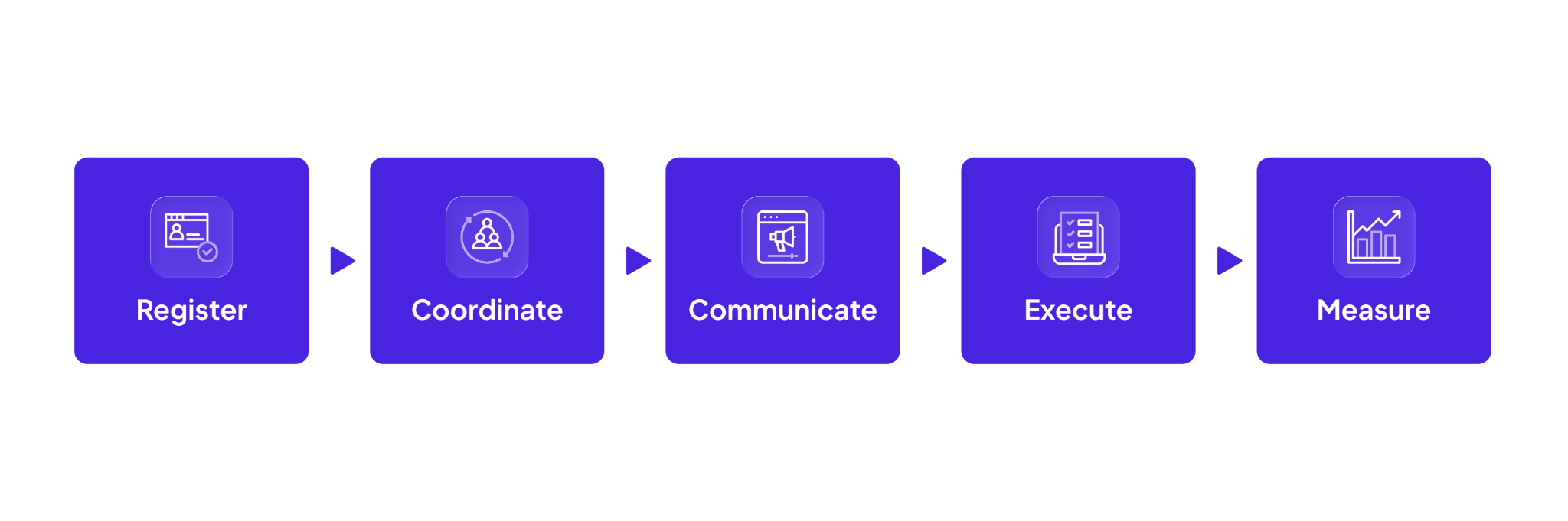
A Homecoming weekend or a Giving Day means these same five things, but now alongside multiple sub-events running in parallel, attendees taking completely different paths through the weekend, tighter timelines to pull it all together, and more data flowing between more systems than any one person can track by hand.
These learnings are gained over time and Almabase is built around them to support the entire event lifecycle, from the first registration to the insights that shape the next event.

Getting alumni to register sounds straightforward, but the complexity could already start building at this stage.
Attendees RSVP and bring guests, or sign up for a single session before opting into several others, which may carry different pricing tiers. Sometimes, they even change their minds midway through.
The organizers’ goal is to accommodate these compounding decisions seamlessly. A good registration experience makes all of these as effortless as possible, for attendees and for the team behind the scenes.
Regardless of when you start planning, your event page should be something your team can build themselves. It is very likely that you’ll need to make last-minute adjustments to keep up with changes to your strategy.
Almabase lets you build fully branded event pages with no code, reuse templates across events, and publish quickly while keeping everything aligned with your institution's visual identity.
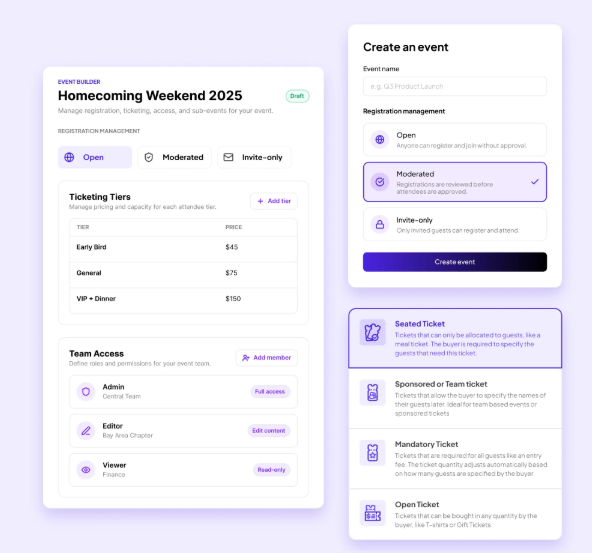
The result is faster launches and one less external dependency when timelines tighten close to event day.
Think about a typical alumni weekend or events scattered throughout spirit week. On the guests’ end, someone signs up for the Friday evening reception, skips the Saturday morning campus tour, buys tickets for the gala, and brings two guests to the football tailgate.
Behind the scenes, every one of those activities has its own capacity, schedule, pricing, and attendee list. If your systems don’t keep up at this point,tracking individual attendee schedules and ticket details becomes overwhelming. Information will slip through the cracks.
With Almabase, you can organize all of those experiences under one parent event, while giving each sub-event its own registration flow, ticketing, capacity limits, and logistics. Alumni still enjoy one seamless registration journey, while your team manages everything from a single backend instead of juggling multiple event pages and spreadsheets.
Cornell College runs its entire alumni program with 15,000+ alumni on a lean team, and it shows in what they've been able to pull off with one connected system: 1,008 donors on Giving Day, a 4.7/5 participant rating, and 430+ Homecoming attendees, all without adding headcount.
Read the full blog here.
Reunions are designed around reconnecting with classmates, old roommates, mentors, partners, and sometimes introducing children to the campus that's featured in so many family stories. The point is, these are not solo events, and the registration should reflect that.
Instead of asking every guest to complete a separate registration, Almabase allows alumni to register together. Families, spouses, classmates, and other guests need not separate out in the registration process, making for a smoother experience while helping your team keep relationships and headcounts organised.
You don’t want a reunion volunteer to see the same questions as a first-time attendee, and someone attending only the gala shouldn't have to scroll through options for every campus tour.
This is solved by the conditional questions that can be used in forms built with Almabase.
Based on an attendee's answers and preferences, you can choose to surface different questions, sessions, ticket options, or pricing automatically. The form adapts as people move through it, keeping the experience simple while ensuring your team still captures the information it needs.
While it is a small detail, saving your attendees unnecessary information overload definitely adds to their experience.
A tale as old as time, and perhaps the most unsurprising: a delayed flight means swapping the morning session for the afternoon one, or someone remembers (well after registrations have closed) that they wanted to bring their spouse along.
While it’s great to accommodate these changes, there’s no way to account for the manual overhead these create.
Instead of asking staff to rebuild registrations every time someone's plans shift, Almabase allows attendees to update registrations, cancel or switch sessions, or manage guests themselves. The time your team would’ve spent fixing records is now free to go into preparing for the event.
Once registrations start flowing in, your team then needs to focus on organizing an increasingly complex event without creating too much operational overhead.
Moments that get your attendees the most excited, such as when they walk in through the campus they once called home, catching up with old friends, watching current students with pride or recounting their campus experiences to their kids, are moments of pure connection.
Fundraising, when built into the event, must come as part of this experience, but not interrupt it. It takes a bit of careful planning to get this just right.
With Almabase, you can choose to build fundraising moments throughout the event journey: during registration, through dedicated giving pages, at check-in, or on-site through mobile giving. Whether someone wants to make a one-time gift, set up recurring giving, or add a donation alongside their ticket purchase, it all happens within the same experience.
Part of running a great event is watching popular sessions get sign ups beyond anticipation.
Without a structured way to manage this demand, your team might find itself needing to maintain manual waitlists, replying to individual emails, or trying to remember who expressed interest first. And when a spot opens up because someone cancels, the scramble unfolds: pulling sign-up data from multiple lists, checking who cancelled, who expressed interest and can be slotted in instead - it’s a lot.
Almabase's sub-event waitlists are built to handle that process for you. When a session reaches capacity, attendees can join a waitlist instead of being turned away. If a spot becomes available, whether through a cancellation or increased capacity, they're automatically (or manually, if you prefer) offered that spot with a time-bound registration link. If they don't respond in time, the offer moves to the next person in line.
For events where some attendees deserve priority, like reunion committee members, sponsors, or VIP guests, you can switch to manual mode, reorder the queue, and choose exactly who receives the next available spot.
It’s one of those details that you think you can manage, but it's exactly the kind of thing that saves event teams hours of back-and-forth while ensuring every available seat has the best chance of being filled.
The event begins much before event day for your team, but in many ways, for your attendees as well. Invitations and save-the-dates are followed by a period of planning: booking accommodation, transportation, taking time off work or family, or bringing someone along.
The communication should spark the decision to come and honor this commitment shown by your attendees. The reminder nudges them to finally register, while the confirmation reassures them they've signed up for the right sessions. The follow-up keeps the conversation going once the event is over. All of these parts come together to make sure the attendees feel like they’re wanted and welcome at the events, and more than just names off of a guest list.
Good communication matches the right receiver with the right message. As simple as it sounds, it can get really complicated in practice as you try and figure out ways to get different messages across to different segments of your audience.
Almabase lets you build audiences using the alumni data you already have. You can decide to segment them by class year, reunion cohort, geography, volunteer involvement, previous event attendance, or giving history.

Instead of blasting your entire database with one generic invitation, you can tailor outreach to the communities you're trying to bring together and no one gets blasted with one generic invitation. A little more thought for some really promising results.
Every event has almost the same email and communication cycle: the save-the-dates, the invitation, a couple of reminders and follow-ups, parking and general event information the day before (sometimes on the day of), and finally a ‘thank you’ once everything is over.
Writing, scheduling, and sending them one by one could take up a lot of time, time that leaner teams especially, could be spending on other, less-repetitive tasks.

Almabase treats email communication as a workflow. With its Emily AI integration, your team can generate a context-aware first draft right inside Almabase's Email Center using a simple prompt like "Invite alumni to our 25th reunion in a warm, conversational tone".It can even pull details from your event page, like the event name, date, location, and registration link, so you're not starting from scratch every time. Once you have a draft, you can refine it, regenerate it, or send it through your usual workflow without ever leaving the platform.
From there the invite automation lets you build an entire invitation sequence upfront, complete with follow-up reminders that are sent only to alumni who haven't yet registered. As people respond, the workflow automatically adapts, so your team isn't manually tracking who still needs a nudge.
And because every email is sent from a sender identity you configure for your institution, the experience feels consistent and familiar to alumni from the very first invitation to the final thank-you. This goes far when your goal is to scale communication without losing the voice that resonates with your audience.
The days immediately after an event are when alumni feel most connected to your institution. The experience is fresh: reliving conversations, sharing photos, reconnecting with classmates, and thinking about when they'll come back next.
That's the perfect moment to keep the momentum going.
Send attendees a thank-you and earnestly ask for feedback while attendees care enough to write back. Share event photos. Reach out with event highlights for those who couldn’t make it. Invite those interested to volunteer at the next planning committee. If fundraising is part of your strategy, follow up with an ask while the emotional connection is still strong.
Almabase makes those conversations easier by letting you tailor follow-up based on what went on: who attended, who didn't, who volunteered, who donated, and who might just need another reason to reconnect.
We believe that the end of an event is a place to show gratitude and leave the door open for conversations about the next one.
Registrations have closed, reminder emails have gone out, and volunteers are at their stations, and everyone's hoping the weather holds up. Months of planning come down to a few hours or a weekend.
Ironically, the mark of a well-run event is when nobody notices the operations behind it.
Attendees notice whether they got through the door without a hitch.
Someone forgot to bring their confirmation email, or a spouse is tagging along but isn't sure whose name the registration is under. These last-minute oddities aren’t unusual, so Almabase equips you with exactly what you need to handle this.
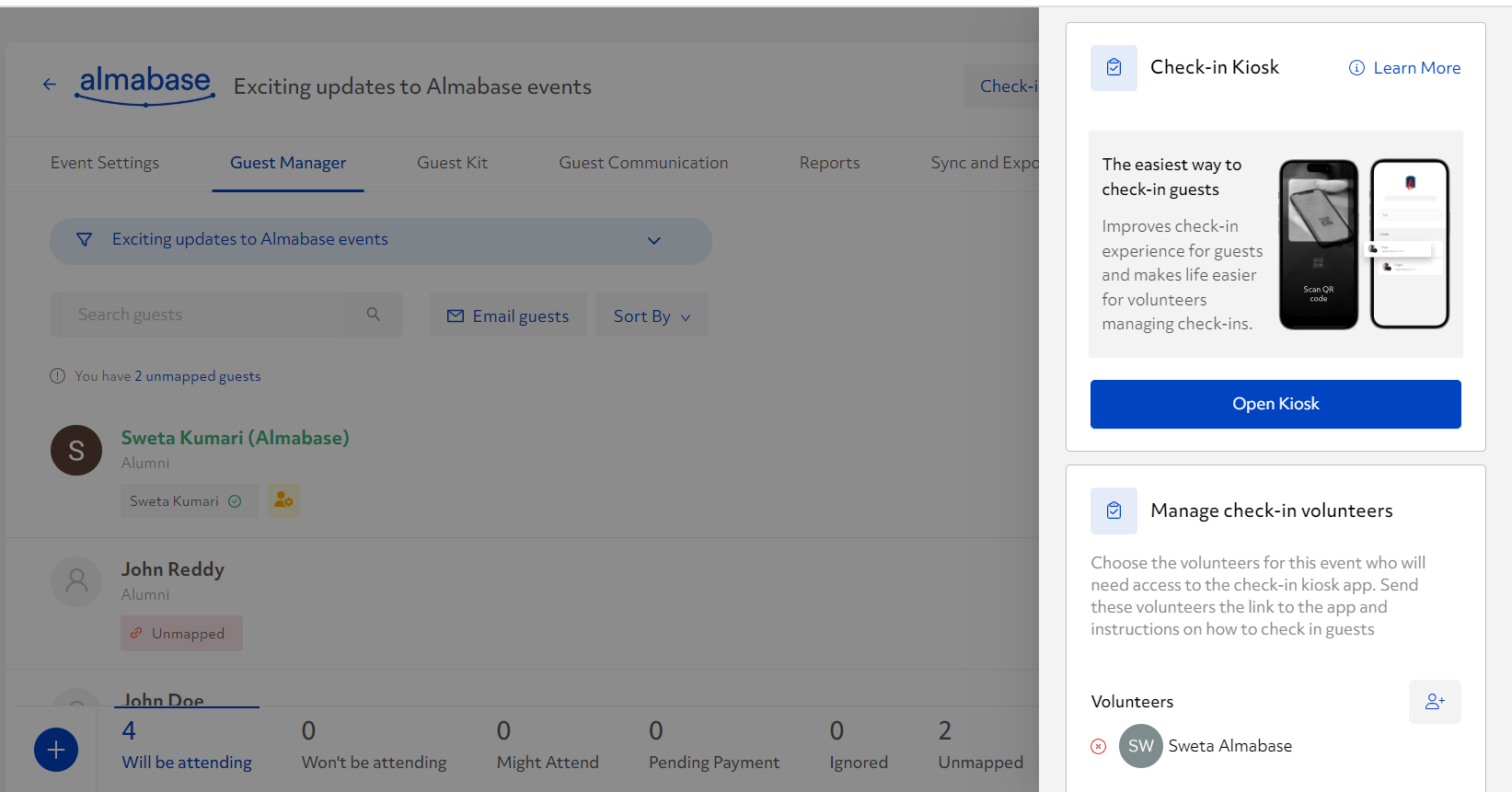
With the QR check-in option, volunteers can scan an attendee's QR code or search for them by name. If someone isn't registered, they can be added on the spot. And because you can assign check-in access to volunteers without giving them full admin permissions, it's easy to run multiple check-in desks without everyone working from the same laptop.
From the attendee's perspective, it's a smooth welcome. From your team's perspective, every check-in is automatically recorded, so you know who actually attended without spending half a day reconciling attendance lists.
Knowing the total headcount of your event is useful, but data that tells you what your attendance means looks like you knowing who showed up for the campus tour, how many stayed for the reunion lunch, and what percentage of your attendees were at the donor reception. This kind of data goes into informing decisions for the next edition of your event.
With Almabase, every sub-event has its own check-in flow. Attendees can scan the QR code from their confirmation email or be checked in by a volunteer, and participation is captured in real time for each individual session. That means you know who attended the event and which experiences they chose to be part of.
Behind the scenes, that attendance data is synced with your CRM, giving your team a complete picture of engagement.
One enduring change since the pandemic years has been the blending of in-person and virtual programmes throughout event experiences, allowing organizers to reach alumni who will not be able to make it in person.
Almabase understands the importance of providing a uniform experience across these formats. It supports in-person, virtual, hybrid, and multi-day events through the same registration, communication, and reporting framework, giving both attendees and event teams a familiar experience regardless of the format.
Now that the event is over, it’s time to unearth the wealth of insights provided by the data captured throughout all the previous stages.
Answering the ‘How did it go’ question depends on accurately reading the insights from this data. As your team embarks on this last project, your platform should be able to keep up by capturing this information for them.
With Almabase's TrueSync with Raiser's Edge NXT, constituent profiles, event registrations, guest information, gifts, ticketing, and sub-event participation stay synchronized between both systems. You decide how data should move, with flexible sync rules that let you automatically update records where it makes sense or review changes before they're pushed to your CRM.
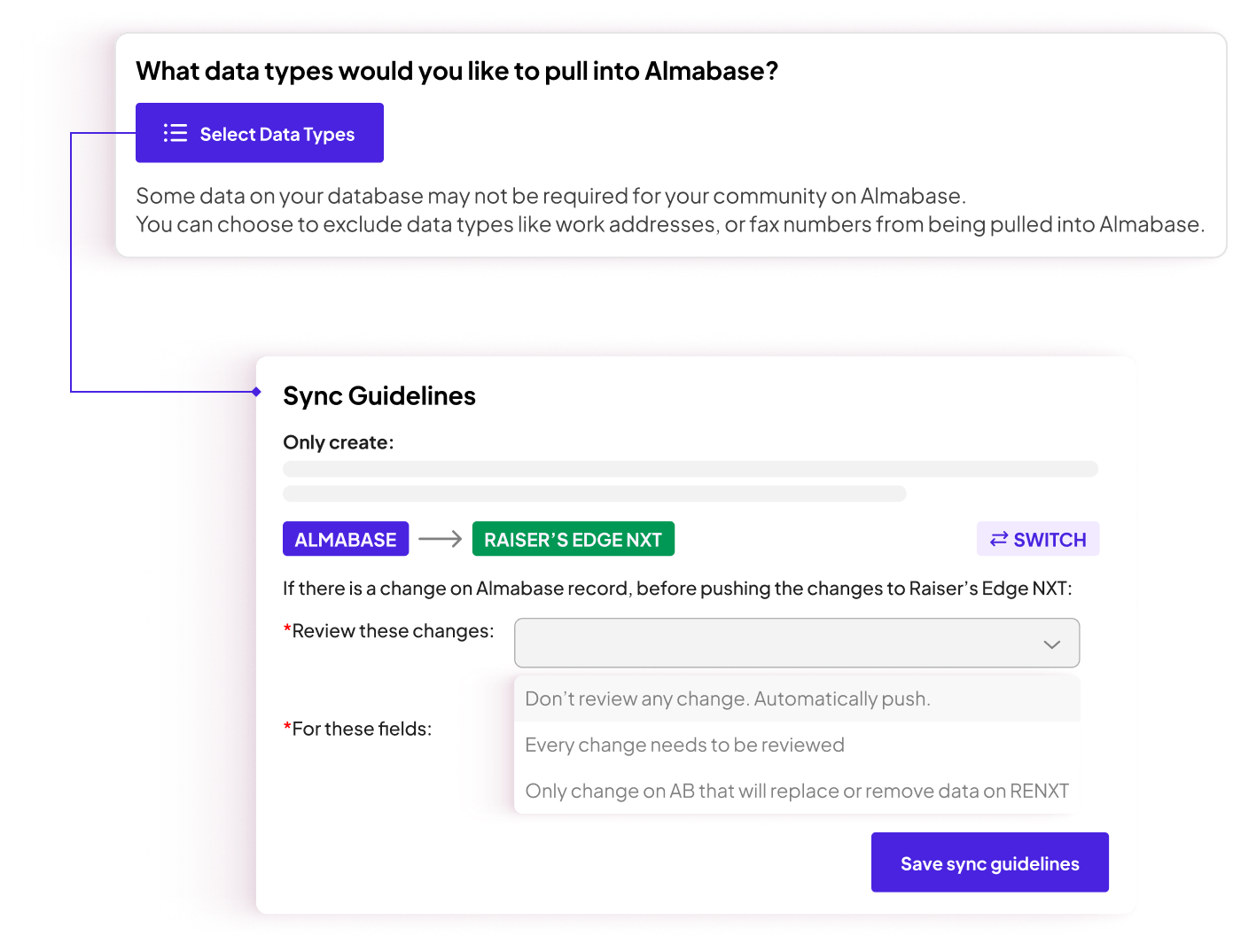
As a result, your team is always working with current, clean data: less time spent maintaining records and more time acting on the insights contained in them.
For MSUM, synced data turned into time they got back: Giving Day reconciliation dropped from four weeks to four days, freeing the team up to launch a stewardship campaign that brought in an additional $40,000 in follow-on gifts. Read more about it here.
Once the event wraps, everyone looks for different metrics for value: the alumni office wants attendance, the alumni relations officer wants to know which reunion class had the highest turnout and leadership wants information on the ROI for the event.
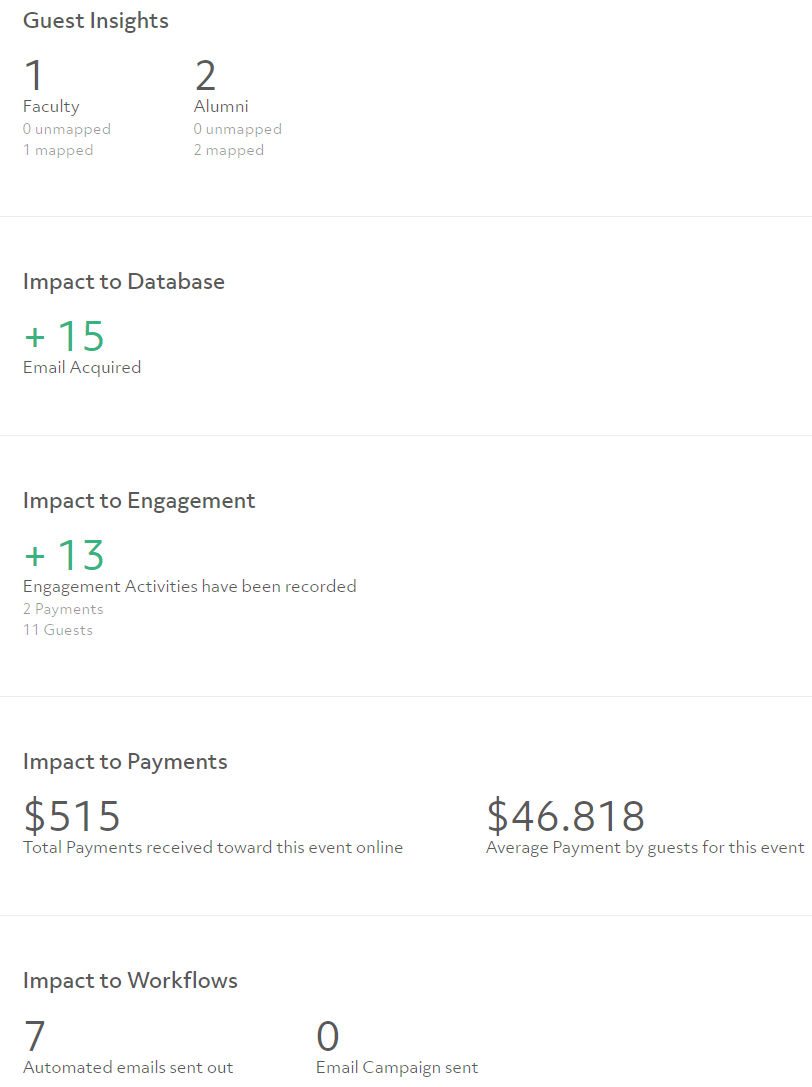
With Almabase, this information is easily accessed and you just have to put it together. Your team gets reports for registrations, attendees, guests, ticket sales, revenue, registration sources, and sub-events without having to export data from three different places first. All of this in a matter of a few clicks.
And because guest data, attendance, and registrations all stay connected via CRM sync, you're working from one version of the truth. Essentially, the data is as reliable as it gets.
Discussing all the stages so far, one thing becomes very clear: if the journey ends at ‘Measure’, you start from scratch with every new event.
Maybe regional events are outperforming expectations while a long-running format has started to plateau. Those patterns only become visible when your event history stays connected. The reports you've built, the attendance you've tracked, the registrations you've captured, and the gifts you've recorded all have another, more important job to do. They're meant to inform the next event.
That's why we'd add one more stage to the framework:

While Measure tells you what happened, Post-event Insights help you decide what to do differently.
Of course, this only works if your event data is complete and trustworthy. When registrations, check-ins, guest records, and gifts flow back into your CRM automatically, you're looking at one complete picture of how the event unfolded and using it to make smarter decisions about the next one.
In other words, you’re feeding the loop instead of closing it.
Every event should leave your team a little smarter than it was before. Over time, Almabase helps build that institutional knowledge, making it easier to compare events year over year, understand what drives engagement, and make decisions based on evidence instead of instinct.
It’s a bit of a misconception that a bigger headcount is what drives up the difficulty when it comes to scaling events. Issues start showing up because with multiple events, the complexity rises, demanding the right systems handle it. With Almabase, teams can handle this complexity while continuing to spend time on curating and creating experiences instead of wrestling with technology.
Scalable ▶️ repeatable ▶️ bigger and better, year on year.
Curious to see what that looks like for your institution? Request a demo with us now! 🤗

Yes. A reunion weekend, Homecoming, or Giving Day can run as one parent event with several sub-events underneath it, each with its own registration flow, capacity, and pricing. Your team manages it all from a single backend instead of juggling separate event pages.
Yes. In-person, virtual, hybrid, and multi-day events all run through the same registration, communication, and reporting framework, so attendees and staff get a consistent experience no matter the format.
Yes. Through TrueSync with Raiser's Edge NXT, registrations, guest information, gifts, and sub-event participation stay synced automatically, so your team is always working from current, clean data.
Almabase is suitable for teams of all sizes. The platform scales to the complexity of the event, keeping registration, coordination, communication, and reporting manageable across an entire calendar of events.
.jpg)
How Almabase Scales Alumni Events Effortlessly
Lorem ipsum dolor sit amet, consectetur adipiscing elit. Suspendisse varius enim in eros elementum tristique. Duis cursus, mi quis viverra ornare, eros dolor interdum nulla, ut commodo diam libero vitae erat. Aenean faucibus nibh et justo cursus id rutrum lorem imperdiet. Nunc ut sem vitae risus tristique posuere.
Anwesha Kiran
July 24, 2026
12 minutes
%201.svg)
%201.svg)
%204.svg)



.svg)